




Hello! Most leaders access only 5-10% of AI’s capabilities using generic prompts. To reach 70%+: visit the Premium Hub, OR book a free discovery call for AI strategy or Second Brain build tailored to your mission.
Every January, we promise ourselves we’ll get organized this year.
I made that promise last January while staring at my AI tool dashboard. 13-seven active subscriptions. Each one purchased with the best intentions - “this will streamline my workflow,” “this solves that one problem,” “it’s only $20 a month.”
By March, I was spending more time choosing between AI tools than actually using them.
That’s the pattern I see everywhere. We simply add more tools, more subscriptions, more “solutions.” We confuse addition with progress. We think the gap between where we are and where we want to be can be filled with another subscription. But I loved the approach of one creator that stood out to me…
Mia Kiraki 🎭 from Robots Ate My Homework understands this better than anyone I’ve encountered. In her words, productive AI users organize by outcome, not by capability.

While 95% of organizations see no ROI on AI investments, the problem isn’t that they need more tools. The problem is they’re drowning in options with zero system for what actually moves the needle.
This January, Mia Kiraki 🎭 walks us through the detox that actually sticks, not another doomed resolution, but a proven audit process that turns 10-20 scattered experiments into 2-4 reusable systems.
In this post, you’ll learn:
How to audit your actual AI usage (subscription statements don’t lie)
The decision tree that protects you from every shiny new launch
How to extract 3-4 core workflows from your current chaos
The hidden costs of tool accumulation that dwarf monthly fees
A 7-day implementation checklist that survives past January
Take it away, Mia…
A January detox for leaders who’ve confused “more AI subscriptions” with “more progress”
Hey there, I’m Mia Kiraki 🎭 !
I build AI workflows and tools for high-taste builders, the kind of people who don’t want to lose their creativity and unique POV while using AI.
Over the past years, I’ve worked with dozens of teams trying to integrate AI into their (mostly content) workflows in the smartest way possible.
And I’ve also made every mistake I’m about to warn you about.
Right now, I’m betting you probably have tens of AI tool tabs open. You’re paying for subscriptions you barely remember signing up for. And every Monday morning, there’s a new “game-changing” AI tool trending that makes you feel like you’re already behind.
95% of organizations see no measurable ROI on their AI investments, and that’s mostly because leaders are drowning in options and have zero system for figuring out what moves the needle.

January is when we love to pretend we’re going to get organized this year.
Rather than another doomed resolution (I’ve tried those and they don’t work), let’s do something that will actually stick: an AI detox that turns your 10-20+ scattered experiments into 2-4 reusable systems.
How to audit your tools
Before you can fix anything, you need to see what you’re actually dealing with. And I promise you, it’s worse than you think. (I did this audit and almost threw my laptop out the window.)
A recent thread on Reddit showed how a team of 11 people did this audit and discovered they had 35 individual AI subscriptions, most of which overlapped by more than 60%. They were paying for the same capabilities five different ways.
Here’s your step-by-step audit:
List every AI tool your team is currently subscribed to. Include the tools people are expensing on corporate cards or paying for themselves because “it’s only $20 per month.”
Track actual usage instead of relying on memory. Check your credit card statements. Look at which AI tools you actually clicked on in the last seven days.
Identify the overlap because chances are, you’re paying for five different tools that all do roughly the same thing. One person is using ChatGPT for draft emails. Another is using Claude. They’re all solving the same problem with different subscriptions.
Calculate the cost of these scattered workflows. Add up your monthly AI spend then multiply it by 12. In practice this can look like a team of 5 people, each paying $20/month for 3 overlapping tools, which means $3,600/year wasted on redundancy alone.
Your number might not be huge but it’s probably enough to fund something that matters more, like hiring that person you’ve been putting off or finally building the feature your customers keep asking for.
From 10-20 experiments to 3 reusable systems
You don’t actually need 15 different tools. You need 2-4 core workflows that you can reuse across every situation.
Here’s how to extract your core workflows:
Look at your last 10 completed projects (even the super small ones). What did you actually ship? What tools did you use?
Identify the pattern underneath. You’re going to find that your 15 different workflows are really just 3-4 jobs you keep hiring AI to do, like:
Generate options, brainstorming, ideation, alternatives (like when you need 10 subject line variations for a product launch email)
Refine existing work (editing proposals or drafts to match your brand voice)
Synthesize complexity (like turning 5 customer interviews into actionable themes)
Turn each pattern into a template. Write down the exact prompt structure you use. Mark the parts that change each time with [PLACEHOLDERS]. Save it somewhere you can find it again (I use Google Drive but honestly, whatever works for you).
Give your workflow a name. If it doesn’t have a name, it doesn’t exist as a reusable system.
The Decision Tree for when you’re tempted by shiny things
The hardest part of an AI detox is saying no to the next tool that shows up on your feed with a viral demo and a waitlist.
This will be hard if you love new tools.
Here’s a decision tree I use:
Question 1: Does this tool solve a problem we’re actually having right now?
If no → Ignore it. Bookmark it if you must, but do not sign up for a trial.
If yes → Move to Question 2.
Question 2: Can we solve this problem with a tool we already have?
If yes → Use that tool and stop looking for something “better.”
If no → Move to Question 3.
Question 3: Is this problem costing us more than this tool would cost?
If no → Ignore it. The tool is more expensive than the problem.
If yes → Move to Question 4.
Question 4: Can we implement this in less than 2 weeks with minimal training?
If no → Super bad news. You’re buying a multi-month integration project disguised as a tool.
If yes → Run a 30-day pilot with a single team before rolling it out company-wide.
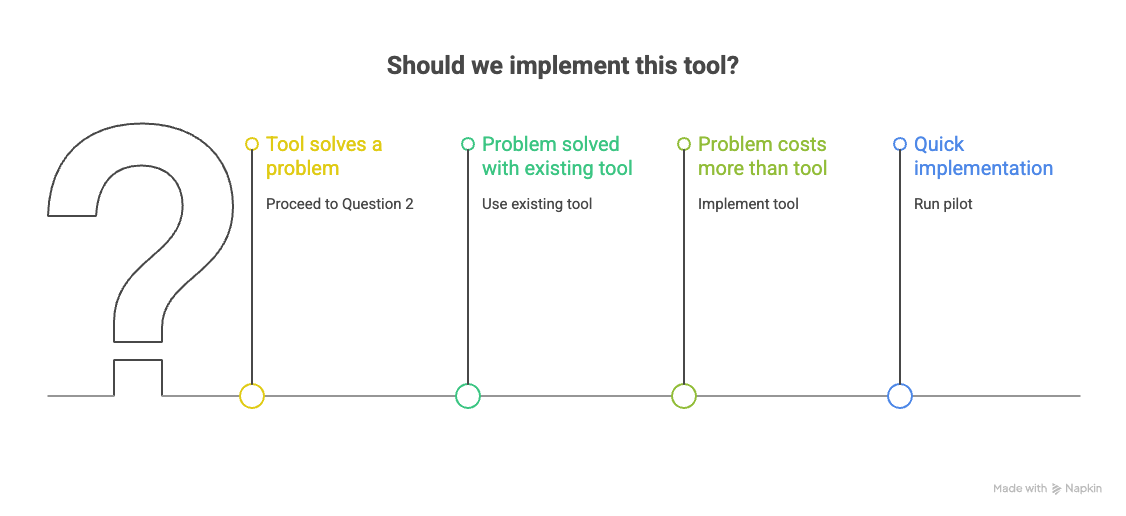
Most tools fail this test, and that’s what you want.
Let’s walk through a real example:
Say you’re considering Notion AI because someone on your team wants to try it out.
Question 1: Does this solve a problem we’re having? Yes, we need help drafting meeting notes faster.
Question 2: Can we solve this with what we have? Actually, yes. We already have ChatGPT and could paste notes there, or use Claude to summarize recordings.
Conclusion: Don’t buy Notion AI. Use what you have.
What scattered tools cost you
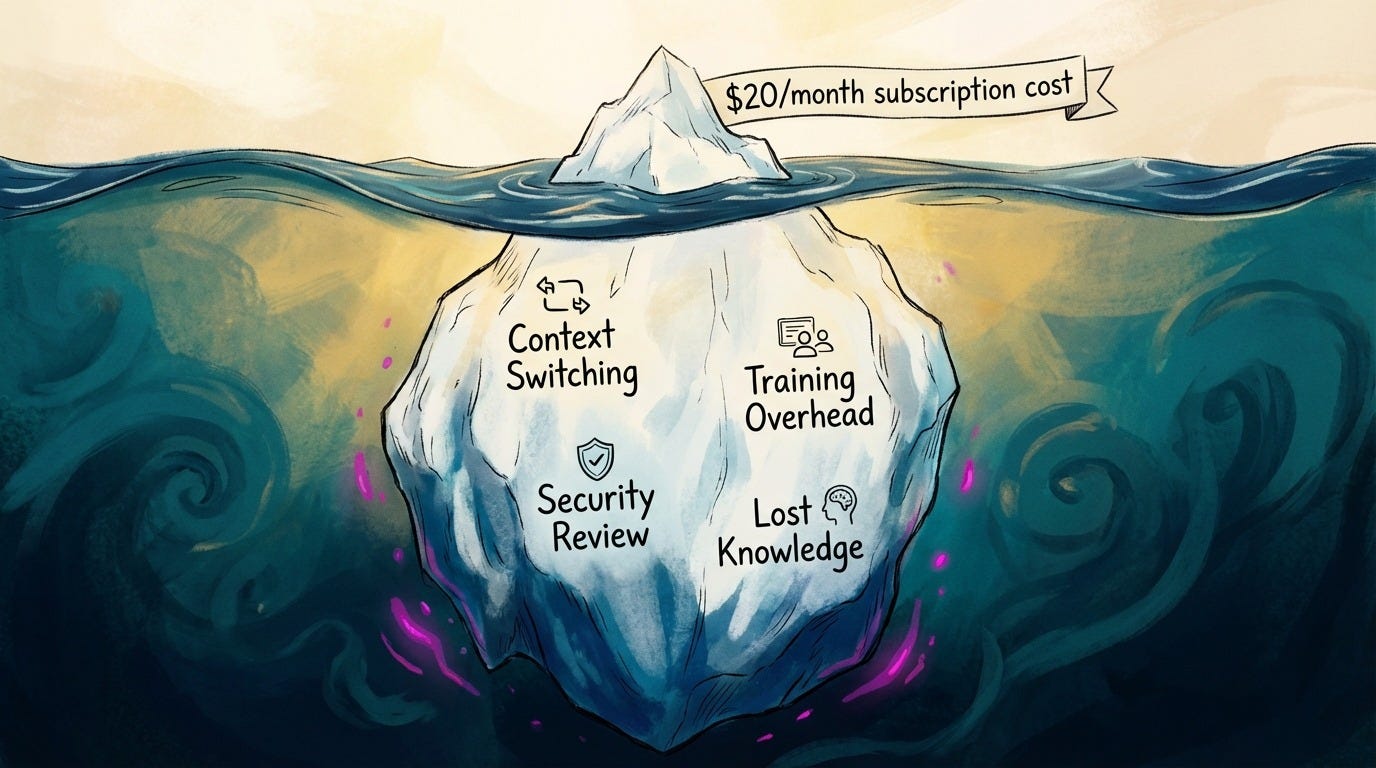
Every AI tool you add without a system is a tax on your team’s focus.
And the subscription cost is just the visible expense. The real costs hide beneath the surface:
Context-switching cost.
The “which tool should I use for this?” decision fatigue. I’ve watched teams spend 20 minutes in a meeting just debating which AI tool to use for a 5-minute task. Over a year, that kind of decision fatigue adds up to dozens of lost hours and that’s time that could have shipped actual features.
Training overhead
Each tool requires onboarding and documentation. Multiply that by every team member and you’ve created a part-time job nobody really asked for.
Security & compliance review
Every new tool needs to be vetted by your security team (or should be, if you’re handling customer data). That’s hours of back-and-forth for each new subscription.
Lost knowledge
When people leave, they take their tool expertise with them. You’ll be probably paying for something no one can operate when an employee leaves.
When you consolidate to 2-4 core workflows instead of 10-20 random experiments, you get compound returns. Your team stops starting from zero every time and you finally have the mental bandwidth to work on the strategic problems that grow your business rather than spending another afternoon comparing AI tools.
Your 7-day checklist
Here’s what I want you to do in the next 7 days:
List every AI subscription your team has (including the ones you forgot about)
Track actual usage for one week
Calculate your total monthly AI spend and multiply by 12
Identify the 3 core workflows you use most often
Write down one template for each workflow
Cancel at least one redundant subscription
On day 8, share your findings with your team and get their input.
What matters in 2026
Most AI predictions for 2026 are just hype about the next shiny tool. Here’s my prediction: the leaders who win in 2026 will be the ones who mastered saying no.
12 month plans are dead. AI moves too fast for that. So, naturally, systems that help you adapt quickly compound forever.
Change is hard (I’m still working on saying no to shiny tools myself), but here’s what we can do: start with this detox. Build your 2-4 systems. And then you’ll have the foundation to move fast when something actually game-changing shows up.
Want more frameworks like this? I publish weekly deep dives on AI workflows at ROBOTS ATE MY HOMEWORK on Substack, where I help builders stay creative while using AI strategically. Come say hi. I’d love to hear what you discover in your own AI audit.
Brought to you by COZORA👇, learn AI live!
Until January 15, All Subscribers get 30% with code HOLIDAY30.
Premium subscribers get $360 off (50% per year) through the coupon in the Premium Hub.

If You Only Remember This:
January is when we pretend addition equals progress - I had 13 AI subscriptions by last January and only used 3-4 consistently. The rest were expensive New Year’s resolutions I never kept.
The real cost compounds invisibly - context-switching, decision fatigue, training overhead, lost knowledge. Those hidden taxes on your team’s focus cost more than every subscription combined.
Organize by recurring need, not potential feature - Stop asking “what could this do?” Start asking “what problem am I solving every week?” Build workflows around your actual work, not theoretical possibilities.
Mia’s framework was amazing; it gives immediate clarity. And amazingly, reducing tools didn’t limit my capabilities. It amplified them.
This January, most leaders will add another dozen AI subscriptions. By February, half will be forgotten. By March, the cycle repeats.
Or you could build systems that compound all year.
For leaders ready to transform scattered experiments into strategic workflows, the Premium Member Hub includes advanced implementation templates and one-on-one guidance for building AI systems that fit your specific context.
You can find more of Mia’s frameworks at Robots Ate My Homework.
Now I’m curious: What’s your honest count? How many AI tools are you paying for right now, and how many did you actually open this week?
PS: Many subscribers get their Premium membership reimbursed through their company’s professional development $. Use this template to request yours.
Partner and Connect
I love connecting with people. Please use the following connect, collaborate, if you have an idea, or just want to engage further:
LinkedIn / Community Chat / Email / Medium
Thank you for having me Joel! With so many AI tools out there, it’s easy to feel stuck sometimes. Having a framework really clears the mental fog. Hope it helps someone else, too! :)
If I am honest, I am paying for five AI tools right now and I properly opened two of them this week.
That gap is exactly the problem you’re naming, activity without traction.