


TL;DR: ChatGPT vs Claude vs Gemini vs Copilot comes down to the job, not a single winner. Across 43 comparisons published July to September 2026, Claude leads writing and long multi-step workflows, ChatGPT leads image generation, Gemini leads research and video, and Copilot fits Microsoft organizations because it runs both OpenAI and Anthropic models inside one tool.
On September 25, Microsoft announced the new Copilot, and within a few days, dozens of creators wrote about how Microsoft plans to “win the AI race.” I wanted to take the idea further than one company’s plan, to the question underneath it: which one of these four should your team actually be using?
I think these tools are all amazing. A lot of it is going to depend on what is done with these tools. All tools are very close, but it does matter.
So below are my recommendations based on personal experience, but also based on research from almost 50 published research projects by different teams over the last three months, comparing all four of these to make sure that we’re looking at the latest available models.
That’s eight jobs, which tool the research favors for each one and how strong the agreement is, three quick profiles (the Microsoft-wide organization, the image-heavy team, and the solopreneur), and the step most of us skip once the tools are chosen: getting them to work together.
Paid subscribers also get the full 12-job PDF guide below.
What You’ll Walk Away With
A one-glance map of which AI the research favors for writing, research, coding, images, video and more, and how close each race really is
A clear read on whether your team should standardize on one tool or pay for two
Editor’s note: I use Claude every day and I’ve written a guide to it, so weigh my experience accordingly. Where the research disagrees with my experience, you’ll see it.
How I built this comparison
The comparison pulls from 28 blog and press comparisons, 15 YouTube comparison videos and the public leaderboards, all published between July 1 and October 1, 2026, plus each vendor’s own documentation for features and data policies. I counted which tool each source favored for each job, and I weighted the ones that ran real side-by-side tests over the ones that only offered opinions.
One honest caveat up front: only about a quarter of those sources ran their own tests, and the models change fast, so treat this as a map of where the evidence points this fall.
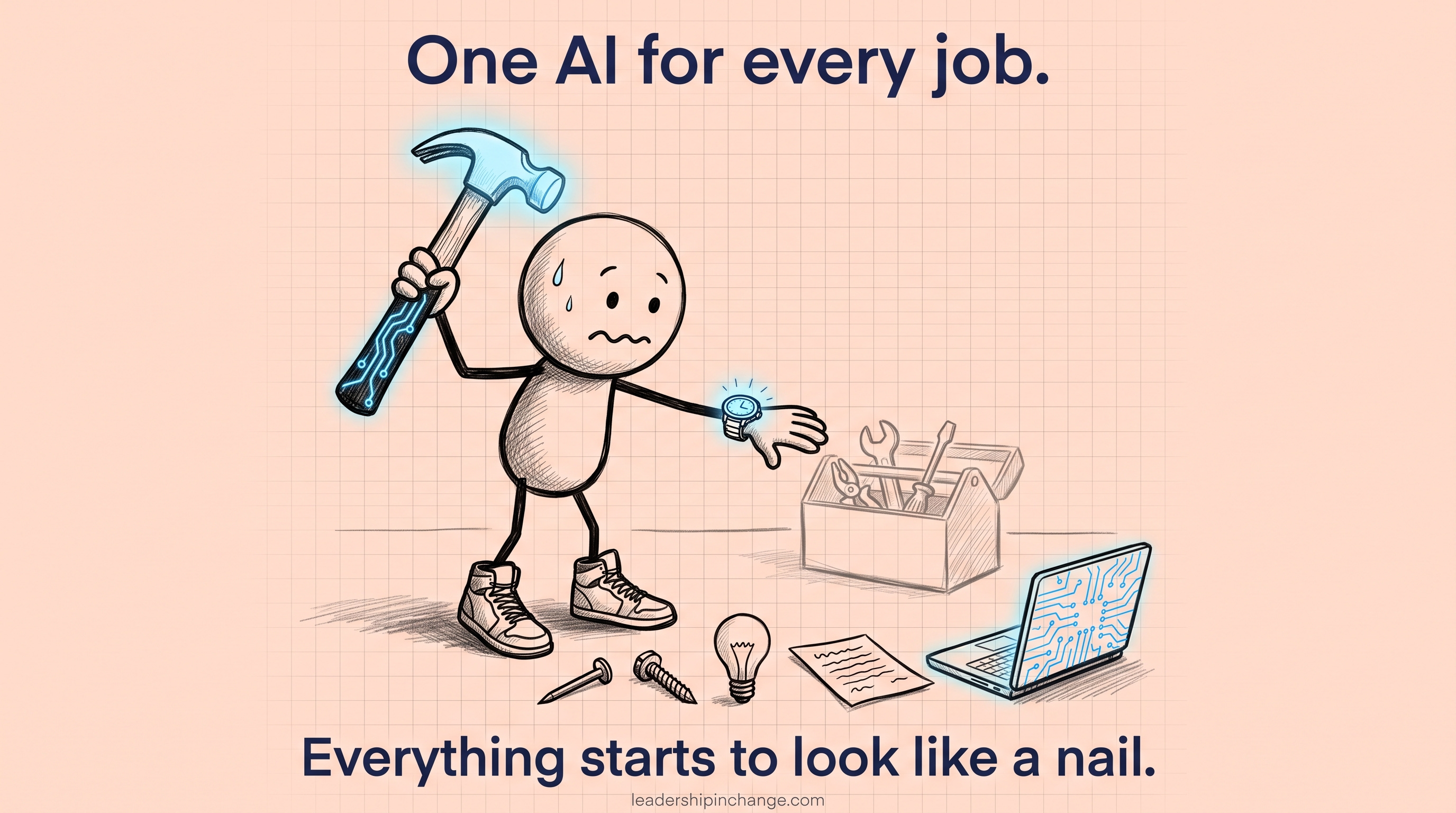
Step one: match the tool to the job
So it’s all about use. Just understand what you’re doing, and the options become clear.
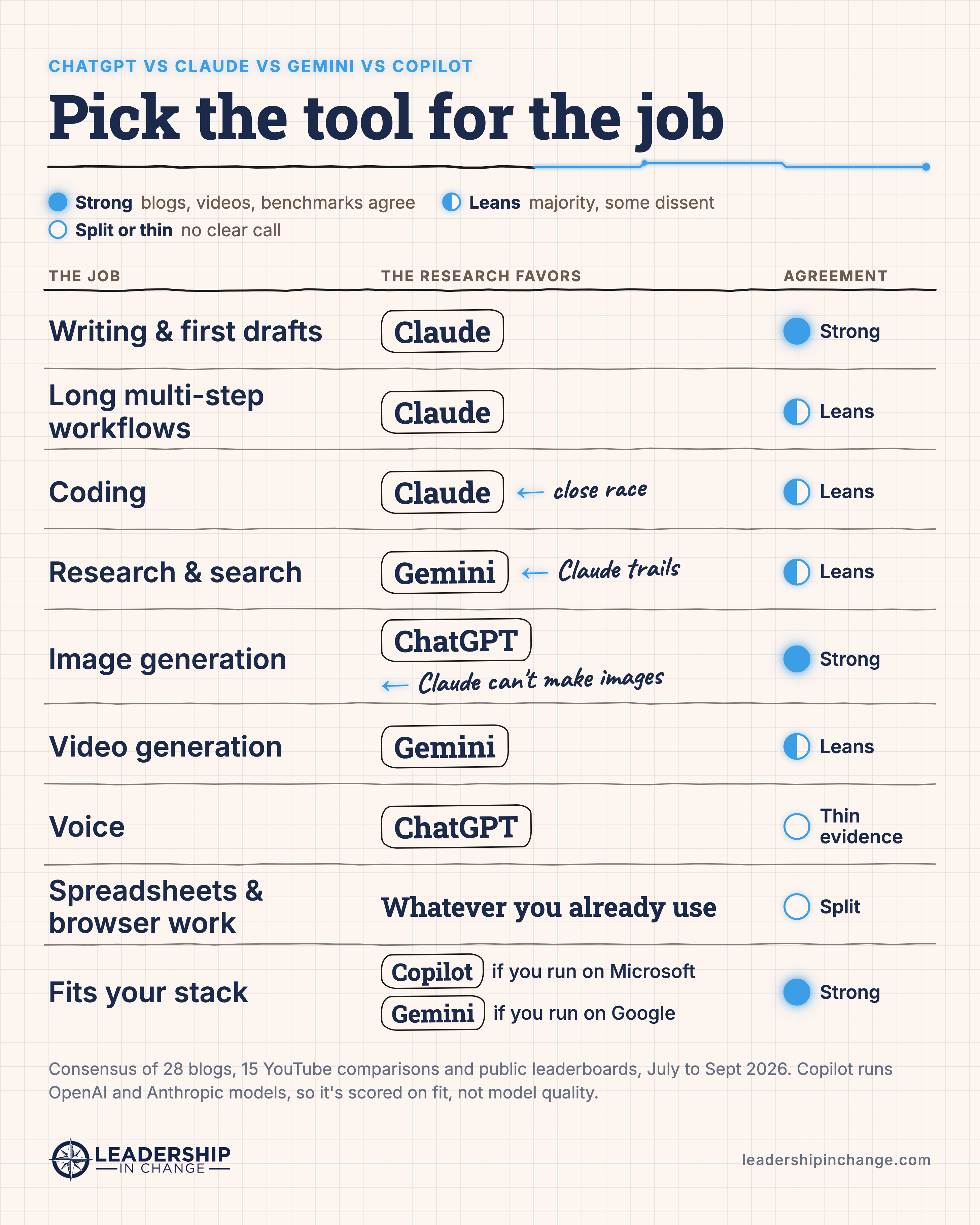
Best AI for writing and first drafts: Claude
Claude has the strongest agreement of any category: 14 of the blog comparisons and 9 of the YouTube tests picked it for writing, against one for ChatGPT. A September hands-on test by Improvado found the same thing, with Claude’s first drafts needing fewer edits.
That matches what I see. If you’re most comfortable with ChatGPT, it’s not gonna be as good for copy and content generation. It is gonna require more drafts. Claude tends to have a much better first draft.
One twist worth knowing: Google’s brand new Gemini 4 Argon edged into first place on the Arena creative writing leaderboard on September 30, a hair ahead of Claude Opus 5.5. It launched with limited access the same day, so none of the comparisons have tested it yet. Watch that one.
Best AI for long, multi-step workflows: Claude (by experience)
This is where my own experience is strongest and the published evidence is thinnest, so I’ll separate the two.
I’ve been working with a couple clients now who are using ChatGPT, and a lot of the first drafts were just too far from where they needed to be, or had really complex workflows that included 20, 25 steps that needed to be followed, and ChatGPT often skips them. Claude follows every single one of them.
I was working with a client who was just getting extremely frustrated because ChatGPT was just not doing what they needed it to do, and what they were using ChatGPT for was just not ChatGPT’s strength. And once they switched over to Claude, everything was good.
The research leans the same way without proving it. Several reviewers found Claude followed instructions more reliably, but Artificial Analysis scores OpenAI’s GPT-6 Astra and Claude Fable 5.1 as tied on overall intelligence, and Astra actually scored higher on its automation benchmark. Nobody has published an independent test of 20-step workflows, so take my side of this as experience, not a benchmark.
Best AI for research and search: Gemini (
NotebookLM)
This is the category where Claude does worst. Gemini led research in 5 blog comparisons and 4 YouTube tests, with ChatGPT close behind, and Claude was picked by one source. Two of the YouTube testers (The Applied AI and AI Leverage Lab) caught Claude citing sources that didn’t exist.
My own research setup pairs Claude with Google’s NotebookLM, which I walked through in When to Use NotebookLM vs. Claude: My Two-Engine Stack.
Best AI for coding: Claude, but it’s close
Blog comparisons favored Claude for coding 12 to 1, and in the YouTube tests Claude led three and tied ChatGPT in five. On the benchmarks the race is much tighter: Claude Code and OpenAI’s Codex sit within a few points of each other, and which one leads depends on the test. GPT-6 Astra wins at operating a computer and terminal, and Google’s cheaper Gemini 3.8 Flash keeps showing up as close enough for a lot less money.
Best AI for images and video: ChatGPT and Gemini
If a team mainly focuses on image generation, they’re gonna need to just steer away from Claude, at least for the image generation piece. Claude can’t make images at all, which Anthropic’s own documentation confirms. On the Arena image leaderboard from September 24, OpenAI’s models hold the top three spots, Microsoft’s MAI-Image-2.6 is fourth, and Google’s is ninth.
My own experience runs the other way: Gemini is the best for images, ChatGPT second on images. Claude is not going to get you anything close to an image, just a vector, half drawn. [smoothed from: “Gemini is the best for images. ChatGPT second on images.”] So that’s one job where it’s worth running the same prompt through both before you pick.
Video flips it. Google’s Gemini Omni models hold the top two spots on the Arena video leaderboard, and none of the other three companies has a model in the top ten.
Spreadsheets and browser work: use what you already use
When it comes to data spreadsheets or even web browser automated work, I really say go with whatever your preferred model for most things already is. The comparisons split here, and most of them land on the same advice: Copilot if your data lives in Excel, Gemini if it lives in Google Sheets.
For me, I load up Claude within the Microsoft products through an extension. I load up Claude in Chrome through an extension, and it performs very well. Both are real, current products: Claude for Microsoft 365 works inside Excel, Word, PowerPoint and Outlook on paid plans, and Claude in Chrome can read, click and navigate websites alongside you.
The feature that tips it: Claude Skills
Under features, I think Claude Skills are definitely one of the top winners. A skill packages your instructions, examples and context once so Claude follows them every time, which is exactly the problem behind those skipped steps. If you haven’t tried one, the Claude Skill Library for Leaders has paste-ready ones sorted by the jobs a leader actually does.
Which AI fits your team: three quick profiles
And then this is different for individuals versus organizations.
The Microsoft-wide organization. Now, for an organization that is using Copilot, that is using Microsoft across everything, then something like Copilot will be good specifically because of the model choice, being able to use ChatGPT when needed, being able to use Claude when needed. [smoothed from: “the tool choice framework”] Microsoft’s own documentation confirms Copilot now offers OpenAI’s GPT-6 Astra and Anthropic’s Claude Fable 5.1, plus an Auto mode that picks the model per request, and it only works with files each person is already allowed to see. Two things to check with IT: admins can switch the Claude models off entirely, and those models currently sit outside Microsoft’s EU data boundary. (I covered Copilot’s agents earlier this year in Master Microsoft’s 4 New Copilot Agents.)
The image-heavy team. Pair your main tool with ChatGPT or Gemini for anything visual, because that’s the one job Claude can’t do at all.
The solopreneur. Now, if you’re just one person that’s a solopreneur creating, honestly, you’re not gonna need much more than Claude other than for image generation. The YouTube comparisons mostly said the same thing a different way: pick two, usually Claude plus Gemini or Claude plus ChatGPT. The difference between my answer and theirs is research, which is exactly where Claude trails.
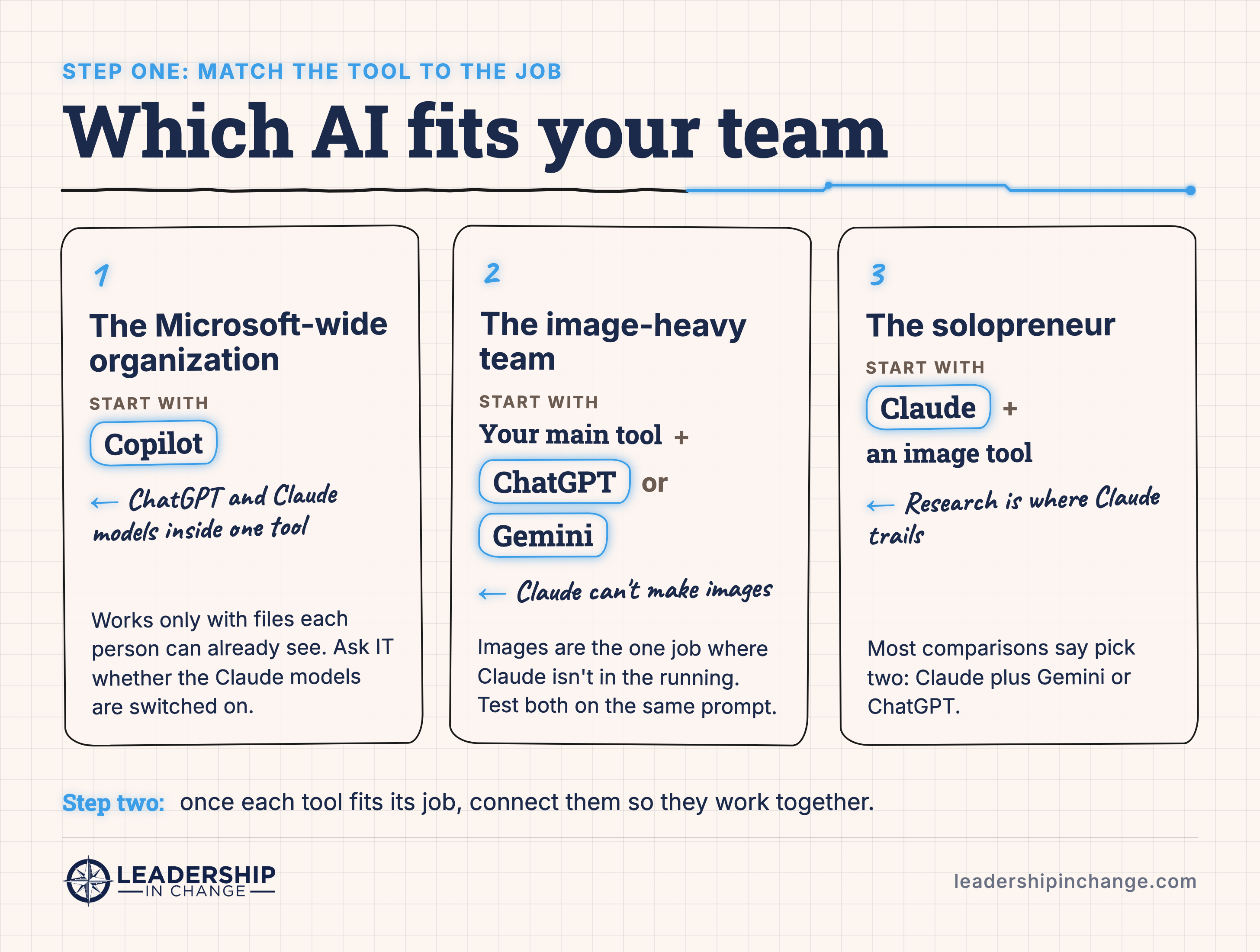
Step two: make the tools work together
And then step two beyond that is, when needed, how can these all work together for something? For example, I have a Gemini and NotebookLM MCP that allows me to comb through my NotebookLM notebooks and use Gemini’s image generation within Claude. [smoothed from: “allows me to use, and comb through NotebookMCP, notebooks, NotebookLM notebooks”] That is a higher level, so that would be step two after you get step one done. [smoothed from: “That is, it’s a higher level”]
An MCP (Model Context Protocol, an open standard that lets one AI tool plug into other software) is what makes that possible. It’s also the practical answer to the image problem above: Claude still can’t draw, but it can hand the job to a tool that can, without you leaving the conversation.
Obviously, this is not a definitive list. [smoothed from: “decisive”] I still encourage everybody to try each tool for themselves. This is what my research, along with all these posts that I’ve read, blogs, videos, show.
So it’s important to know strengths and weaknesses of each tool. Which company wins the AI race matters a lot less to your team than whether the tool you open every morning is good at the work you actually do, a point I made in Winning the AI Race Is a Fool’s Errand.
So that’s the map. Below this line is the full AI Tool Map: all twelve jobs with the research verdict, how close each race is, the sources behind it, what each tool costs as of October 2026, and the side-by-side test I’d run before committing a team to any of them.
💎 Your AI Tool Map
Below is the full AI Tool Map, the reference version of the graphic above. It comes with everything else your membership includes:
The Claude Skill Library. Twenty-five paste-ready Claude Skills, sorted by the six jobs a leader actually has. You copy one block, answer a few questions, and it builds itself around your role and your business. No downloads, no setup, and you can’t buy these anywhere at any price.
Both field guides, free. Leading with Claude is the 51-page climb from your first prompt to running real work through it. The NotebookLM Leader’s Playbook is the 36-page grounded-research system. They’re $19.99 for the pair on Gumroad, and you pay nothing for either.
Premium Q&A. Unlimited questions, answered by me in 24 to 48 hours. It’s the benefit members forget they have.
Half off Newsletter Compass and Cozora. Both of them, for as long as you’re a member.
Every artifact I’ve gated. The skills, templates and walkthroughs from every past Monday, yours the moment you join.
Premium is $49 for the year.
