



TL;DR - AI adoption differs from AI access: giving employees AI tools does not change how work gets done. The real unit of AI adoption is the workflow rather than the employee. Five layers (access, ability, trust, workflow, ownership) show where adoption stalls, and a 15-minute audit locates the blockage.

So, here’s a question worth taking into your next leadership meeting.
If you took AI out of your organization tomorrow, what would stop working?
Zohre Shirazi, my guest today, asks it near the end of the piece below. Her line:
If the answer is “almost nothing,” the organization may have AI usage, and it may not have AI adoption yet.
There’s a number sitting underneath that. Microsoft and LinkedIn’s Work Trend Index found 75% of knowledge workers already using AI at work and that number has only risen. Access is close to solved, and plenty of it is running whether we blessed it or not, which is what a shadow AI audit is for.
We get this wrong the same way we get onboarding wrong. When we hire someone, we don’t hand them a badge and call it finished. We work out what they’ll own, what comes off somebody else’s plate, and where the handoffs move. We redesign a small piece of how the work happens around them. With AI, most of us stopped at the badge.
Zohre Shirazi writes AI Wide Open, and the framework below is her map of the distance between access and adoption.

What You’ll Walk Away With
A five-layer test that shows which layer your AI rollout is actually stuck on
The five questions to ask your team this week, and what their answers tell you
A way to tell real adoption apart from usage numbers that only look like progress
Take it away, Zohre.
The AI Adoption Gap: Your Employees Have Access to AI. So Why Hasn’t the Work Changed?

The more I look at how companies are adopting AI, the more I think we are measuring the wrong thing.
We ask how many employees have access to ChatGPT.
How many people are using Copilot.
How many AI tools the company has approved.
How many prompts employees are sending.
All of these numbers tell us something.
But they don’t tell us the thing I care about most:
Has the work actually changed?
Someone can have access to some of the most capable AI tools available and still do their job almost exactly the same way they did before.
They might use AI to write an email, summarize a document, or brainstorm an idea.
Then they close the tab and go back to the same process they were using yesterday.
That is why I think there is an important distinction missing from a lot of AI adoption conversations:
AI access is not the same as AI adoption.
And the more I think about it, the more I believe the real unit of AI adoption isn’t the employee.
It’s the workflow.
Giving people AI doesn’t automatically change the work
Microsoft and LinkedIn’s 2024 Work Trend Index found that 75% of knowledge workers were already using AI at work.
That number sounds like strong adoption.
But individual usage and organizational change are two different things.
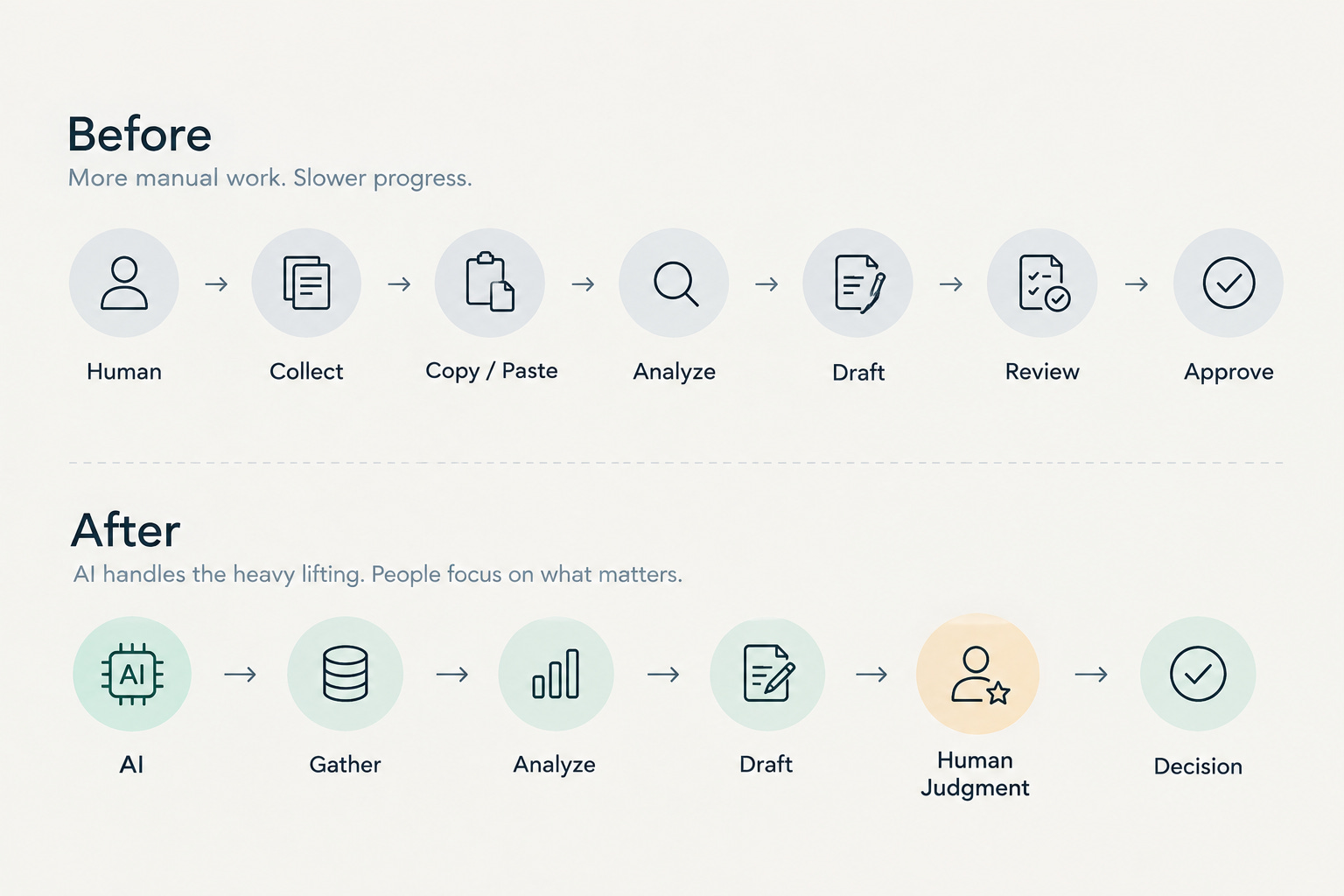
Imagine a team that spends several hours every week preparing a report.
The team gets access to an AI tool that can produce a first draft in minutes.
Great.
But what happens next?
The employee still collects the information manually.
They still move it between the same systems.
They still send it to the same people.
They still wait for the same approvals.
They still make the same edits.
AI made one part of the job faster.
The workflow stayed the same.
This is where I think companies can easily mistake activity for adoption.
People are using AI. Usage goes up. Leadership can put the number in a presentation.
But if the underlying process hasn’t changed, the business may not have changed either.
True adoption starts when AI changes how the work gets done.
What workflow change actually looks like
Klarna is an interesting example.
Its AI assistant was integrated into its customer service operation rather than simply given to employees as another productivity tool.
Klarna reported that during its first month, the assistant handled 2.3 million conversations, equivalent to the work of 700 full-time agents, while average resolution time fell from 11 minutes to less than 2 minutes.
The numbers are impressive.
But I find the change in the workflow more interesting than the headline.
The question was no longer:
“How do we get employees to use AI?”
It became:
“Which parts of this process should AI handle, and which parts should people handle?”
That’s a very different question.
Most companies don’t need to redesign customer service on the scale of Klarna to apply the same thinking.
Take the report example.
If AI simply writes the first draft faster, you have improved a task.
But if AI changes who gathers the information, who performs the initial analysis, how the information moves through the organization, or where human review happens, you have changed the workflow.
That’s the difference between putting AI into work and redesigning work around AI.
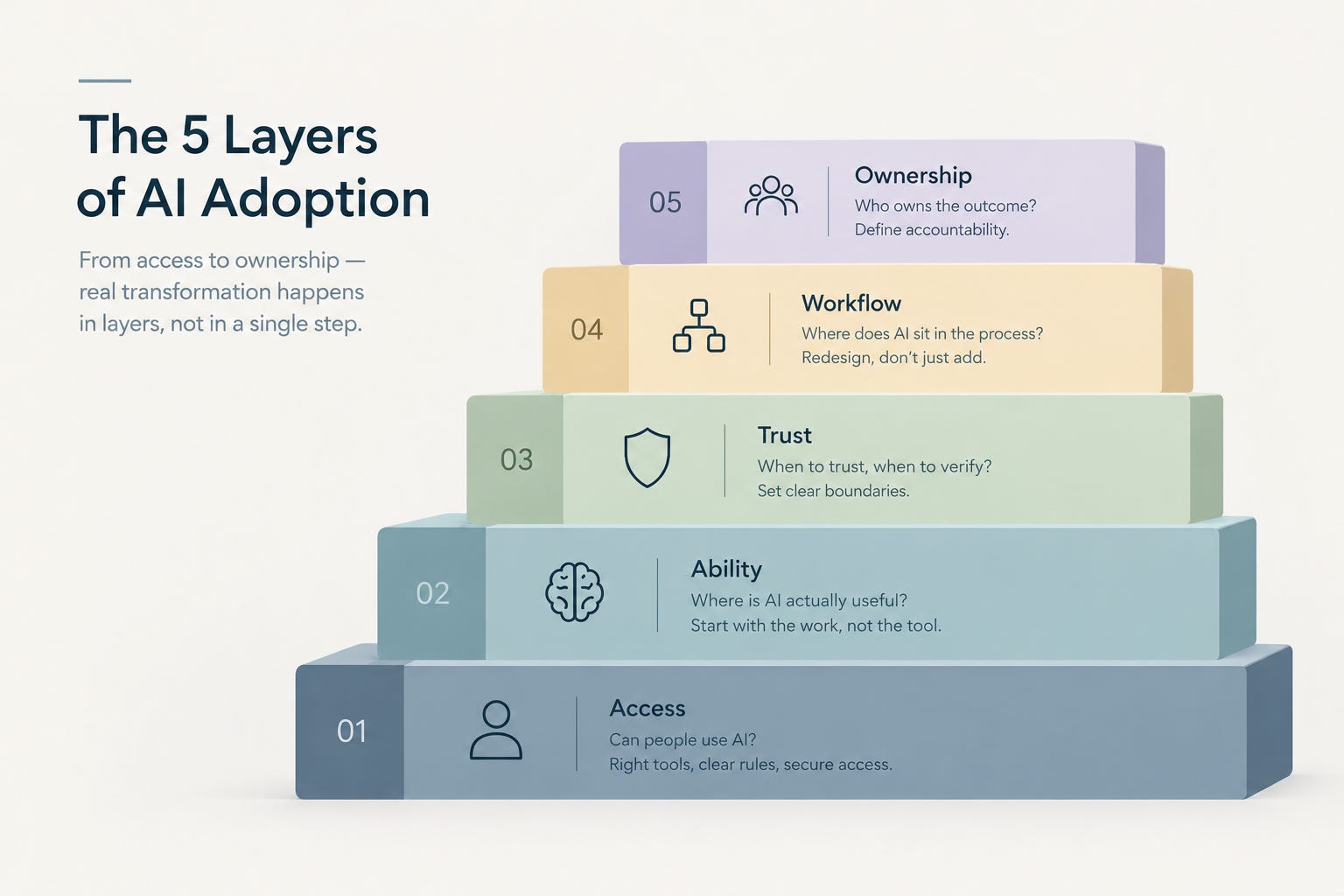
The 5 Layers of AI Adoption
ACCESS
Can people use AI?ABILITY
Do they know where it helps?TRUST
Do they know when to trust it?WORKFLOW
Is AI actually part of the process?OWNERSHIP
Who owns the outcome?
1. Access
The first question is obvious:
Can people use AI?
Do they have access to the right tools?
Are there clear enough rules around what they can use?
Can they use AI without creating unnecessary security or compliance problems?
This matters.
But access is only the starting point.
Giving everyone an AI account and expecting transformation to follow is a little like buying new software and assuming the organization has changed because the software is now available.
It hasn’t.
2. Ability
The next question is:
Do people know where AI is actually useful?
This is not the same as teaching everyone how AI works.
Most employees don’t need to understand model architecture.
They don’t need to become prompt engineers.
They need to look at the work already in front of them and recognize where AI might genuinely help.
Where are they repeatedly summarizing information?
Where are they creating first drafts?
Where are they searching through large amounts of material?
Where are they comparing options?
Where are they spending time on work that requires effort but very little judgment?
This is why I think some AI training gets the starting point wrong.
Instead of beginning with the tool, start with the work.
Ask:
“Which parts of this person’s existing workflow could AI make meaningfully better?”
That question tends to produce much more useful conversations.
3. Trust
Then there is trust.
And this is where things get more complicated.
Do people know when to trust AI and when not to?
If employees don’t trust AI at all, adoption will stall.
If they trust it too much, you have a different problem.
AI can produce an answer that sounds completely reasonable and still be wrong.
That matters in financial analysis, hiring, legal work, healthcare, customer communication, research, and any other situation where an error can have consequences.
Leaders don’t need to remove all uncertainty.
They need to make the boundaries clear.
What can AI draft?
What can it recommend?
What needs to be checked?
What requires human approval?
The goal isn’t blind trust. It’s calibrated trust.
4. Workflow
This is where adoption becomes much easier to see.
Ask: Where does AI actually sit inside the process?
If an employee has to leave their normal workflow, open another application, copy information into it, wait for an answer, copy the result back, and then continue working, AI is likely to remain an optional side activity.
But when AI becomes part of the workflow itself, behavior starts to change.
Consider customer support.
AI might summarize incoming cases, identify recurring issues, suggest responses, and surface relevant customer history.
Useful, certainly.
But what happens if you redesign the process around those capabilities?
AI could handle initial classification.
Simple cases could be resolved automatically.
Unusual cases could go to a human.
The human’s job could shift from writing every response to reviewing exceptions and handling conversations that actually require judgment.
At that point, the company isn’t just asking employees to “use AI.”
The process itself is different.
5. Ownership
There is one more layer that becomes increasingly important as AI gets more capable:
Who owns the outcome?
Suppose an AI system analyzes customer feedback, and a manager uses that analysis to make a business decision.
The AI misses an important signal.
Who is accountable?
The AI?
The vendor?
The employee?
The manager?
The organization?
There isn’t an AI button you can press when something goes wrong and say, “the machine did it.”
AI doesn’t remove accountability.
In many cases, it makes the question of accountability more important.
The more responsibility we give AI, the more clearly we need to define where human responsibility begins and ends.
That becomes especially important as organizations move from AI that recommends actions to AI that can actually take them.
Want Part 2?
The 5 Layers are only the starting point.
In Part 2, I’ll break down a 15 Minute AI Adoption Audit you can use to identify where AI is already changing your workflows, where it’s getting stuck, and where the biggest opportunities may be.
Subscribe to AI Wide Open if you’d like to follow along when Part 2 is published.
Thank you, Zohre!
Zohre’s fifth layer is the one I’d start with rather than finish on. Ownership is what decides whether the other four survive contact with a real decision, which is roughly where 517 leaders landed in The AI Skills Gap Is a Judgment Gap.
We stopped at the badge.
Which of the five layers is your team actually stuck on?
Questions Leaders Are Asking
What is the difference between AI access and AI adoption?
Access means people can open the tool. Adoption means the work itself changed. A team can have full access, high usage numbers, and an unchanged process underneath. The test is whether steps disappeared, decisions moved, or handoffs shifted, not whether the license count went up.
How do I know if my team has actually adopted AI?
Ask what would stop working if you removed AI tomorrow. If the honest answer is almost nothing, you have usage rather than adoption. Look for steps that disappeared, reviews that moved to a different person, or work that became possible when it wasn’t practical before.
We gave everyone AI access and nothing changed. Where do we start?
Start with the work, not the tool. Pick one workflow your team runs every week, map who does what and where the waiting happens, then ask which step AI could remove entirely rather than speed up. Removing a step changes the economics. Speeding one up rarely does.
How do I get my team to trust AI without over-trusting it?
Set boundaries instead of trying to remove uncertainty. Write down what AI can draft, what it can recommend, what always gets checked, and what requires human approval. Clear boundaries beat blanket encouragement, because the failure mode of too much trust is quieter than the failure mode of too little.
Who is accountable when an AI-assisted decision turns out wrong?
A person is, and naming who before the decision is made is the leadership work. AI does not absorb accountability, and it usually makes the question sharper, especially as tools move from recommending actions to taking them. Assign ownership at the workflow level, not the tool level.
Do we have to redesign our whole workflow to get value from AI?
No. Start with one process and one step. The distinction that matters is whether AI sits inside the workflow or beside it. If someone has to leave their normal process, paste information into another tab, and paste the result back, AI stays an optional side activity no matter how good it is.
Zohre Shirazi writes AI Wide Open, a publication focused on practical AI adoption, real world workflows, and how organizations are putting AI to work beyond the hype.
Joel Salinas is an AI Strategy Coach and entrepreneur. AI is everywhere; judgment is scarce. Joel helps founders and leaders adopt AI without outsourcing their judgment to it, and he builds the systems too. Creator of the AI Leadership Triad.
Written by a human, for humans.