


TL;DR: Claude, Anthropic’s AI assistant, is as useful at home as it is at work. These eight everyday uses, from kid-safe book vetting to translating a parent’s prescription into plain Spanish, build the AI judgment leaders need on the job. As of June 2025, 73% of ChatGPT messages were already personal, not work.
I write about using Claude for work almost every week, and I’ve started to think that’s the wrong place for most people to begin.
Almost everything written about these tools, including by me, is about work: saving hours, building systems, running a team. But here’s the thing I keep coming back to. You can’t spot where AI fits in your business until you actually understand the tool, and the cheapest, lowest-risk place to build that understanding isn’t a work project. It’s your Tuesday night dinner. It’s your kid’s bookshelf. It’s a bill your mom can’t read.
I’m not guessing at that. When OpenAI studied how people actually use ChatGPT, they found that as of June 2025, 73% of messages had nothing to do with work, up from 53% a year earlier. Most people are already using AI in their personal lives. They just haven’t connected that to how they’d use it on the job.
I call these low-stakes reps. You practice on things where a wrong answer costs you nothing, so that when the stakes are real, your judgment is already there. There’s one use on this list that matters more to me than all the others, and it doesn’t involve me at all. I’ll get to it.
Quick note before we start: if you’re already deep in Claude Code (Anthropic’s tool for developers) building agents and complex workflows, this post isn’t for you. This is for everyone else, the people who just want a reason to open Claude in the first place. A couple of these will even have Claude build you a reusable skill, and you won’t write a single line of code to do it.
In this post, you’ll learn:
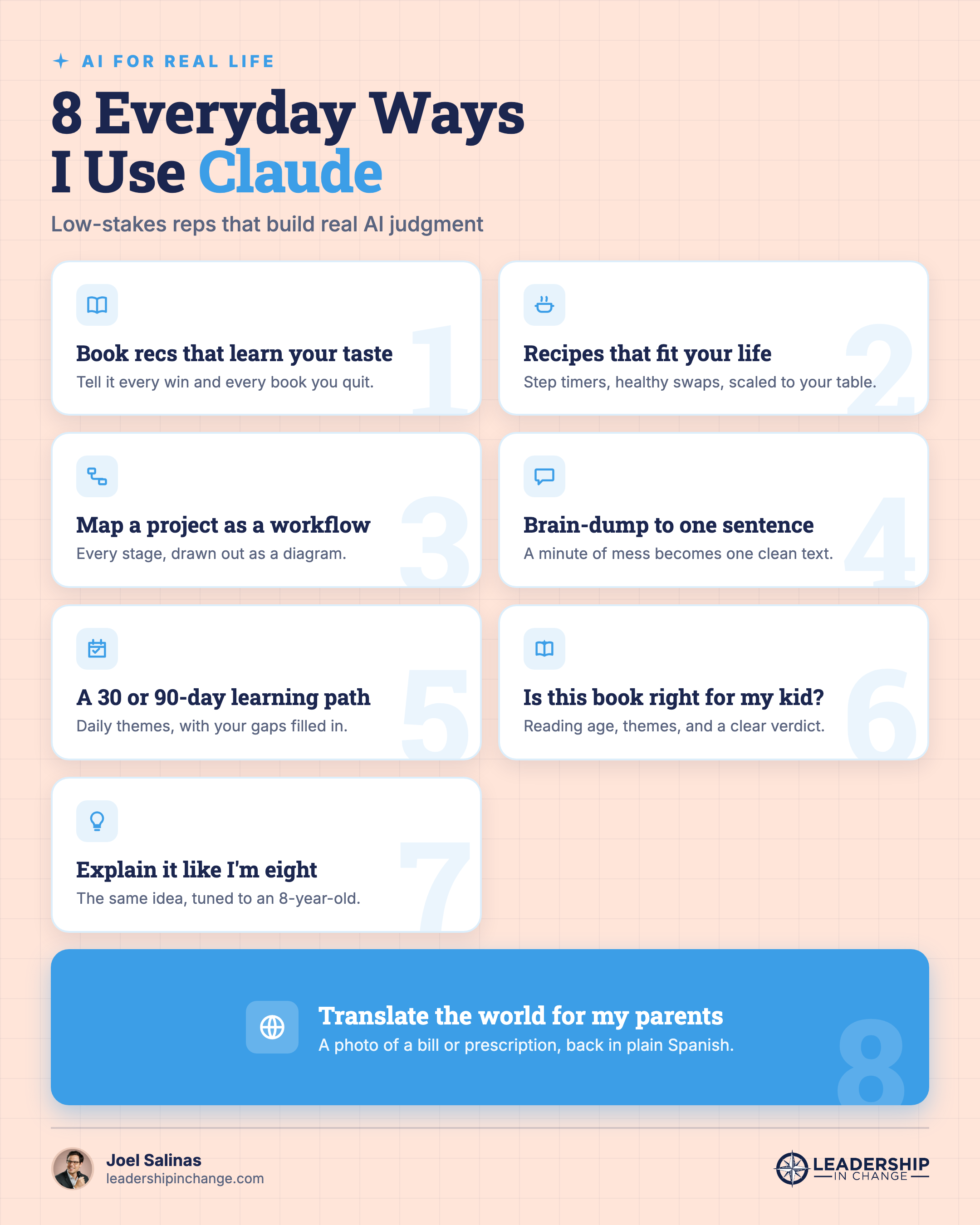
Eight everyday ways I use Claude that have nothing to do with my job
The exact prompts I use for each one, ready to copy
How to turn a recipe, a book, or a bill into a thirty-second rep that builds real AI instinct
1. Book recommendations that actually fit your taste (Claude Skill)
The trick is to treat it like a running relationship, not a one-time ask. Every time I finish a book I loved, I tell Claude what worked for me. Every time I quit a book after chapter one, I tell it why I bailed. It keeps a saved profile of my taste on my Book Recommendation Skill, so each recommendation is sharper than the last. Last week I used the skill we are creating here to look at Joanna Stern’s new book, I Am Not a Robot (currently on my To Be Read list and should be on yours), and tell me what it believes I’ll think by the time I’m done reading it. I wrote a whole piece on why generic book recommendations fail and how to fix them, and the short version is that the feedback on what you didn’t like matters more than the praise. Stop reading for a second and try it.
Use the prompt below on Claude Desktop and create your own book recommendation skill, which will be pulled up by Clause every time you ask about your next read…
Copy-Paste Prompt: I want you to build me a personal book-recommendation skill. Work through this in order, one step at a time:
Interview me first. Ask me for five books I loved and why, five books I quit early and why, and my single favorite book of all time and why. Then wait for my answers.
From my answers, write a short profile of my reading taste.
Before anything else, show me one sample recommendation built from that profile, with a few sentences on why you think I’d like it, so I can tell you if it’s on target or adjust it.
Once I say it’s right, generate a ready-to-save Claude skill that runs any time I ask about a book. It should use my taste profile to tell me whether I’d like a given title and why, and to recommend new ones. Format it so I can save it in one click.
2. Recipes that cook on a healthier, tighter schedule
Claude doesn’t hand me a generic recipe. It rebuilds one around how we actually eat. We try to keep it clean at home, so I ask it to swap refined sugar for fruit and work in yogurt for extra protein, and it adjusts the whole thing. The two features that changed weeknights for us: a timer built into each step, and instant serving-size math when the table grows. Last weekend, it walked me through a batch of scones with a timer on every step, then redid all the amounts the moment I decided to double the batch, with a click, not a prompt.
Here’s a simple prompt to get started.
Quick Win (< 60 seconds) After Claude nails something you'll want again, ask it to "turn this into a skill I can save." That's how a one-time prompt becomes something Claude does for you automatically, with no copy-pasting next time.
Copy-Paste Prompt: I want to build a recipe. Here are the ingredients I have: [LIST]. Ask me a few questions about my preferences first, then let's cook.
3. Turning a brain-dump into one sentence you can send
Some of my best uses are the least impressive. I’ll talk on my phone for a minute, a messy pile of half-thoughts, and ask Claude to hand me back one clean sentence I can actually text. Last week it was telling a friend I couldn’t make the time we’d set, because work has been heavy and I’m trying to stay heads-down and get a lot done. I said all of that into my phone, messy, and got back one warm line that didn’t read as a brush-off. It’s the difference between a paragraph nobody reads and a single line that gets a yes.
Here’s a simple prompt to get started.
Copy-Paste Prompt: Here’s a brain-dump: [TALK FOR A MINUTE]. Turn this into one clear, warm sentence I can send as a text. Keep my voice, and skip the corporate tone.
4. Turning a project into a visual workflow
When my daughter had a school project on how a caterpillar becomes a butterfly, we didn’t just write it out in a paragraph. I asked Claude to map the whole thing as a visual workflow: every stage in order, egg to caterpillar to chrysalis to butterfly, with what happens at each step and how one leads to the next. Seeing it drawn out as a diagram did more for her than a wall of text ever could. It gives her a place to start from, and it isn’t a shortcut around the actual learning, which is the whole reason I don’t just hand my thinking to AI. The same move works for anything with stages: a process at work, a plan, a science-fair project.
Here’s the prompt I used.
Copy-Paste Prompt: I’m helping my [grade] grader with a project on [topic, like how a caterpillar becomes a butterfly]. Map the whole process as a visual, step-by-step workflow: each stage in order, what happens at each one, and how it leads to the next. Lay it out as a diagram I can show her, and keep the wording at her level.
You’ve now got three prompts you can use tonight. If you’d rather not rebuild my whole setup from scratch, there are two ways I can help.
Which Sounds Like You?
“Just give me the ready-made versions” → Leadership in Change Premium ($49/yr): the prompts above work on their own, but members get them as ready-to-install Claude skills (a saved set of instructions Claude reuses) so you skip the setup, plus my ChatGPT agent prompts (the version of ChatGPT that clicks around and runs tasks for you) and my full prompt library. Join here
“I want this built around my own role” → 1:1 AI coaching: we set up your personal AI practice so the work version comes naturally. Book a free call
5. A real learning path for anything, in 30 or 90 days
When I want to actually learn something instead of just reading about it, I ask Claude to build a dated plan. Thirty days, ninety days, with a theme for each day so I’m not deciding what to study every morning. It asks what I already know first, then fills the gaps. Right now I’m using it to climb from a 1700 to a 2000 chess rating in ninety days, drilling my weak spots first instead of just playing more games. This is the same muscle that makes AI useful at work, which is why I keep telling leaders the personal reps come first. If you want help turning this into a structured plan for your own role, book a free discovery call. This is what my Exec AI Coaching business is founded on.
Copy-Paste Prompt: Teach me [SKILL] in 90 days. Ask me three questions about my current level first. Then build a day-by-day plan with a theme for each day and one small action per day.
6. Checking whether a book is right for my kids (Claude Skill)
Again, this is a skill that will be looked up by Claude anytime you prompt for a book, but this time only for books for young kids. Before a book reaches my kids, especially my daughter who reads about a book per week, it runs through a filter I built with Claude. No horror, no gore, no adult themes. Detective stories and mysteries are a yes. I give it their ages and what we’re comfortable with, paste the title, and it flags anything I’d want to know before they open page one. Last week it was The Wild Robot, before I handed it to my daughter.
Here’s the prompt to run on Claude Desktop and create your own personalized skill.
Copy-Paste Prompt: I want you to build me a “kids’ book check” skill. Work through this in order:
Interview me first. Ask me my kids’ ages, the genres we like, and what we don’t allow (for example: no horror, gore, sexual content, or adult themes). Then wait for my answers.
Show me two sample checks on books you pick, so I can see the format: recommended reading age, anything violent, scary, sexual, or mature, any heavy language, the overall themes, and a clear verdict (yes, no, or “preview it first”) with one line of why.
Once I confirm the format works, generate a ready-to-save Claude skill that runs any time I ask whether a book is right for my kids. If you don’t know a specific title, tell me instead of guessing. Format it so I can save it in one click.
Here is Kids Book Review Skill in action:
7. Explaining hard things at exactly the right level
My eight-year-old daughter is deep into animals right now, so we point the phone at a bird and ask what it is and how you’d care for one. But the real trick is telling Claude who’s listening. The same question, “how do you calculate the angles of a right triangle,” comes back one way for me and another way built entirely around dinosaurs for her. A while back I watched her build her own app faster than most adults could, which I wrote up in how my 7-year-old built an app in 12 minutes, and it’s because nobody told her the explanation had to be boring.
Copy-Paste Prompt: Explain [CONCEPT] to my [AGE]-year-old who's really into [INTEREST]. Build every example around that interest, use plain words, and go one small step at a time. At the end, give me two or three simple questions I can ask to check she actually understood it, plus a quick version I could use to explain the same thing to an adult.
Here’s what it looked like for me, explaining right triangles to my daughter:
8. Translating the world for my parents
Here’s the one I promised. My parents don’t speak English well, and the paperwork that runs an adult life, a bill, a doctor’s note, a prescription label, is almost all in English. So they take a photo, and Claude doesn’t just translate it into Spanish, it explains it in Spanish, in plain terms they can act on. A prescription stops being a wall of fine print and becomes “take one in the morning, one at night, with food.”
That’s the use that reframed all the others for me. I started doing this stuff to get better at AI for work. I keep doing it because of what it gives the people I love.
Copy-Paste Prompt: I’m pasting a photo of a [document type] written in English. Translate it into Spanish, then explain in simple Spanish what it means and what I need to do, as if you’re explaining it to someone who doesn’t read English.
So start tonight, with something that doesn’t matter. Ask for the recipe, run the book check, use a diagram to visualize something you are struggling to grasp. The reps are free, and they compound, and that habit of staying adaptable as the tools change is the whole game (it’s the first of the three skills in the AI Leadership Triad I write about). And if you want help turning these everyday reps into real fluency in your own role, my calendar’s here. The first conversation’s free.
If You Only Remember This
Most AI use is already personal, and that’s the on-ramp, not a detour. 73% of ChatGPT messages have nothing to do with work.
Low-stakes reps are where judgment gets built. Practice on a recipe so you’re steady on a real decision.
The fastest way to understand what AI can do for your business is to first let it do something for the people you love.
What’s the most unexpected thing you’ve used AI for that had nothing to do with your job? Tell me in the comments. I read them, and I’m always looking for number nine.
Questions Leaders Are Asking
Is it safe to use Claude for personal documents like bills or prescriptions? Treat it as a helper, not the final word. Don’t paste full account numbers or a Social Security number, and check anything medical against the original or with a professional. For translation and plain-language explanations, it’s genuinely useful, as long as you verify the dose or the due date yourself.
What’s the difference between Claude and ChatGPT for everyday tasks? Both handle everyday tasks well. Claude tends to hold longer context and follow detailed instructions closely, which helps for ongoing things like a running book-taste profile. The honest answer is to try both on the same task and keep the one you like better.
Do I need to pay to use Claude for these everyday things? No. The free version of Claude handles every use in this article. Paid plans add higher limits and features like saved skills, but you can build the book filter, the recipe helper, and the translator on the free tier today.
How do I get Claude to remember my preferences? Tell it directly and ask it to save them. For a taste profile or your family’s rules, paste your preferences at the start and say “remember this.” On paid plans you can store them as a skill, a saved set of instructions Claude reuses, so you never re-explain.
Can AI really recommend good books for my kids? Yes, if you give it your boundaries. Tell it your kids’ ages and what you do and don’t allow, then paste a title. It won’t replace your judgment, but it will flag adult themes or scary content before your child opens the book.
Joel Salinas is an AI Strategy Coach for leaders at small and mid-sized businesses and nonprofits. 1:1 coaching, team workshops, and AI strategy work built around amplifying what your team is already good at. Creator of the AI Leadership Triad. He writes Leadership in Change.
Written by a human, for humans.
Good reminder that the best way to learn AI is to use it on everyday problems before trying to apply it at work.
Helpful and concise, Joel