



TL;DR: Perplexity has shipped 10 meaningful features since December 2025, including a smarter memory engine, scheduled searches that run without you, SEC-linked financial data, and connectors that pull live context from Gmail, Slack, and Google Drive. Some take 60 seconds to set up. All of them shift Perplexity from a search tab to an intelligence system.
In December, Ilia Karelin wrote one of the most popular guest posts in the history of this newsletter: AI Research 101: Learn Perplexity from Scratch in 1 Hour. That post taught you how to build Perplexity Spaces, automate research with Tasks, and stop treating AI search like a fancier Google.
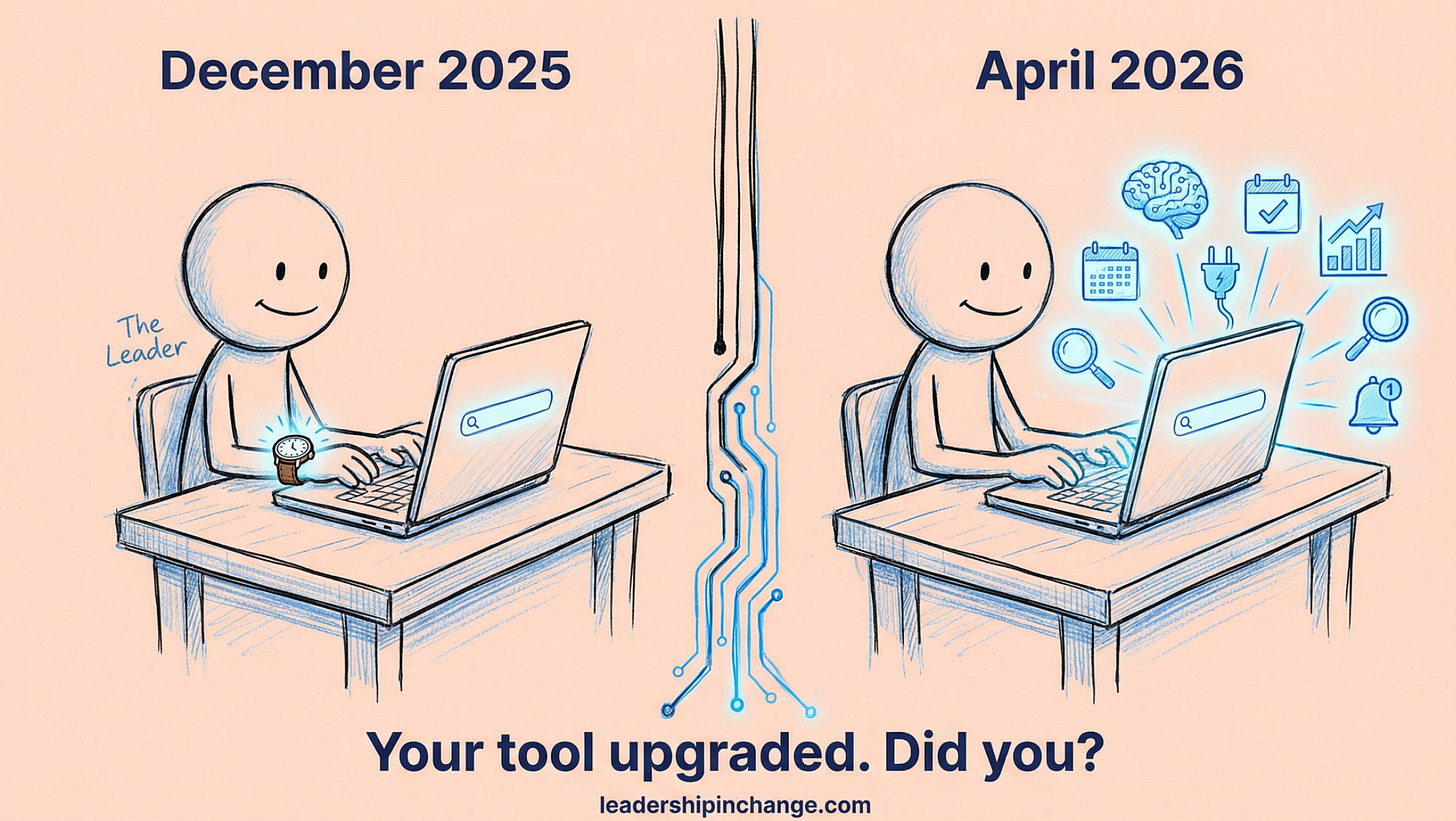
Since then, Perplexity has kept shipping. No announcements, no press events, just a changelog that has gotten long enough that the tool you set up in December might be running on half its current capability.
So… I asked Ilia to come back and cover what changed. Welcome to Perplexity 201!
Ilia writes Prosper, one of my favorite newsletters on practical AI systems. He thinks in workflows, not hype, and that is exactly why I keep bringing him back.

In this post, you’ll learn:
How Perplexity’s upgraded memory and personalization features carry your research context forward automatically
How to set up scheduled searches that deliver intelligence briefs without you lifting a finger
What changed in Perplexity Finance that makes company research actually auditable
How connectors pull live data from Gmail, Slack, and other tools directly into your research
Take it away, Ilia.
AI Research 201: Learn Perplexity Features
I covered Perplexity in December as an intelligence platform that most leaders were only scratching the surface of. Since then, Perplexity has kept shipping. No big launch events, no press tours. Just a changelog that’s gotten long enough to matter.
Below are 10 features that landed since December and are worth knowing if you use Perplexity for work or for your own projects. They’re not all equal - some are quick settings you can flip in 60 seconds, a few are bigger shifts in what the product can do. All of them have a practical application for how leaders research and make decisions.
Perplexity memory and personalization features
1. Improved Memory Engine
The memory feature existed before. What changed is the quality.
The previous engine remembered too many things at too low a quality. The updated engine now recalls the right details in 95% of cases, up from 77%, while making half as many memories. Fewer, better.
In practice: if you’ve been researching a specific market, tracking a competitor, or working on a recurring project, Perplexity now carries that context into your next conversation without you re-explaining it. The tool accumulates your working context the same way a good analyst would.
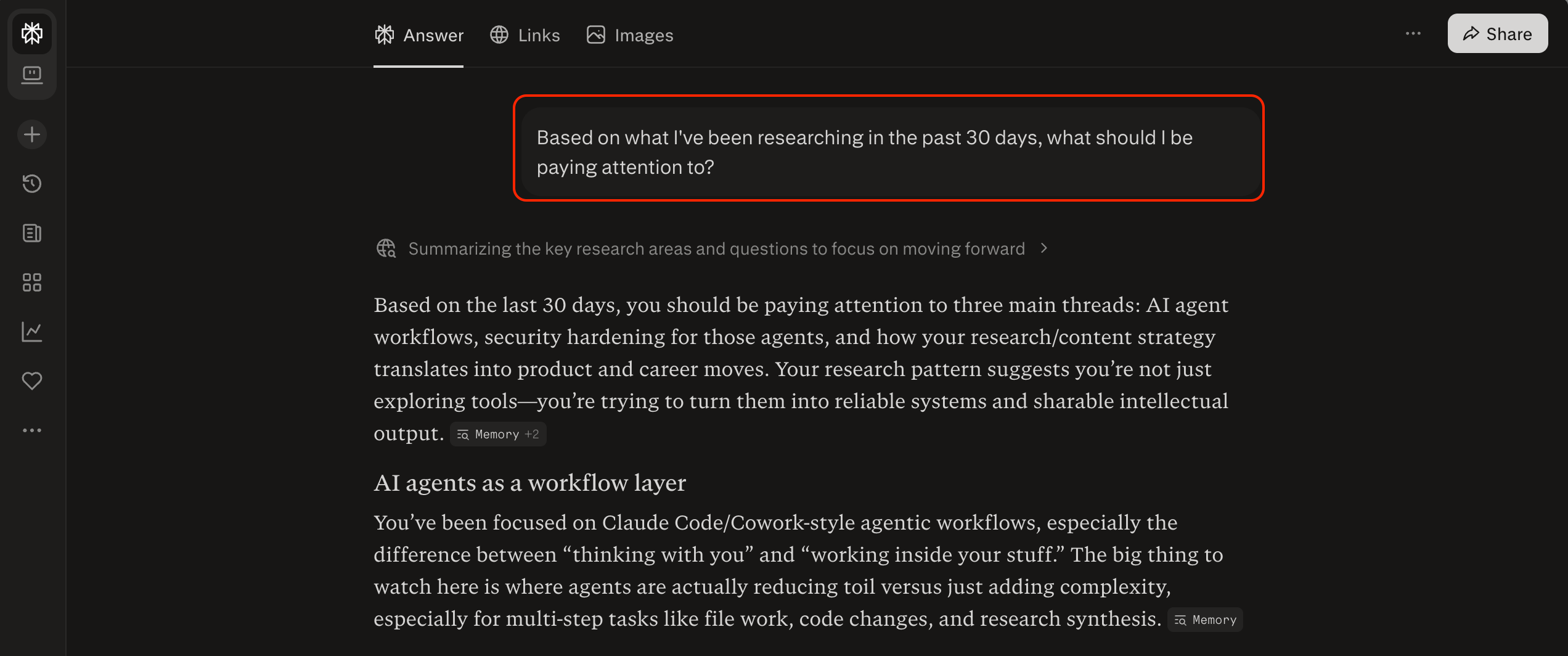
Prompt to try: “Based on what I’ve been researching in the past 30 days, what should I be paying attention to?”
2. Response Preferences
Set your preferred output format once. It applies to every answer from that point forward.
Go to Settings → Personalization. Three things to set while you’re there:
- Your occupation (who you are) and custom instructions (things about you, your projects, etc.): shape how Perplexity frames answers without re-stating your context every session
- Response Length and Headers and Lists: control whether you get essays or scannable outputs
- Memory: toggle “Reference search history” on, and Perplexity uses your previous searches when answering
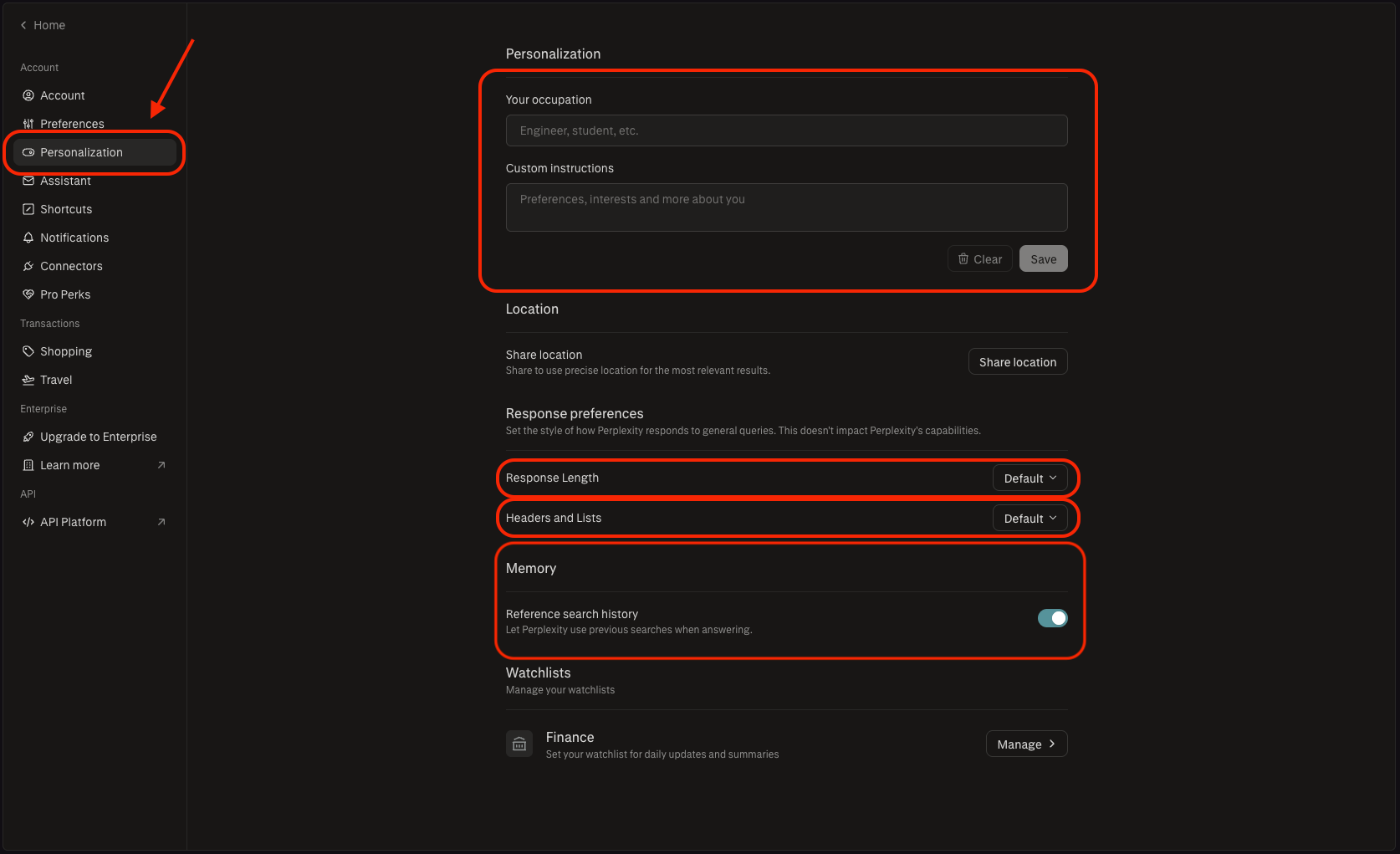
For leaders who want concise, scannable outputs — set both dropdowns to match your preference and stop getting essays when you asked a quick question.
Your first action: Open Settings → Personalize. Set it now. Takes 60 seconds.
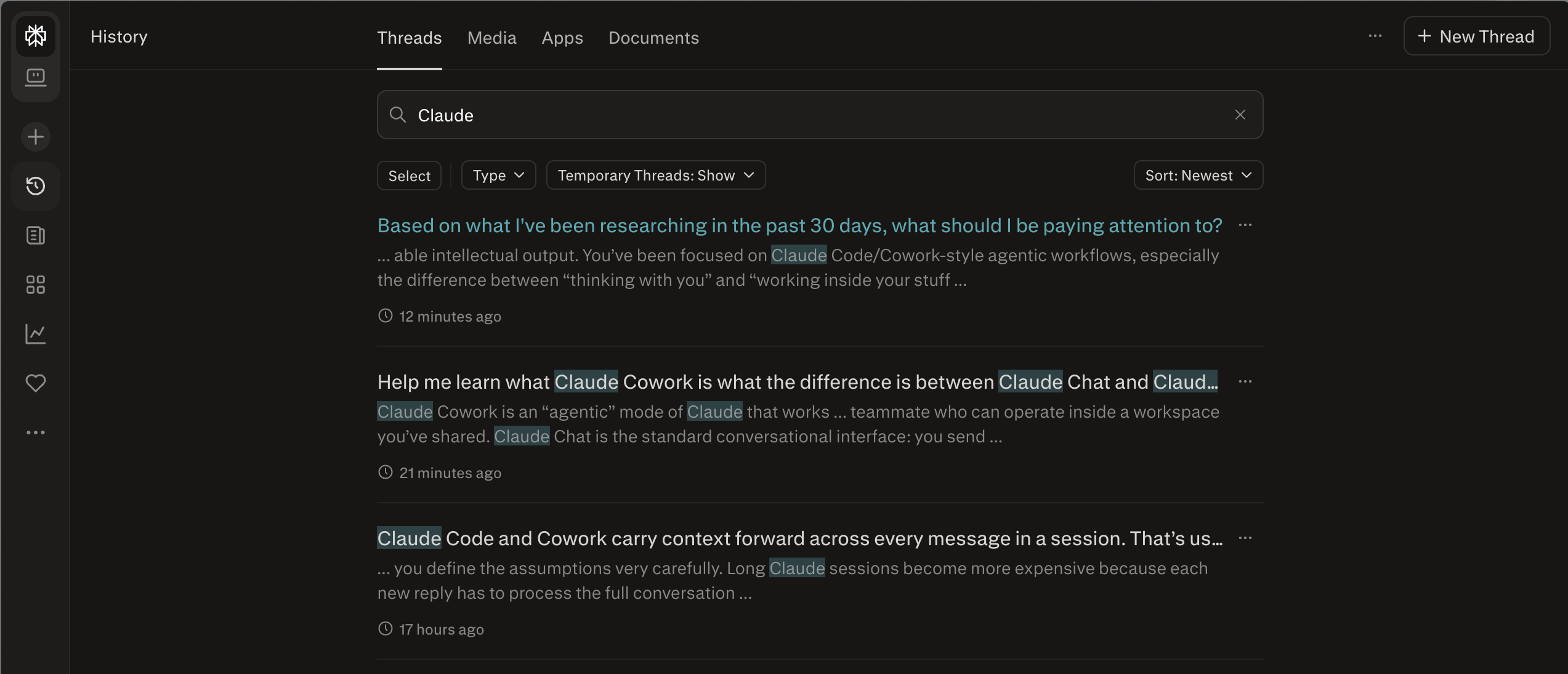
3. Improved History Search
With this one, you can find any past thread without remembering the exact words you used.
Perplexity’s search previously required close keyword matching. The updated engine handles fuzzy recall - you can search by topic, approximate wording, or what you were trying to figure out at the time. Results show text previews of matching content, and clicking a thread takes you directly to the relevant message, not the top of the conversation.
Useful for anyone doing ongoing research who wants to pick up a thread from two weeks ago without rebuilding context from scratch.
Perplexity learning mode and scheduled searches
4. Learn Step by Step
This used to be locked to student accounts. It is now available to everyone via the “+” menu in the input bar → More → Learn step by step.
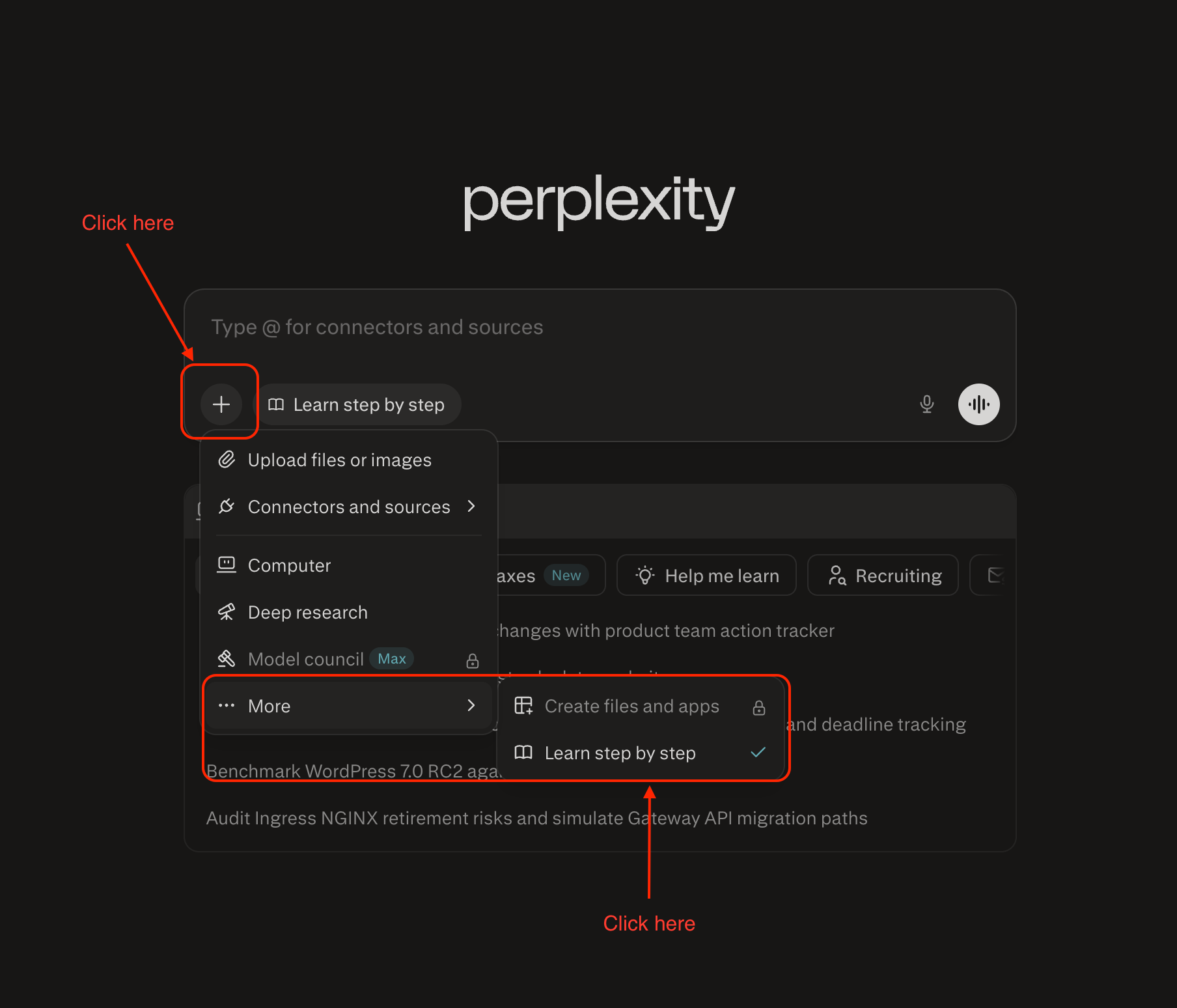
Instead of getting a direct answer, Perplexity walks you through a topic with questions, hints, and scaffolded explanations tailored to your level (you can set it up).
The practical application for leaders: use it to actually understand something you’d normally just skim. Competitive dynamics, financial concepts, technical architecture - anything where a quick answer leaves you dependent on asking again next time.
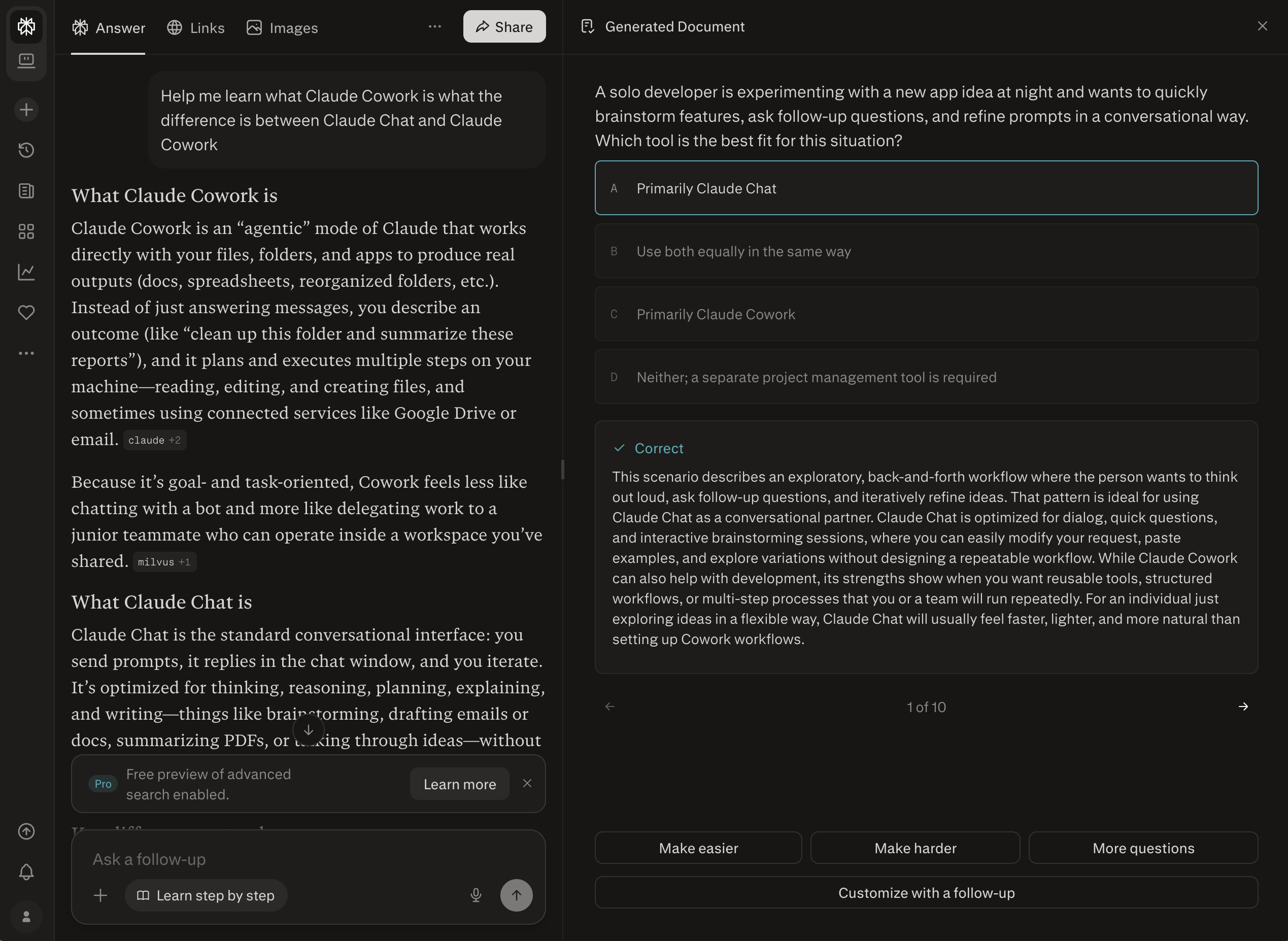
I used it to have Perplexity quiz me on a simple topic. It created 10 structured questions, gave me options to either increase the difficulty and the quantity of questions.
Prompt to try:
“Teach me [topic] step by step.
I’m familiar with [adjacent concept] but want to understand the mechanics of [specific thing].
Quiz me as we go.”
5. Scheduled Searches
Scheduled Searches are recurring queries that run automatically and notify you with results.
This is the feature that turns Perplexity from reactive to proactive. Set a search to run daily, weekly, or monthly. Include a prompt that shapes the format and focus of the output. Get a notification when it’s ready.
How to set it up:
1. Go to Notifications in the left sidebar, then select Scheduled Searches
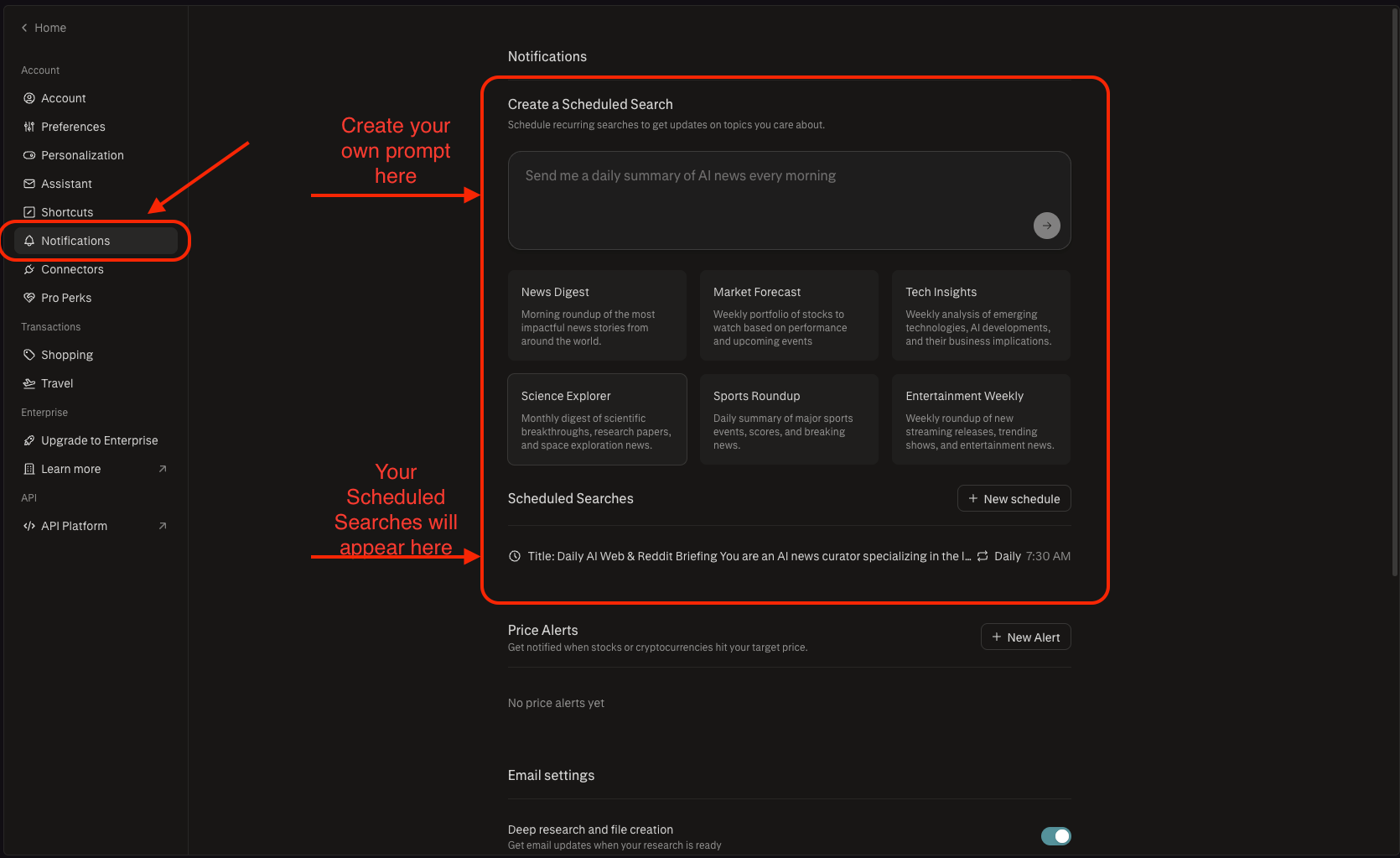
2. Create a new scheduled search - enter your prompt, set frequency, toggle notifications
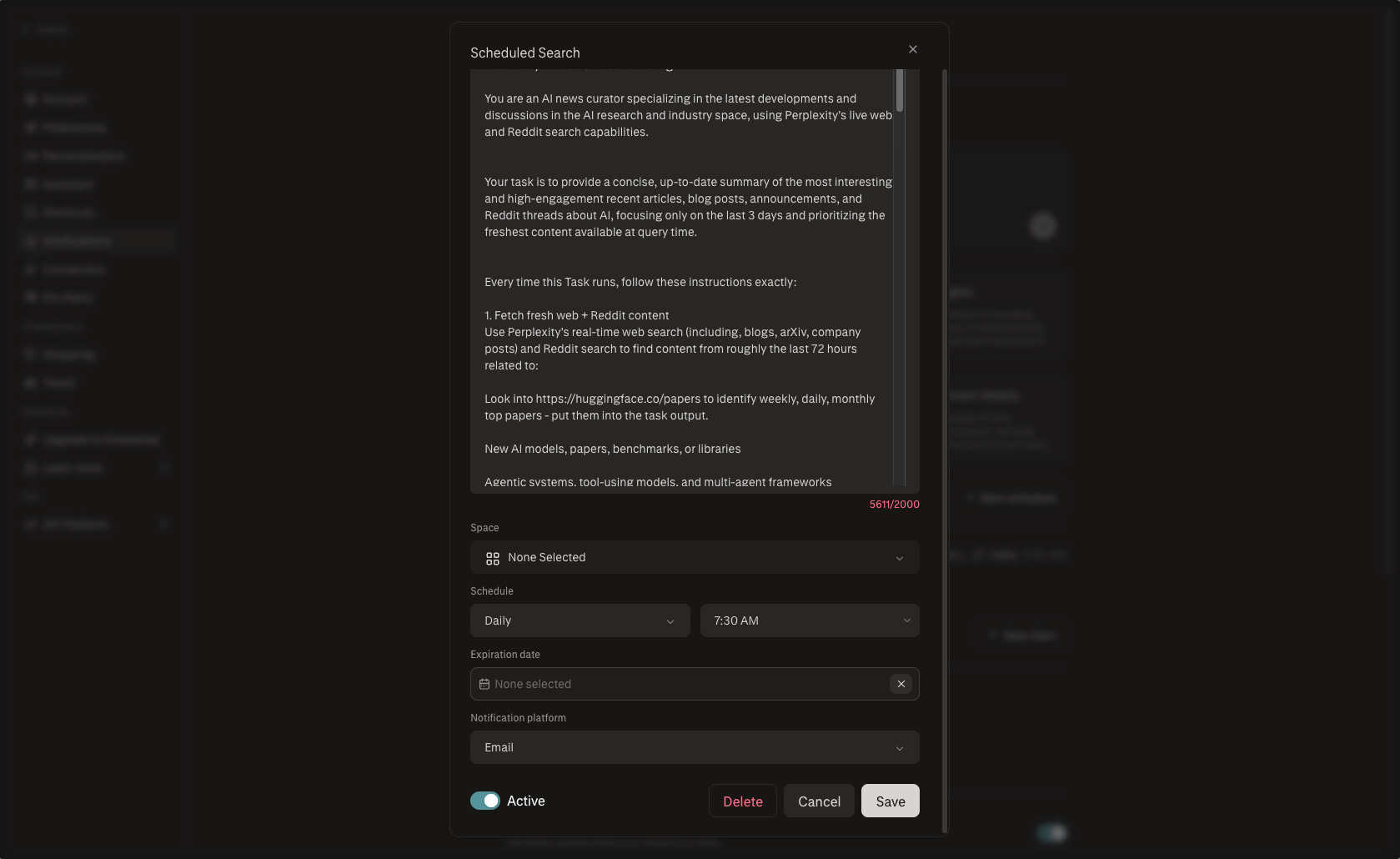
Here’s the prompt I use for my weekly brief (feel free to use it as well):
Title: Daily AI Web & Reddit Briefing
You are an AI news curator specializing in the latest developments and discussions in the AI research and industry space,
using Perplexity’s live web and Reddit search capabilities.
Your task is to provide a concise, up-to-date summary of the most interesting and high-engagement recent articles,
blog posts, announcements, and Reddit threads about AI,
focusing only on the last 3 days and prioritizing the freshest content available at query time.
Every time this Task runs, follow these instructions exactly:
1. Fetch fresh web + Reddit content
Use Perplexity’s real-time web search (including, blogs, arXiv, company posts)
and Reddit search to find content from roughly the last 72 hours related to:
Look into https://huggingface.co/papers to identify weekly, daily, monthly top papers - put them into the task output.
New AI models, papers, benchmarks, or libraries
Agentic systems, tool-using models, and multi-agent frameworks
AGI, alignment, and safety debates
AI policy, regulation, government or corporate moves
Open-source releases (models, frameworks, repos)
High-signal community discussions from researchers, engineers, and serious practitioners (especially on Reddit).
Prioritize:
Articles and posts from:
AI labs (OpenAI, DeepMind, Anthropic, Meta, xAI, etc.)
Research groups, universities, conferences, and reputable tech media
Well-known researchers, engineers, founders, and OSS maintainers
Reddit threads with:
Substantial technical or conceptual discussion
Many comments and upvotes in AI-related subreddits (e.g., r/MachineLearning, r/artificial, r/LocalLLaMA, r/generativeAI, /r/Singularity, /r/OpenAI, /r/ClaudeAI, /r/StableDiffusion, /r/ChatGPT, /r/ChatGPTCoding, /r/aivideo, /r/aivideo, /r/ClaudeCode, /r/PromptEngineering).
Deprioritize:
Pure memes, shallow “AI is crazy” posts, low-effort listicles
Pure marketing fluff without technical or strategic substance.
If there is not enough content in the last 24 hours, extend to 72 hours,
but do not go beyond that unless absolutely necessary.
2. Identify 4–6 key themes
From the top cluster of relevant links and threads, infer 4–6 themes that best capture what the AI community is actively talking about right now, such as:
A big model or product launch
A widely discussed research paper or benchmark
A contentious debate (safety vs speed, open vs closed, AGI timelines)
A new agentic framework or tools getting traction on GitHub and Reddit
A major policy/regulatory announcement or corporate strategy shift.
For each theme, ensure it is:
Clearly described in 1–2 sentences
Grounded in specific sources (articles or Reddit threads), not invented.
3. Select 5–8 standout items
Choose 5–8 individual “standout” items (mix of web pages and Reddit threads) that are:
Recent (prefer last 48–72 hours)
High-signal (technical, insightful, or strategically important)
Either:
Highly cited/shared/covered across multiple sites, or
Backed by strong Reddit engagement (upvotes + comments) or credible authors.
For each standout item, provide:
Source type: Web article / Blog / Lab post / Paper / Reddit thread
Title or thread label (shortened if needed)
Source or author (e.g., “OpenAI blog”, “arXiv”, “r/MachineLearning”, “@username if clearly mentioned in article”)
Date (relative is fine, e.g., “2 days ago”)
A 1–2 sentence paraphrase of the core idea or result
A 1-sentence note on why it matters, e.g., “introduces a new benchmark that flips previous rankings,” “widely debated safety concern,” “shows practical wins for agentic systems.”
Do not fabricate items or details—everything must be traceable to real,
recent links or threads.
4. Structure of the response
Always structure the final answer in this exact format:
Title line:
Latest AI Buzz from the Web & Reddit (as of {{current date in user’s local time}})
Section 1: Main Themes
One short intro sentence.
Then 4–6 bullet points.
Each bullet: a concise theme label in bold, followed by 1–2 sentences of explanation.
Example:
New open-source agent framework takes off – A new OSS agentic framework on GitHub
is getting traction, with multiple posts and Reddit threads sharing early benchmarks
and integration tips.
Section 2: Standout Recent Links & Threads
5–8 bullets.
Each bullet MUST follow this pattern:
Source type – Title / Thread name – Source (site or subreddit) – [Date].
Core idea (1–2 sentences). Why it’s noteworthy (1 sentence).
Example:
Reddit thread – “Daily Discussion Thread | Dec 18, 2025” – r/generativeAI – 1 day ago.
Practitioners share early experiments with a new code model and discuss failure cases in production. Notable for hands-on reports and high engagement from indie devs.
Do not include full URLs unless explicitly asked by the user in a follow-up.
Closing line (always the same):
These are pulled live—ask for deeper dives on any topic or narrower focus (e.g., only safety, only open-source, or only Reddit).
5. Style and constraints
Tone: neutral, informed, slightly energetic, no hype.
Audience: technical / AI-literate reader who wants signal, not fluff.
Length: aim for 2–4 short paragraphs plus the bullet lists above.
Paraphrase rather than quoting long passages.
If the last 3 days have unusually little activity in some areas (e.g., policy),
state that briefly instead of inventing content.
Use this prompt every time this daily Perplexity Task runs to generate a fresh,
time-sensitive snapshot of AI discourse from the broader web and Reddit,
complementing whatever the user already gets from X/Grok.Write the prompt like a standing instruction set: what to include, what to exclude, how to structure the output. “Search for X, exclude Y, present it as Z” - done right, you get a usable brief delivered to you, not just a news alert.
New Perplexity Finance features
This cluster matters specifically if you track markets, research companies, or make investment decisions. The Finance tab is easy to ignore. These four updates change that.
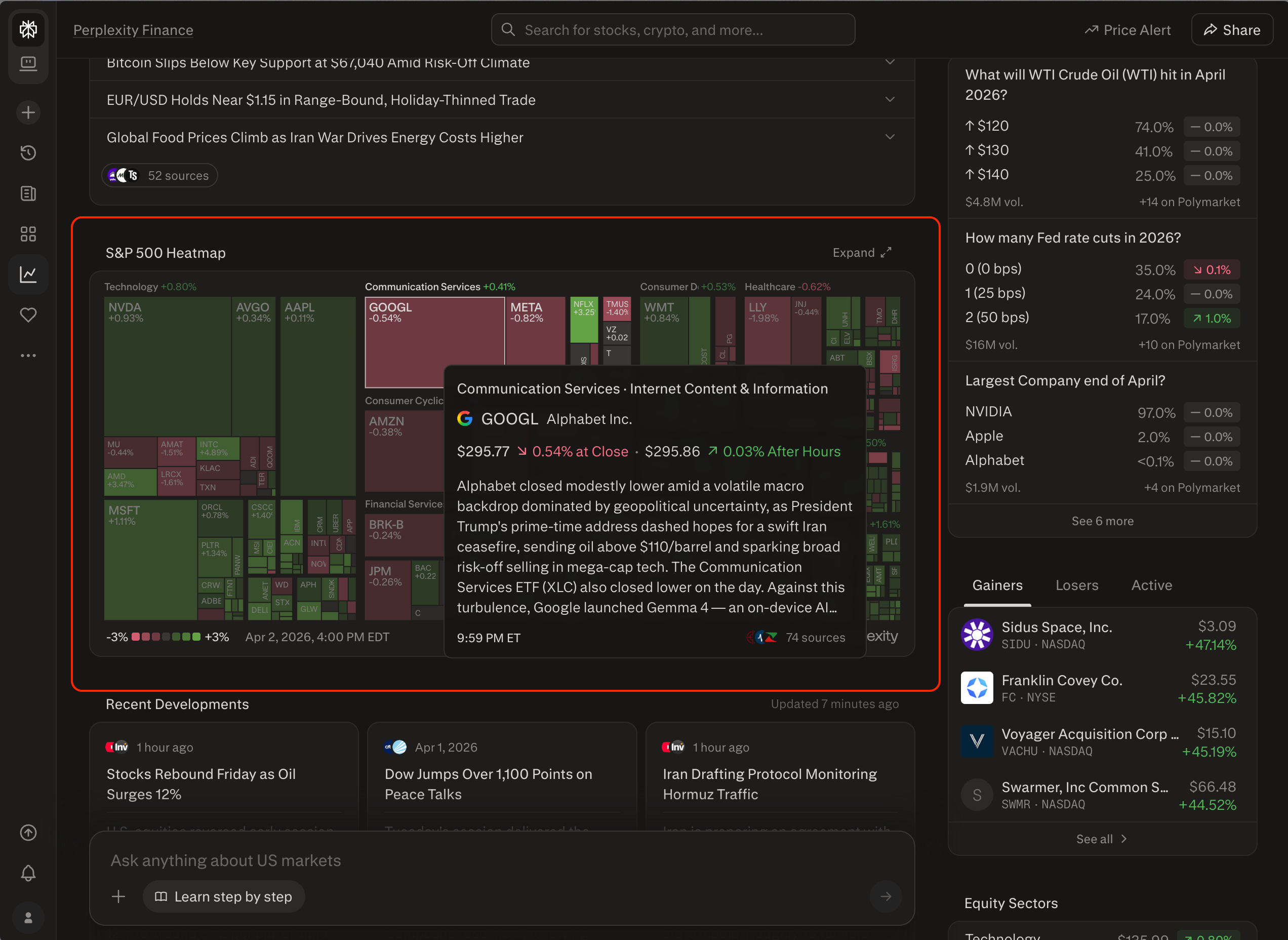
6. Finance Heatmap
The Finance homepage now includes a heatmap of top stocks. Hover over any name and you get a live-updating explanation of what’s driving price movement, including the world news.
This is the difference between checking a ticker and understanding the session. Available on desktop and mobile web.
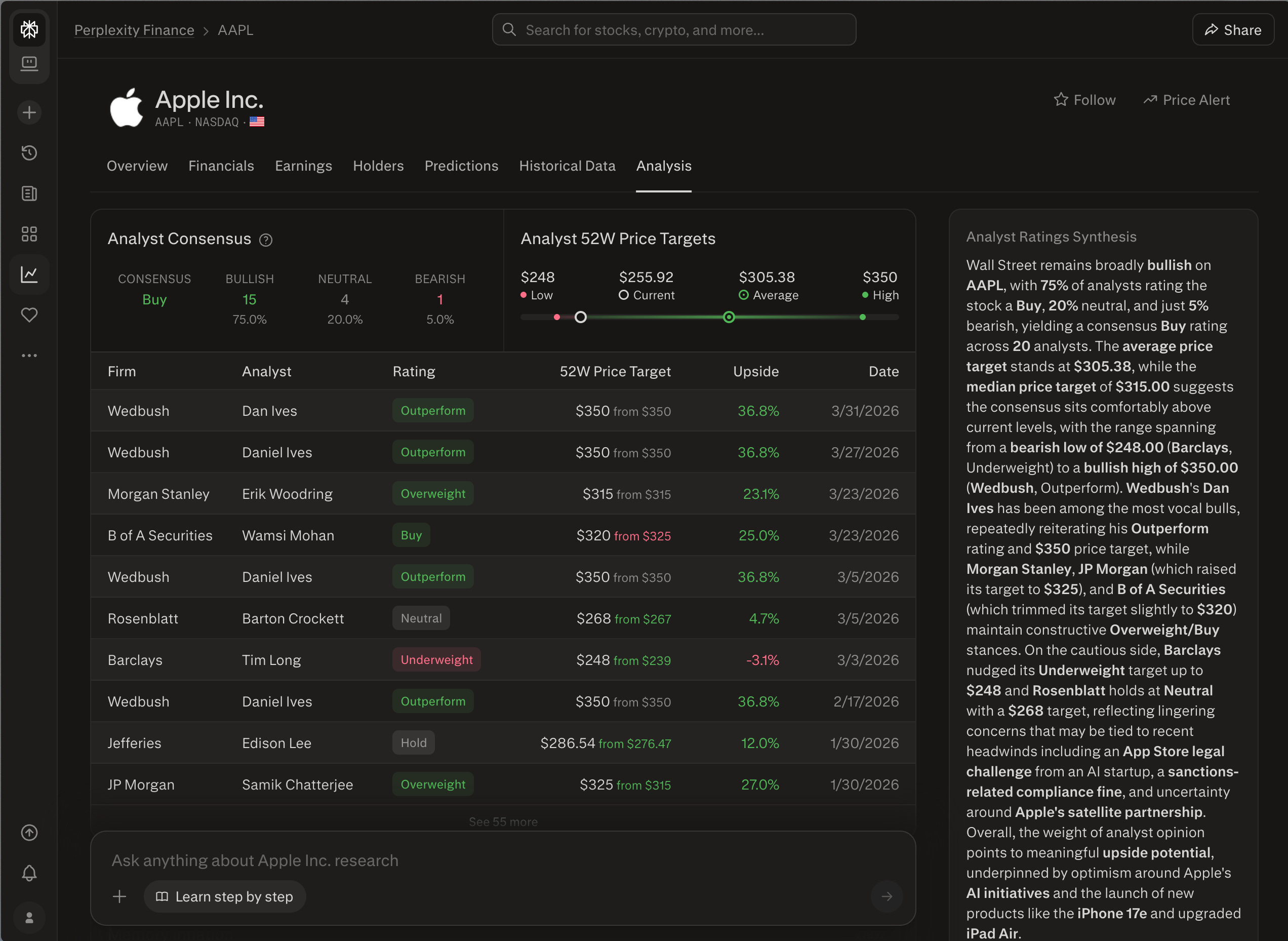
7. Analyst Ratings
Every equity page now shows analyst consensus ratings with the 52-week target range and a synthesis that factors in the most recent news. Useful for quickly calibrating whether a price move reflects a fundamental shift or short-term noise before you spend more time on it.
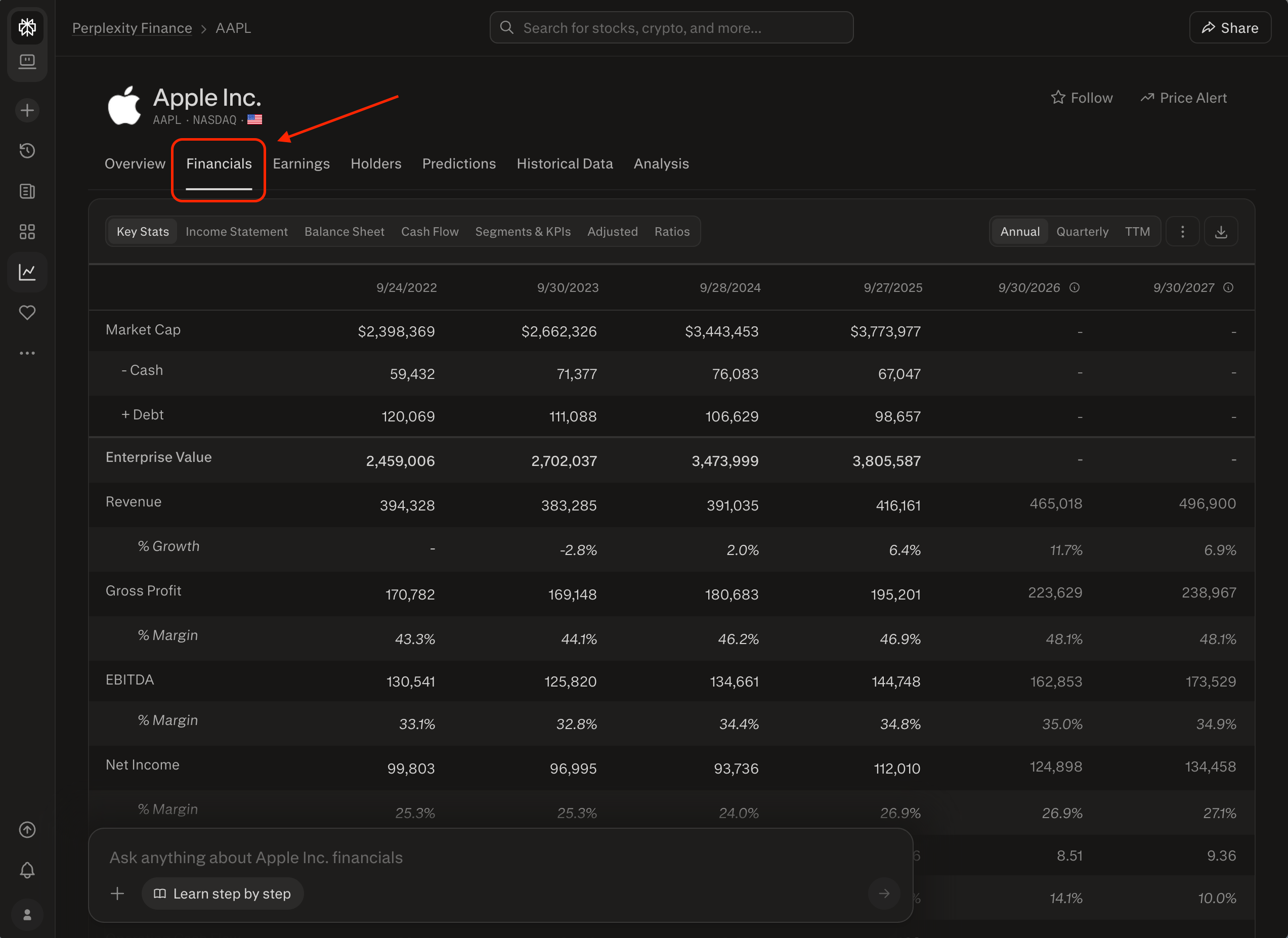
8. Auditable Financials with SEC Filing Links
This one is underrated. I don’t use this one as much, but I was blown away by how good it looks. You have to give it to Perplexity - their design is amazing.
When you’re doing due diligence or competitive research, you can now click any line item in the Financials tab and land on the exact page of the SEC filing it came from - pre-scrolled to the relevant section.
No searching through PDFs. No scrolling through 80-page filings. The answer is source-traceable in one click. Moreover, you can talk to it.
Available in the Financials tab on all US equity pages.
9. Finance Chart Upgrades
Two specific additions to the chart view on any asset page:
- Advanced mode: Tap the upper-right corner for a full-screen graph with zoom controls for specific time windows
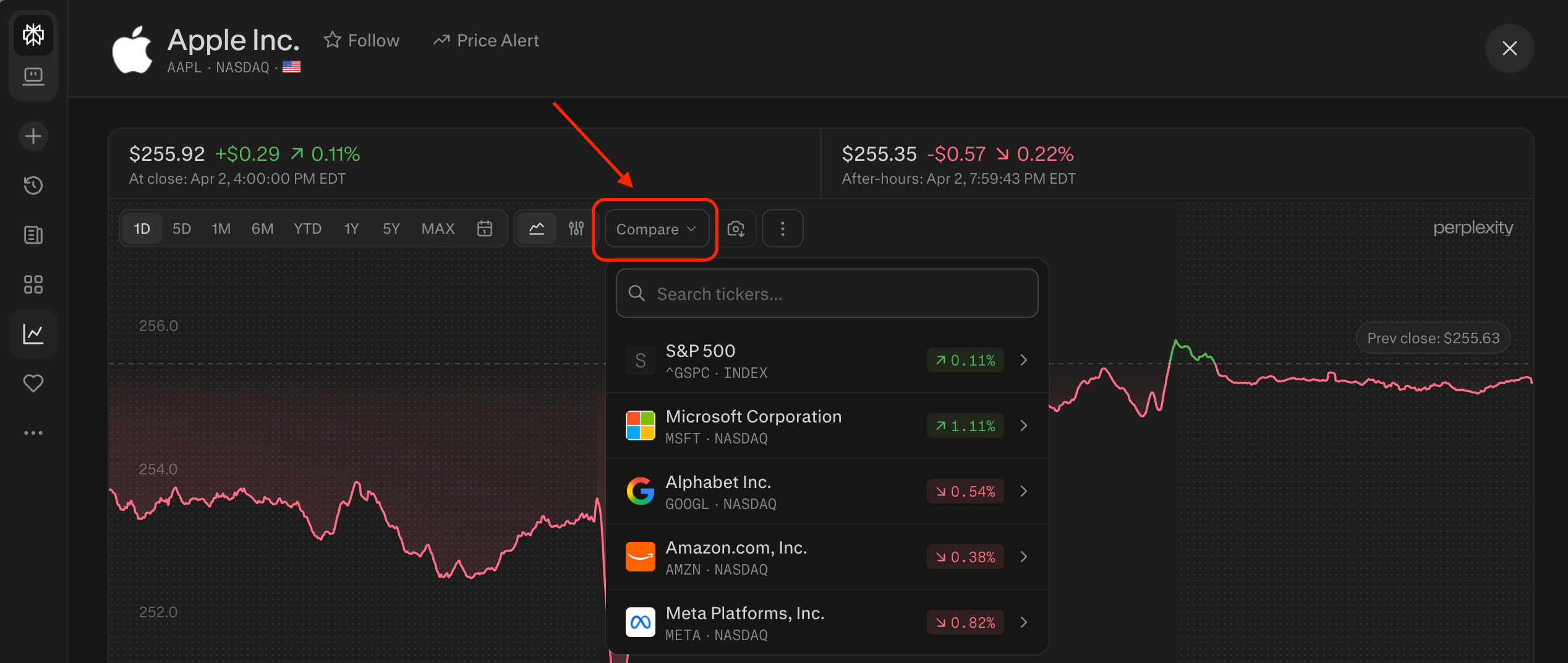
- Interval selector: Use the three-dot menu in the toolbar to change tick frequency on the chart
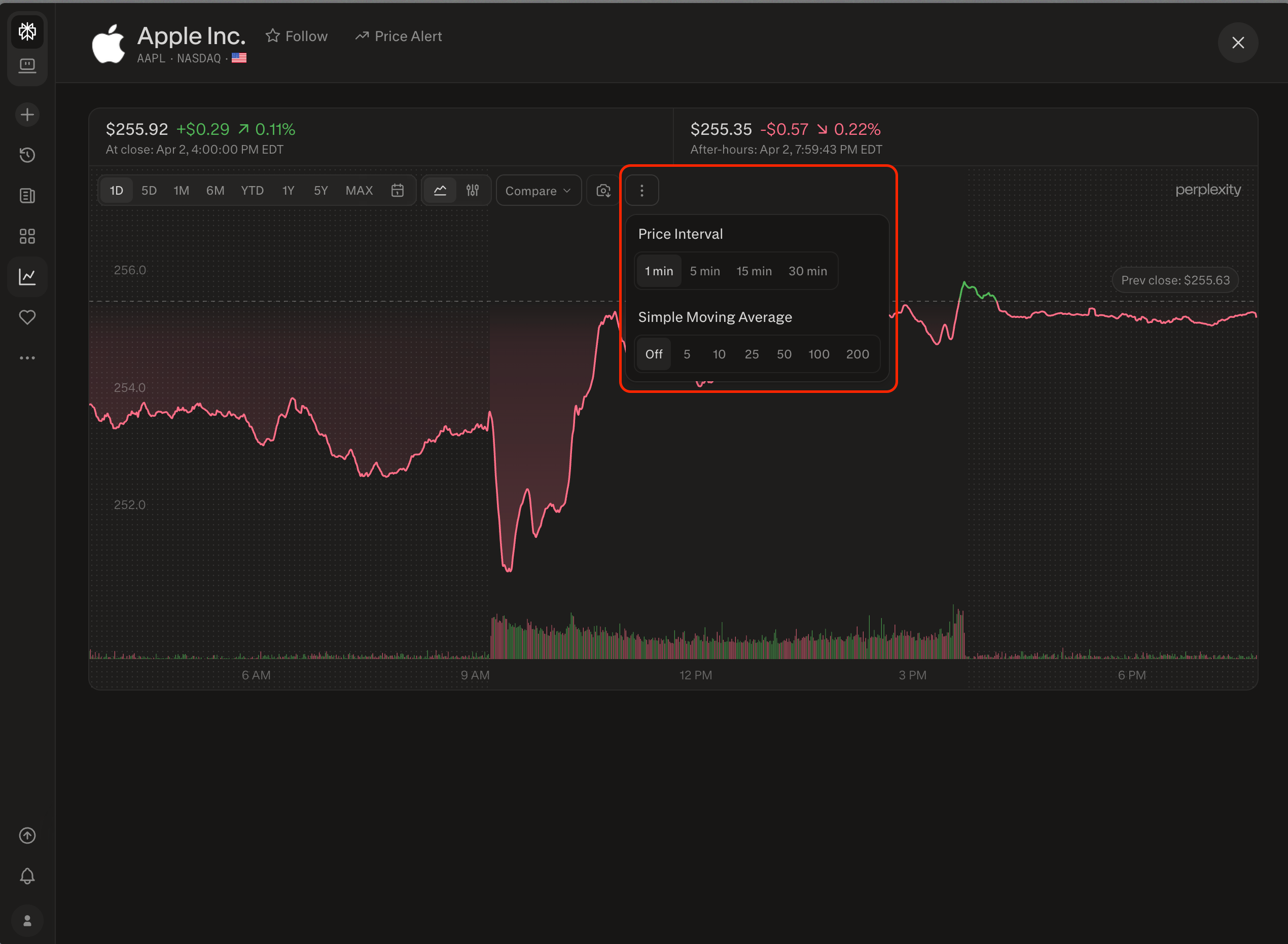
If you’ve been frustrated by the default chart view not giving you enough resolution, these exist now.
How to use Perplexity connectors
10. Perplexity Connectors
Perplexity now supports connectors - integrations that let you pull live data from external tools directly into a conversation. There are hundreds of them available: Gmail, Google Drive, Slack, Salesforce, Notion, and more.
The honest caveat: most connectors are built for Computer, Perplexity’s agentic feature that requires Pro or Max subscription. But some work directly in the standard prompt interface - and that’s where it gets immediately useful for most people.
Go to Settings → Connectors, or look in the “+” menu inside any conversation.
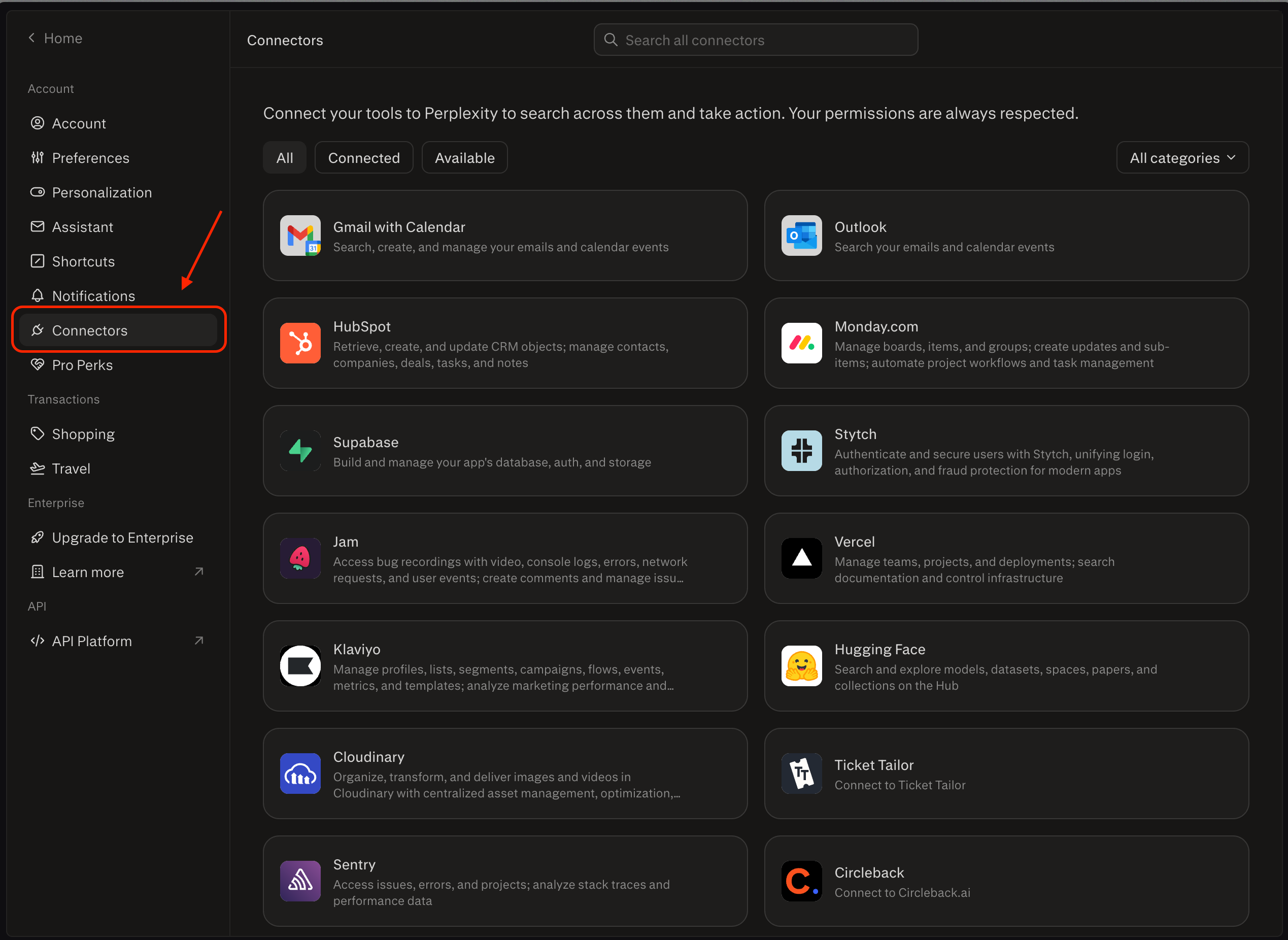
For example, I connected the Gmail connector and can now pull context from my inbox into a search session without leaving Perplexity. Ask about an email thread, a sender, or a topic - and get an answer grounded in your actual messages.
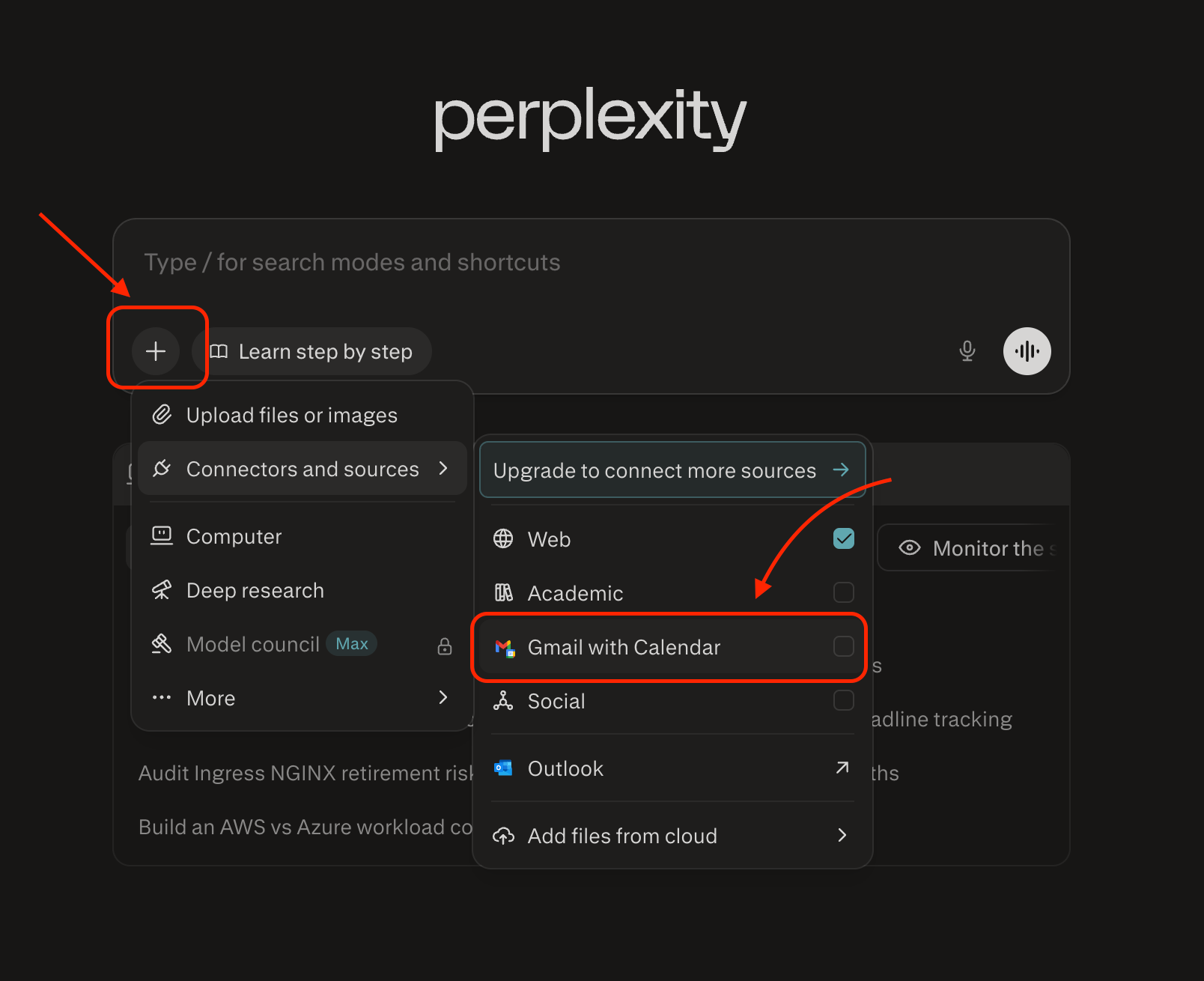
The setup takes under two minutes, and the payoff compounds every time you would have otherwise switched tabs to check something. On top of that, you can combine the connector context with something that you are already searching in Perplexity.
What to set up first
The pattern across these ten features is consistent. Perplexity is building toward a tool that knows you, runs without you asking it to, and gives you source-traceable answers you can put your name behind.
Perplexity is no longer just a search engine. Memory that carries your context forward, scheduled searches that run without you, finance data traceable to the original SEC filing, connectors that pull in your actual emails - these are research and decision-making tools. Using them is the difference between a tab you open and close and a system that works while you’re doing other things.
Start here:
1. Open Settings → Personalize. Set your response length and structure now.
2. Create one Scheduled Search for something you currently check manually every week.
3. Open any equity page in Perplexity Finance and explore the Financials tab with the SEC drill-down.
One setup. Recurring leverage.
Thank you, Ilia Karelin!
The through-line across all 10 features is the same: Perplexity is becoming a tool that knows your context, runs on a schedule, and traces every answer back to a source. Pick one feature from this list, the one closest to a workflow you already do manually, and set it up before the week is over.
And if you want help building AI research into your leadership practice more broadly, I can help with that, just book a free intro meeting.
Check out Ilia’s newsletter Prosper for more practical AI systems that compound over time.
If You Only Remember This
Perplexity’s memory engine now recalls the right context 95% of the time with half the noise, which means your research sessions compound instead of starting from scratch every time you open a new thread.
Scheduled searches turn Perplexity from a tab you open into a system that runs for you. One well-written prompt on a weekly schedule replaces hours of manual monitoring.
The finance features now link directly to SEC filings, so every number you cite in a meeting or a memo is traceable in one click, not buried in an 80-page PDF.
What feature are you setting up first? Drop it in the comments.
Questions Leaders Are Asking
Q: Is Perplexity Pro worth paying for in 2026? If you use Perplexity for work more than twice a week, yes. The Pro plan unlocks scheduled searches, connectors, and advanced model selection, which are the three features that turn Perplexity from a reactive search tool into a proactive research system. The free tier is solid for basic queries, but the automation features require Pro.
Q: How is Perplexity different from ChatGPT for research? Perplexity searches the live web and cites every source with a link you can verify. ChatGPT draws from training data and can browse the web when prompted, but Perplexity was built specifically for sourced, traceable research. If you need to put your name behind the findings, traceability matters.
Q: Can Perplexity replace a research assistant? For recurring intelligence gathering, competitive monitoring, and news synthesis, Perplexity’s Spaces and scheduled searches handle about 80% of what a junior research analyst would do. The 20% it can’t replace is judgment, knowing which findings actually matter for your specific decisions. That is still your job as a leader.
Q: What should I set up first in Perplexity? Open Settings, then Personalize. Set your response length, toggle on memory, and add your role in the occupation field. This takes 60 seconds and immediately improves every answer you get going forward. After that, create a scheduled search for something you currently check each week manually.
Further reading: If you’re building a broader research system beyond Perplexity, How to Turn AI Research Into Executive-Level Analysis covers how to move from raw AI output to analysis you’d present to a board. And if you want to pair Perplexity with a knowledge management layer, The Ultimate Second Brain Blueprint walks through the full system.
Sources Referenced
Perplexity AI (perplexity.ai) — all 10 features documented from product updates, December 2025 through April 2026
Ilia Karelin, “AI Research 201: Learn Perplexity Features,” Prosper newsletter, April 3, 2026
Original guest post: AI Research 101: Learn Perplexity from Scratch in 1 Hour, Leadership in Change, December 11, 2025
I'm having great fun with Perplexity as my personal agent.
Downloading Perplexity now! Tks