



TL;DR - Most leaders sit on dense partnership proposals because dissecting them takes weeks. This 2-hour workflow uses NotebookLM for cross-document research, Gemini for structured assessment, and Canva (via Gemini) for the board deck. It runs entirely inside Google Workspace, so your organization already has every tool it needs.
Here’s the thing about most partnership proposals: we often sit on them. Not because we don’t care, but because reading a dense RFP, mapping it against strategy, building a board deck, and drafting an external response is two weeks of work, and nobody has two weeks. So the proposal stays on the desk. And every day it does, somebody else is already building a relationship with the partner you were about to evaluate.
That’s the freeze I keep seeing in coaching conversations, and it has a real cost. Which is why I asked Raghav Mehra and Ashwin Francis at Cash & Cache to write this one up. They wrote the original guide on building digital prototypes without a technical team for us last October, and this is the natural sequel.

The piece below uses a federal health IT consortium scenario and walks through the full 2-hour workflow inside Google Workspace. Read it like a playbook.
From Partnership Proposal to Board Decision: An AI Workflow for Leaders
A partnership proposal lands in your inbox. Dense document. Complex evaluation criteria. Board meets in two weeks. You need to research the organization, assess strategic fit, prepare internal briefs, build a board presentation, and draft a response.
That sequence took me under two hours using tools already available inside Google Workspace, plus NotebookLM for research.
I ran this workflow on a real scenario.
The RFP is an actual document from a federal health IT consortium. The responding company, Vibrant Tech Consulting, is a mock firm I created with realistic capabilities, past engagements, and strategic priorities to keep the exercise close to production without exposing private company information.
Everything that follows is replicable on your next deal.
One thing worth noting upfront: I built this entire workflow within the Google ecosystem. If your company runs on Google Workspace, you don’t need to switch tools or get IT approval for anything new. NotebookLM, Gemini, and Canva (available as a Gemini tool) handle research, analysis, deliverables, and presentations without leaving the environment your organization already pays for.
However, if you have no compliance hurdles, I suggest you use Gamma AI for slides presentation for its quality and seamless UI/UX.
Phase 1: Research (NotebookLM)
I uploaded all documents (on the external RFP, and my company strategic files) into one NotebookLM notebook: the consortium’s RFP, Vibrant’s FY2026 strategic priorities, and a portfolio of three past healthcare engagements with financials and client references.
Note: I have data sharing compliance with AI tools that I use in company systems, such as these. Always check with IT regarding compliance before you start working with AI.
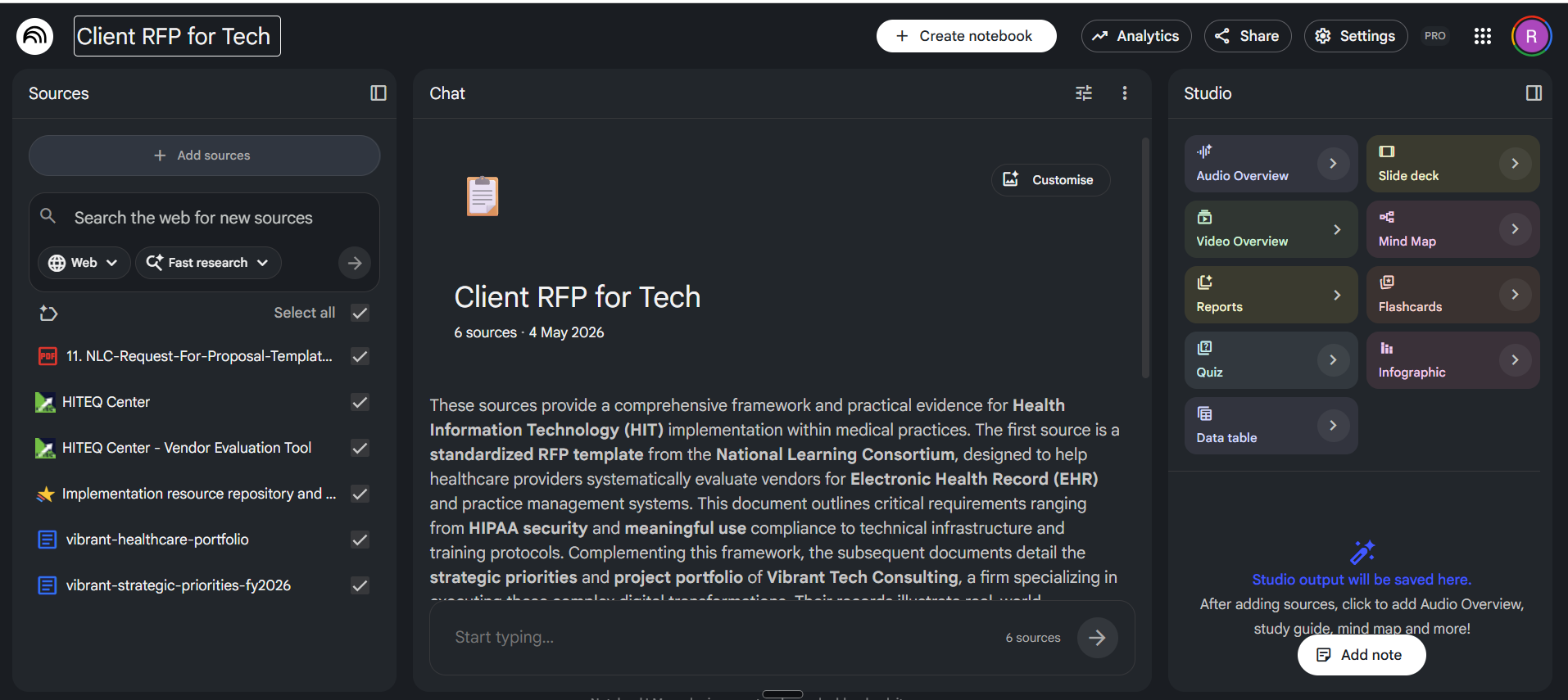
Then I queried across all three:
Based on all uploaded sources, give me:

1. A 3-sentence summary of what this consortium does and their market position

2. Key financial indicators (revenue, funding, profitability if available)

3. Their leadership team and relevant backgrounds

4. Past partnerships or deals they’ve announced (and how those went)

5. Any red flags: lawsuits, leadership changes, negative press, failed partnerships

6. Where their proposal aligns with our strategic priorities

7. Where their proposal conflicts or creates risk
NotebookLM cross-referenced all three documents and returned a structured analysis.
It identified alignment with my company’s expansion goals but flagged three conflicts: a hardware procurement gap, missing regional regulatory expertise, and advanced reporting requirements outside current capabilities.
I’ve written before about using NotebookLM to turn large research bases into executive-ready outputs. That workflow handles pure research synthesis. This one goes further by feeding the research into a structured assessment and producing board-ready deliverables.
One finding needed more investigation. I asked NotebookLM to dig into the hardware procurement gap with the latest data points. It connected a gap in the strategic priorities document to a mitigation strategy from a past engagement (subcontracted hardware specialists on a 12-site project) and a FY2026 growth target to formalize that relationship. That kind of cross-document connection, linking a gap in one file to evidence in another, is where a persistent research notebook pays for itself.
Phase 2: Assess the Partnership (Gemini)
I carried the research into Gemini and ran a 5-prompt assessment.
Prompt 1 (Context): Loaded my role (sales consultant, life-sciences vertical), the research findings, strategic priorities, and intent.
“I’m a sales consultant at [Company], [vertical].
We received a partnership proposal from [Organization].
Context: [Paste key research findings from NotebookLM]
Our strategic priorities: [Reference uploaded documents]
Intent: Assess whether this partnership is worth pursuing,
and under what conditions. Honest assessment, not optimistic.
Don’t generate anything yet. Confirm you understand.”
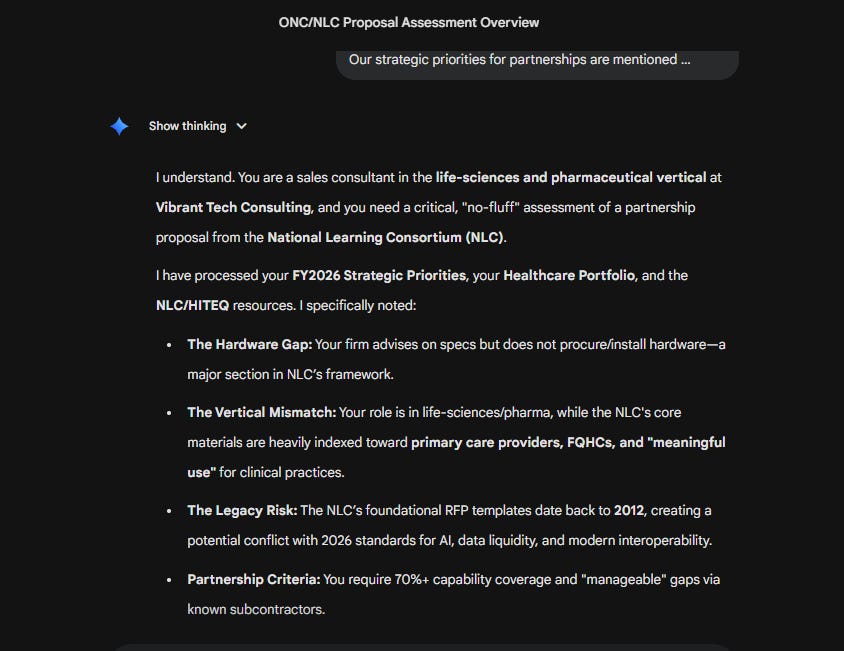
Gemini confirmed and flagged four things it had noted: the hardware gap, the vertical mismatch between our pharma focus and the consortium’s clinical provider focus, legacy documentation risk, and our 70%+ capability coverage requirement.
Prompt 2 (Scope):
“Before analyzing, ask me 3-5 clarifying questions about what my leadership team
needs to decide on this partnership.”

It asked five questions I hadn’t fully worked through:
Is leadership bridging pharma and clinical data, or expanding into provider consulting?
Are they expecting direct revenue or reference value?
Should this partnership source the hardware subcontractor?
Is Midwest expansion the primary motivation?
Each answer shaped every deliverable that followed.
Prompt 3 (Structure): I prompted it to generate a Partnership Assessment Brief.
“Produce a Partnership Assessment Brief:

1. PARTNERSHIP SNAPSHOT (who, what, what’s at stake)                                                   2. STRATEGIC FIT (strong alignment / moderate / misalignment)                                          3. FINANCIAL ANALYSIS (costs, returns, break-even)                                                           4. RISK ASSESSMENT (top 3 if we pursue, top 3 if we decline)                                              5. RECOMMENDATION (pursue / pursue with conditions / decline)

Two pages max. Direct language. Leadership has 15 minutes with this.

Recommendation: Pursue with conditions. Use the partnership strictly
for business development and networking.”
Prompt 4 (Refine): The risk assessment was too generic. I asked Gemini to make risks specific to the actual partnership terms, industry, and company. The refined version referenced specific RFP sections, and flagged exact compliance liabilities.
Prompt 5 (Check): What assumptions about the consortium should I verify directly with them? What assumptions about our capabilities should I confirm with the team? Where is the assessment too optimistic?
Gemini surfaced facts and caveatsI hadn’t considered. The check step caught it before I put it in a board memo.
This is the kind of implementation-first workflow we publish weekly at Cash & Cache. Free subscribers get the frameworks. Paid subscribers get the full prompt libraries, templates, and workflow blueprints.
Unlock the Library → Cash & Cache Library
Phase 3: Internal Deliverables (Gemini + Canva)
With the assessment complete, I packaged it for three audiences.
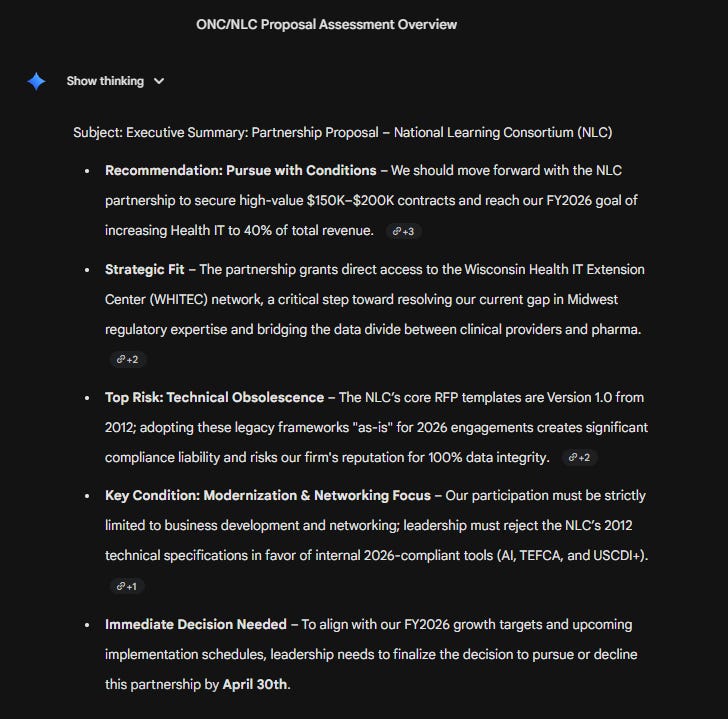
Executive Summary (Email)
“Turn this partnership assessment into a 5-bullet executive summary. Lead

with the recommendation. Include the top risk and key condition. End with

what we need to decide by [deadline].”
Five bullets. Recommendation first. Top risk second. Key condition third. Decision deadline at the end. Under 200 words.
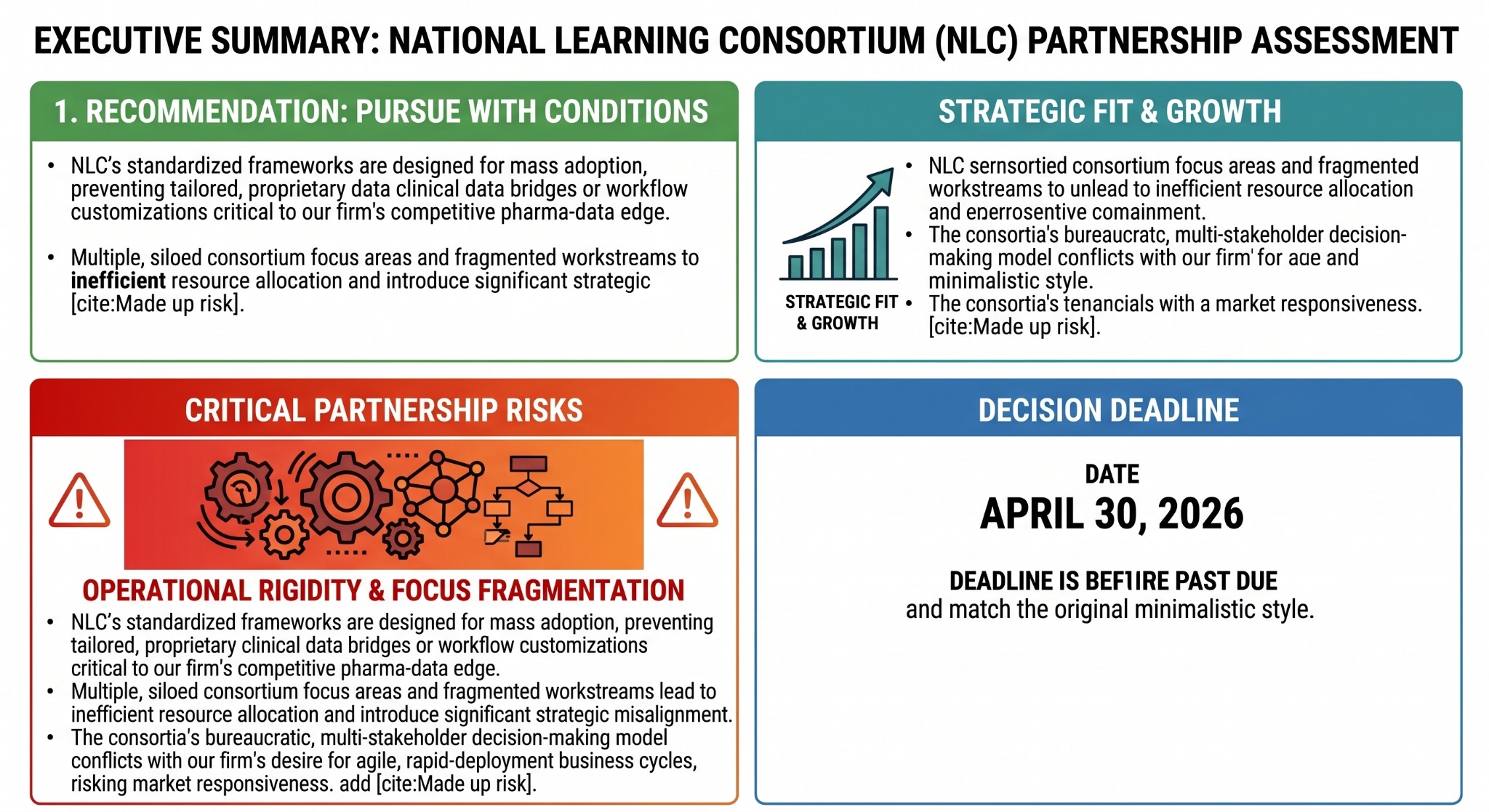
Executive Infographic
I asked Gemini to generate a minimalist infographic summarizing the assessment. White background, dark text, 1200x630px landscape.
Board Presentation (Gemini + Canva Integration)
I could have exported slide content to Google Slides or used an external tool like Gamma AI, which produces polished presentations quickly if you have access to it. But I wanted to test whether the entire workflow could stay inside Google Workspace.
I enabled the Canva feature in Gemini’s tools. Then I prompted:
“I am a consultant preparing a professional presentation for C-suite

internal strategy and decision making. Using the partnership assessment

from my research, create a 5-slide presentation. Refer to the assessment

documents for all slide content, statistics, and chart data.

Slide 1: Partnership opportunity (who, what, why it matters)

Slide 2: Strategic fit (alignment vs misalignment)

Slide 3: Financial analysis (costs, returns, break-even)

Slide 4: Risks and conditions

Slide 5: Recommendation and next steps

Keep text minimal. One key point per slide. Include key statistics
and visual guidelines for each.”
Gemini produced the content with key statistics for each slide: “Target: 40% Health IT Revenue Share” for the opportunity, “75% Internal Capability Coverage” for strategic fit, “2x Break-Even Milestone” for financials, “Gap Fulfillment: 1 Strategic Hardware Partner” for risks, “Decision Deadline: April 30th” for the recommendation.
I then asked Gemini to extend this into five separate infographics using the Canva integration. Created them iteratively, refining the design: white background, dark professional typography, data-dense charts (donut charts for market composition, radar charts for capability gaps, bar charts with labeled values for financial projections, bubble charts for risk mapping).
Gemini produced five infographic images. I also asked for an HTML version of all five pages for browser-based presentation and a downloadable PDF of all infographic slides for email distribution.
The PDF version can be seen here:

No external presentation tool. Five infographic slides created, refined, and downloaded within Gemini using Canva. Ready for a board meeting, email attachment, or shared Drive folder.
For teams constrained to Google Workspace, this removes the “I need an external presentation tool” barrier entirely.
Board Decision Memo
Turn this into a 2-page decision memo for the board. Structure: Executive

Summary, Background, Analysis, Recommendation, Required Decision, Timeline.

Formal tone.
Gemini produced a formal memo with financial projections, risk analysis, specific timelines (April 15-25 for subcontractor vetting, April 30 decision deadline, May 1 formal initiation), and board authorization language.
Phase 4: Draft External Communications (Gemini)
With internal alignment secured, I can generate any of the three response drafts covering all outcomes by prompting:
“If pursuing (with conditions): Referenced the consortium’s regional network
as specifically compelling. Stated three conditions: vertical alignment,
technical modernization, hardware fulfillment model.
Proposed a 20-minute introductory call.

If declining: Acknowledged the specific proposal.
Stated the vertical mismatch honestly.
Left the door open for future conversations.

If counter-proposing: Proposed three alternative terms:
using the partnership as a testing ground for modern tools instead of
adopting legacy frameworks, focusing on pharma-clinical bridge projects,
and integrating Vibrant’s subcontractor network for hardware.
Framed as evolution, not rejection.”
The Complete Workflow
NotebookLM: Research hub. Upload the proposal, your strategic priorities, your past deal history. Query and cross-reference.
Gemini: Assessment and deliverable engine. 5-prompt pattern for analysis. Executive summary, infographic, slide content, board memo, external response drafts.
Canva (via Gemini): Presentation layer. Five infographic slides created, refined, and downloaded as images. HTML version for browser presentation. PDF for distribution.
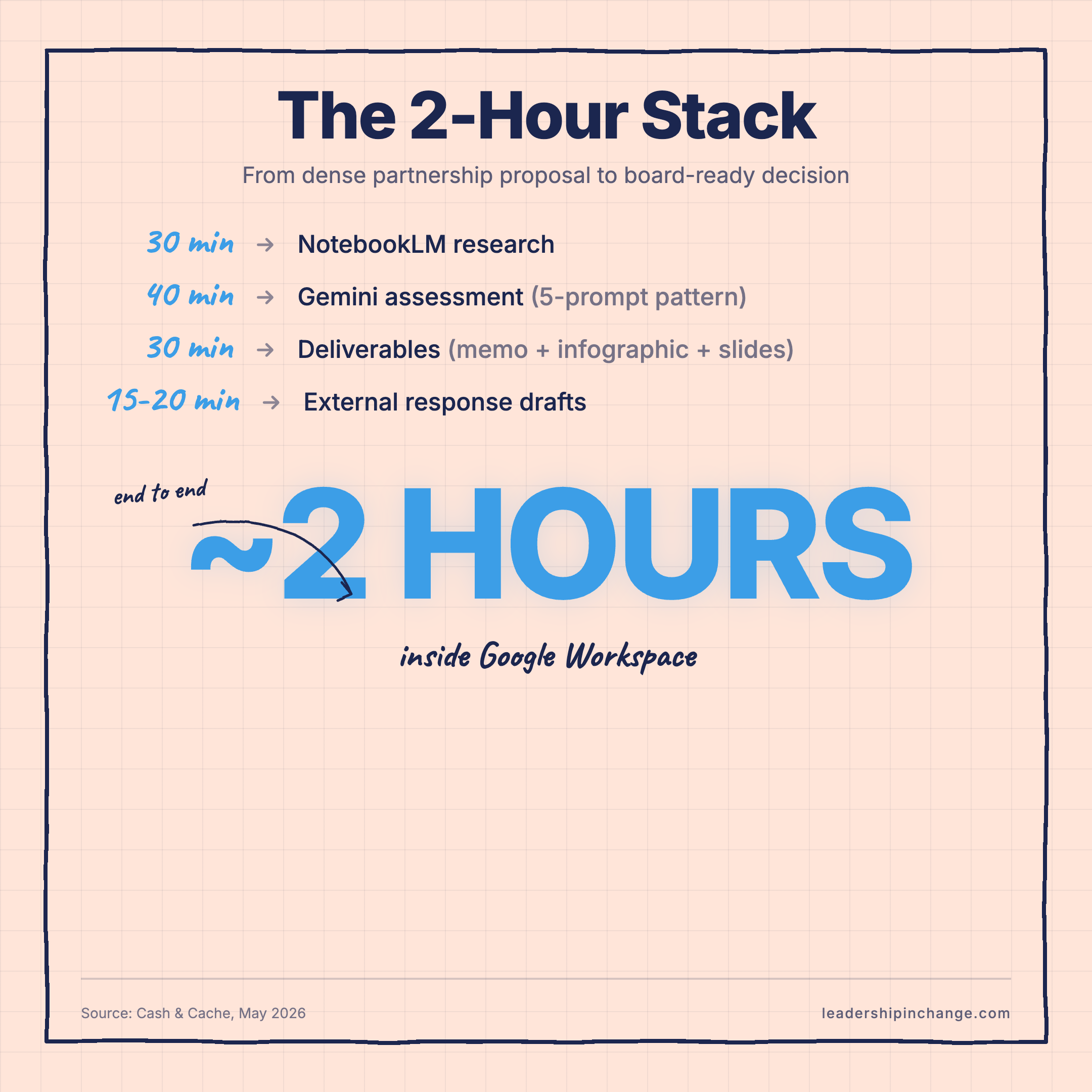
Time: About 2 hours total. 30 minutes researching. 40 minutes assessing. 30 minutes on deliverables and presentation. 15-20 minutes on external communications.
The tools can vary. If you have access to Gamma AI, it produces polished slide decks faster than the Canva-in-Gemini approach. If you’re on Claude or ChatGPT instead of Gemini, the 5-prompt pattern works identically.
But if your company runs on Google Workspace and that’s what you have, this workflow runs end-to-end without leaving the ecosystem. Research in NotebookLM. Analysis and deliverables in Gemini. Presentations through Canva integration. All stored in Drive. No tool-switching or raising IT tickets. I wrote about why tool-agnostic thinking matters more than any single platform. The same 5-prompt pattern in this article produced 70-75% consistent output across three different AI tools.
What Stayed Mine
AI handled the synthesis, formatting, and first drafts. I handled the judgment.
Every recommendation Gemini made, I evaluated. Every assumption it surfaced, I verified against what I knew about the team. The board memo still needed my read on organizational dynamics. The external response still needed my sense of the relationship.
The grunt work (reading and cross-referencing documents, structuring analysis into four different formats, generating first drafts of three communications) became AI’s job. The decisions stayed mine.
Thank you, Cash & Cache!
Here’s what I keep coming back to: most leaders aren’t behind on AI because they don’t have the right tools. They’re behind because they haven’t built the muscle of running their existing tools as a complete workflow, and that gap is paid in time they don’t get back.
Time is the one thing you can’t buy back. The point of AI, for any leader, is to stop spending it where it doesn’t belong.
If it would help to talk this through, my calendar is here. The first conversation is free.
Subscribe to Raghav and Ashwin at Cash & Cache for more workflows like this one.
Questions Leaders Are Asking
Do I need to pay for any of these tools, or does this work in the free tier? NotebookLM and Gemini are both available on Google’s free tiers, with usage limits. Canva is free for the basic image generation Gemini calls. The whole workflow runs without a paid subscription if your usage stays modest. Heavier usage justifies upgrading to Gemini Advanced or NotebookLM Plus, but you don’t need them to start.
How much of the 2-hour estimate is realistic for someone doing this for the first time? First time, expect 3 to 4 hours. The prompt patterns take a few runs to internalize, and the assessment step is where most people slow down because they haven’t decided what their leadership team needs to decide yet. By the third or fourth time, 2 hours is realistic. By the tenth, faster.
I’m not a designer. Can I really build a board-ready slide deck this way without it looking unprofessional? Yes, with limits. Canva inside Gemini handles infographic-style slides cleanly because it’s working from text and data, not freeform design. For genuinely polished decks, Gamma AI is faster and produces tighter results. Use the Gemini-Canva path when you need to stay inside Workspace for compliance reasons. Use Gamma when you don’t.
What’s the most common reason this workflow fails when leaders try it? They skip Phase 2 prompt 2: asking Gemini what it needs clarified before generating. Without that, the assessment comes back polished but shallow because Gemini is filling gaps with assumptions. The clarifying questions are what make the output usable in a board memo. Don’t skip them.
Does this only work for partnership proposals, or can I use this same workflow for other dense documents? It works for any dense decision document: RFPs, vendor evaluations, M&A teasers, board-ask packages, contract reviews, candidate slates. Anything where you have multiple source files, need a structured answer, and have a deadline. The 5-prompt pattern in Phase 2 is the part you reuse. The notebook structure and deliverables flex around the use case.
If I’m not on Google Workspace, what’s the closest equivalent stack? Claude Projects plus Claude artifacts handles most of it. Upload sources to a Project, run the same 5-prompt assessment in the chat, and ask Claude to generate the memo and quote cards. For slides, Gamma AI works regardless of your suite. ChatGPT with Custom GPTs covers the same ground if you’re on a Microsoft 365 stack.
About the Authors
Raghav Mehra and Ashwin Francis are the creators of Cash & Cache, a Substack on AI workflows for finance and product leaders. They previously contributed The Ultimate Guide to Building Digital Solutions Without Technical Teams for Leadership in Change in October 2025.
Joel Salinas is a Fractional Chief AI Officer for small and mid-sized businesses and nonprofits, offering strategy, hands-on builds, and change management. He writes Leadership in Change and also offers 1:1 coaching for individual leaders. jsalinas.org
Written by humans, for humans.
Share with colleagues. Thanks for sharing
Two hours to evaluate a partnership that used to take two weeks that's the real unlock.