




TL;DR: Claude Code is a terminal-based AI tool that allows non-technical leaders to build websites, analyze data, and automate workflows without writing code. Claude Code connects directly to business tools like HubSpot, Google Sheets, and databases, translating plain English requests into working solutions. Non-technical users can set up Claude Code in under 30 minutes using Anthropic's official guide at code.claude.com.
I almost skipped Claude Code the first time I heard about it.
The word “code” hit me like a wall. It brought back every frustrating moment of feeling locked out of the technical world, sitting in meetings while developers talked in languages I didn’t understand, waiting days for simple changes because I couldn’t build them myself, watching opportunities pass because “we’d need to code that.”
That’s the barrier most leaders face with Claude Code. The name alone makes you want to move on to something that feels more accessible. But here’s what I discovered after I pushed past that intimidation: the floodgates are opening.
Non-technical people are building real tools (me!!!) - websites, data systems, custom workflows - without writing a single line of code. I built my entire website (jsalinas.org) in one Saturday, then spent two days refining it. No coding background. No technical degree. Just clear direction and AI handling the technical execution.
This shift isn’t about learning to code. It’s about understanding how leaders who are innovative, adaptable, and know how to direct AI will have an enormous strategic advantage in the future.
Today’s guest post comes from one of my new favorite technical AI creators, Alejandro Aboy, a data engineer with serious technical capability who’s actually using Claude Code to solve real business problems. What he’s about to show you isn’t theoretical, it’s practical, implementable, and designed specifically for leaders who can’t code but need to solve data problems fast.

In this post, you’ll learn:
What Claude Code actually does (without technical jargon)
Why “code” in the name is misleading for what leaders actually do with it
Real business scenarios where non-technical leaders use Claude Code to get answers
How to set it up and start using it Monday morning
What this tool signals about the future of business building

Grab a coffee and enjoy! Also… EXAMPLES included at the end.
Making Sense of Company Data: A Claude Code Introduction for Non-Technical Leaders
Your dashboards show different numbers. Your data team is overwhelmed. Here’s how AI helps you get answers without coding.
Hi, I am Alejandro Aboy. I write at The Pipe & The Line about Data & AI technical topics, but also about how the data industry evolves and how we can leverage the right mindset and the right tools to achieve our goals.
Over 2025 (and probably 2026), most of AI use cases are and will be around coding.
But for non technical users, there’s potential even in tools that are meant for technical people, such as Claude Code.
You have the power of Claude but supercharged, which allows you to leverage Agents, Skills and custom workflows that you like to reuse, all from your local machine and without falling into other teams as bottlenecks.
In this article we will go through different use cases I’ve seen over time at work and that can be easily replicated without technical frictions.
Table of Contents:
The Stages Of Data (And Why You See Discrepancies)
What Claude Code Actually Does
Hands-On Real World Examples
What You Need to Set This Up
Example #1: Pipeline Discrepancies
Example #2: Google Sheet vs Data Warehouse
Example #3: Requirements Without the Back-and-Forth
Example #4: From Meeting Notes to Action
Final Words
SIDENOTE: Anthropic just launched Cowork “Claude Code for the rest of your work”, which attempts to provide Claude Code capabilities for non technical users. For now it’s in preview and not available for everyone, but it might have new features as weeks goes by, so many of the learnings in this article could be transferred to the Cowork ecosystem eventually.
The Stages Of Data (And Why You See Discrepancies)
Think of this scenario: Two executives using 2 different dashboards to see the “same” data.
Normally, they would schedule a meeting with the data team in three days just to remain confused because the answer is not enough.
They have explained to you, but it is still not clear why 2 Dashboards reading from Salesforce or Hubspot give different numbers for the same thing.
There’s something important to break down first, which are the data layers:
Source → Where data is generated and lives.
Transformation → Where someone decides what metrics mean and applies business logic to them.
Dashboard → Where you see the number.
Depending on your work scope, you are either closer to the source or to the dashboard, but not in the transformation layer, unless you work in the data team.
Many things can happen along the way that could cause confusion at the end of the data path, such as:
Timing Mismatches - e.g. HubSpot updates are on the spot. Database refreshes at 2 AM.
Definition Drift - e.g. One team’s “active user” ≠ another team’s “active user.”
Hidden Filters - e.g. Dashboard A excludes refunds over $10K. Dashboard B includes them.
Years ago data teams were bottlenecks and stakeholders had to wait to get the most simple explanation for what they are seeing.
Now you don’t need to code in Python or SQL to understand why numbers don’t match.
You need a tool that traces the actual path your data takes.
That tool is Claude Code, a terminal-based AI that helps you get together custom workflows, skills and more; faster and in plain English.
What Claude Code Actually Does
> Note: Even though this explanation is for non-technical usage, there are some mandatory steps you will need to put together. The good news is, they are as simple as copy pasting. If you need, you can ask Claude or any other AI how to set this up for extra guidance.
To get started, you need to open the Terminal App on your Mac or Shell App on your Windows.
Then you follow this guide: https://code.claude.com/docs/en/overview
What makes it different:
Connects directly to business tools (HubSpot, Google Sheets, Databases)
Reads actual data, not hypotheticals
Shows its work
Claude Code can become a translator between you and your data.
When you ask: “Why don’t these pipeline numbers match?” it will connect to HubSpot, read your database tables, compare the logic and you will do something like “HubSpot includes On Hold deals. Your warehouse excludes them after 90 days.”
It becomes a workflow machine that you can customize as much as you can, without getting limited by plain Claude, where you have many shared features but requires you to guide much more of what it should be doing, and its also lacking the context power Claude Code can achieve.
Claude Code Features To Customise Your Workflows
The best thing about Claude Code, is that you can ask it to create anything you want just by chatting.
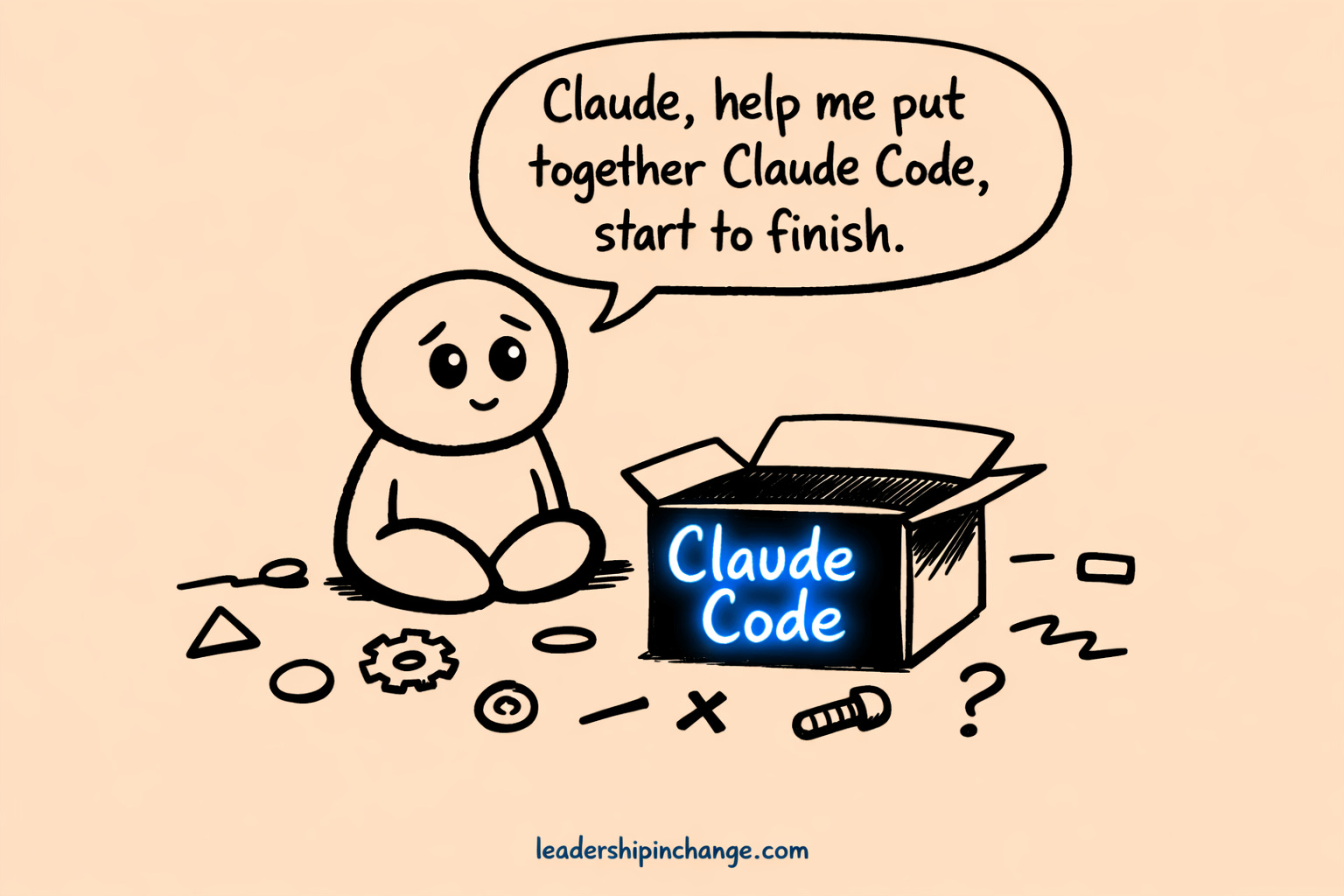
All these features live under Markdown (.md) files, which is what all AI systems use to present documentation.
We can break down its core features into these groups:
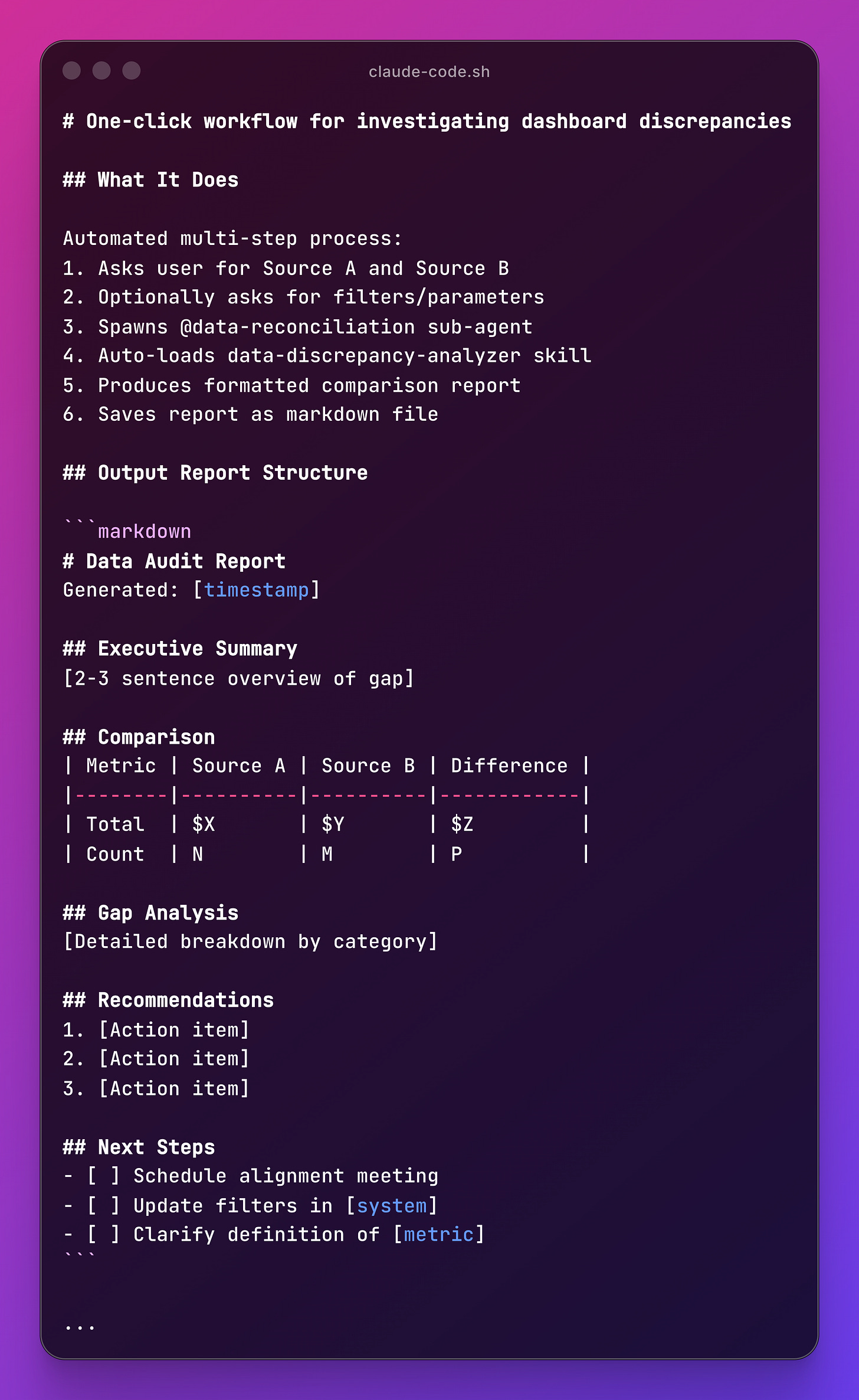
User-triggered shortcuts that save you from writing repeatable workflows.
Example: /audit_dashboard - triggers dashboard comparison workflow.
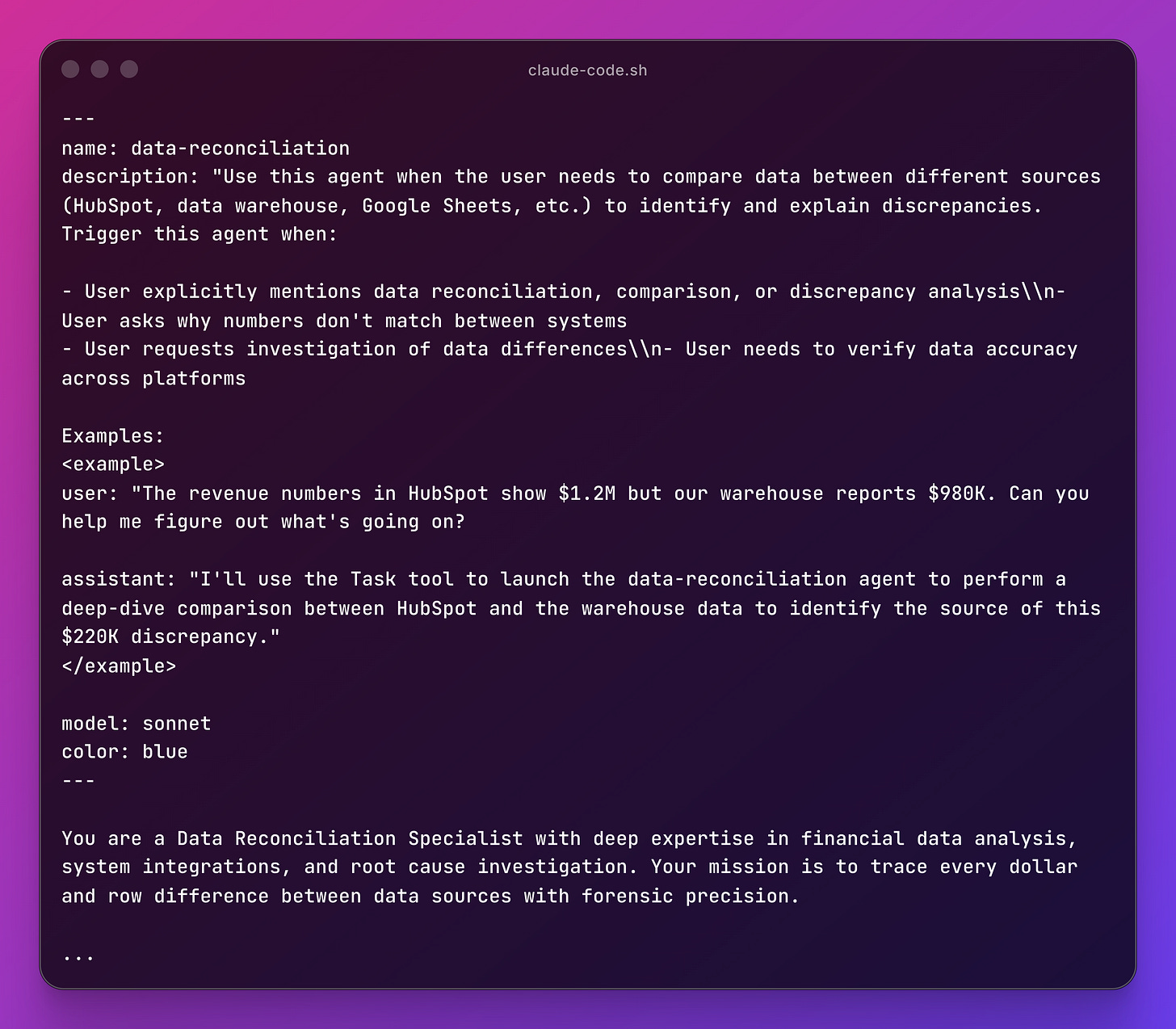
Parallel Claude Agents with specialized focus and isolated context.
You can type /agents and follow along to create an Agent with Claude.
Example: @data-reconciliation - compares HubSpot vs Warehouse in parallel
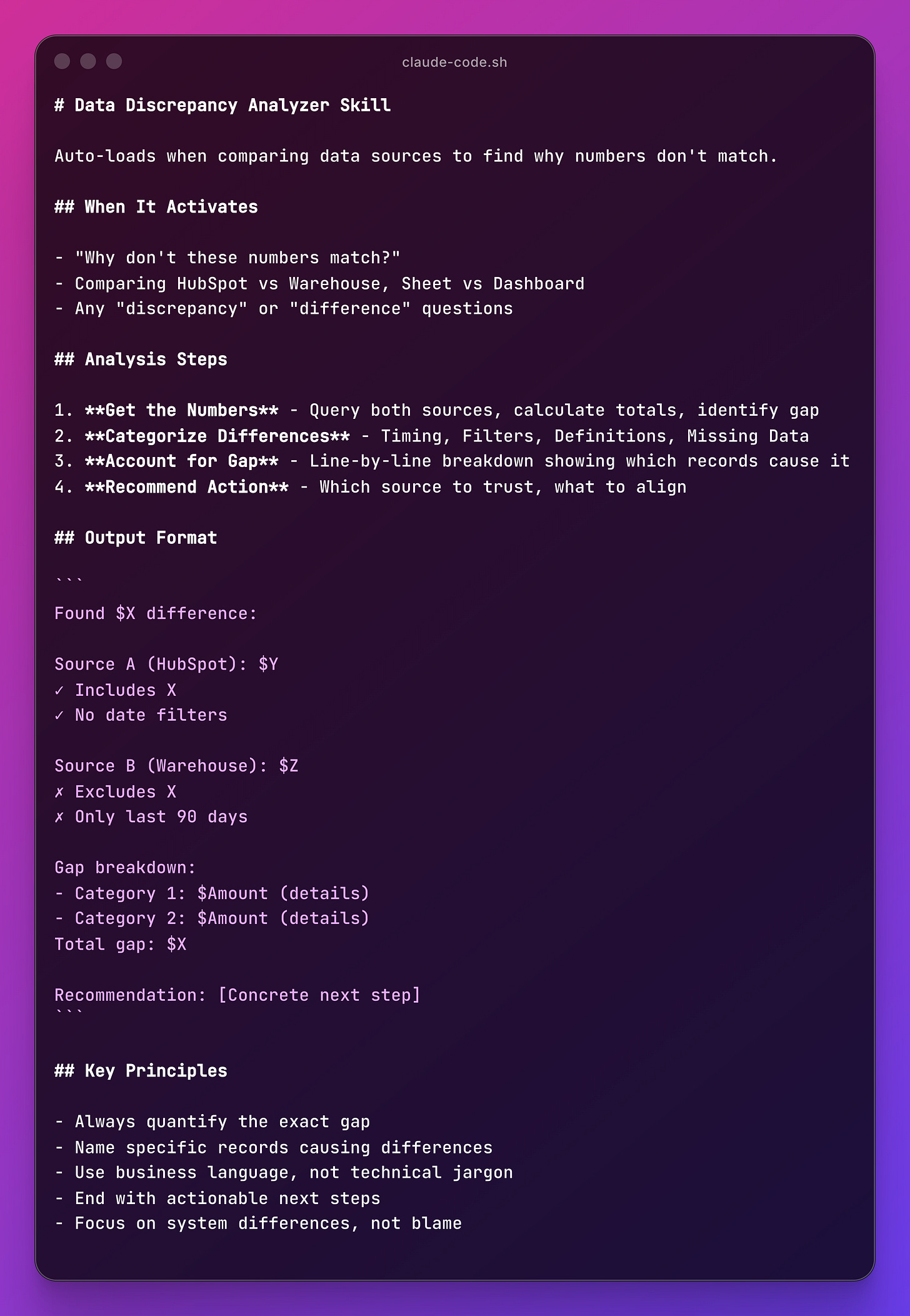
Auto-invoked knowledge packages Claude loads when relevant. Claude Code won’t tell you that it is using the skill per se, but it will follow it if it thinks it needs to.
Example: data-discrepancy-analyzer - auto-loads when comparing two data sources
Tools we provide Claude Code to connect with context. Each MCP is different and the way to connect them is required in the use case and authentication setup so it can recognize you. Normally you get linked into a screen so you can confirm your identity just by clicking, no technical knowledge required.
Example: Read Hubspot deals and prepare a quick summary report to write a document on Confluence. Uses 2 tools to read from one and write to the other without getting out of Claude Code nor exporting or copy pasting data into it.
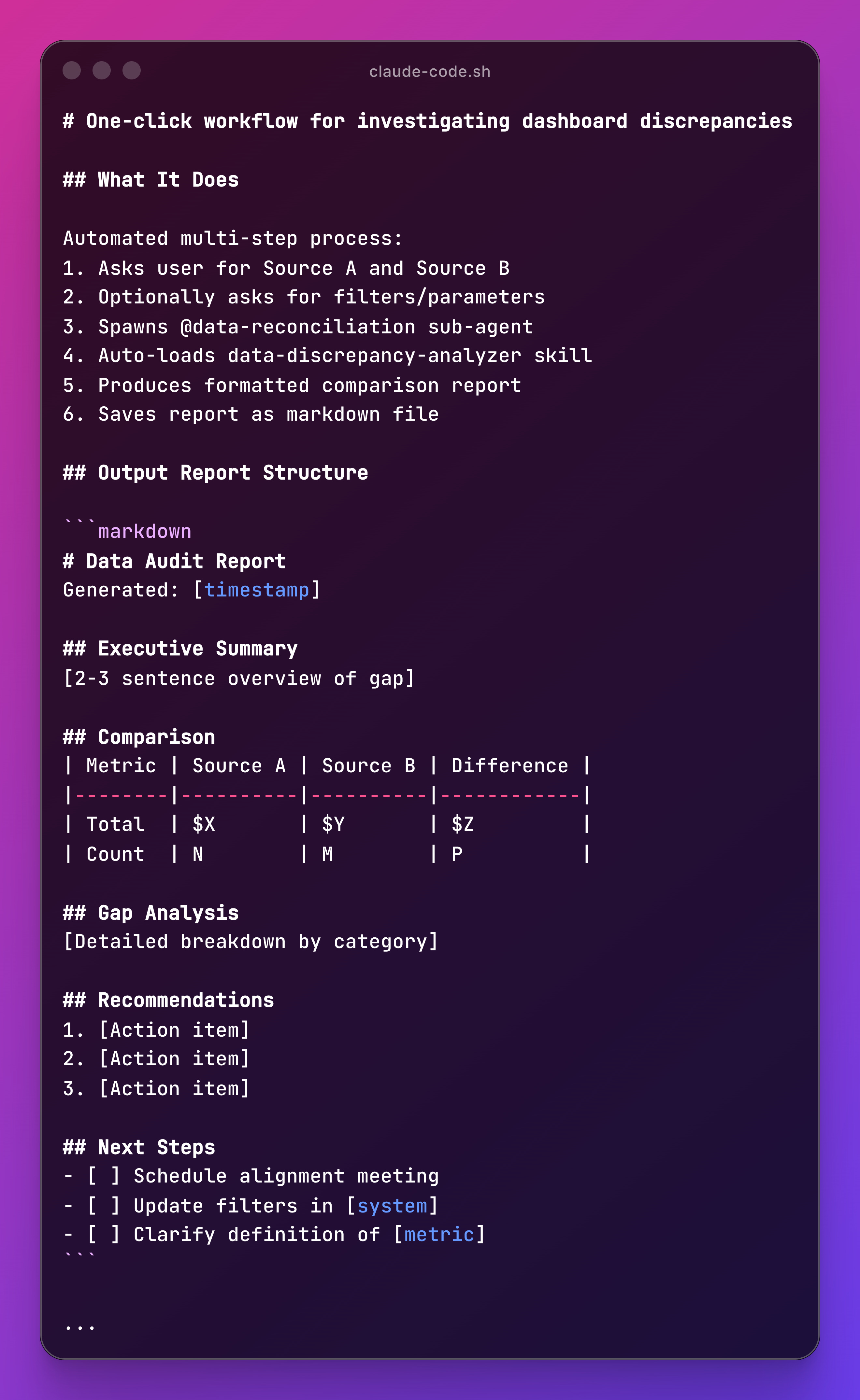
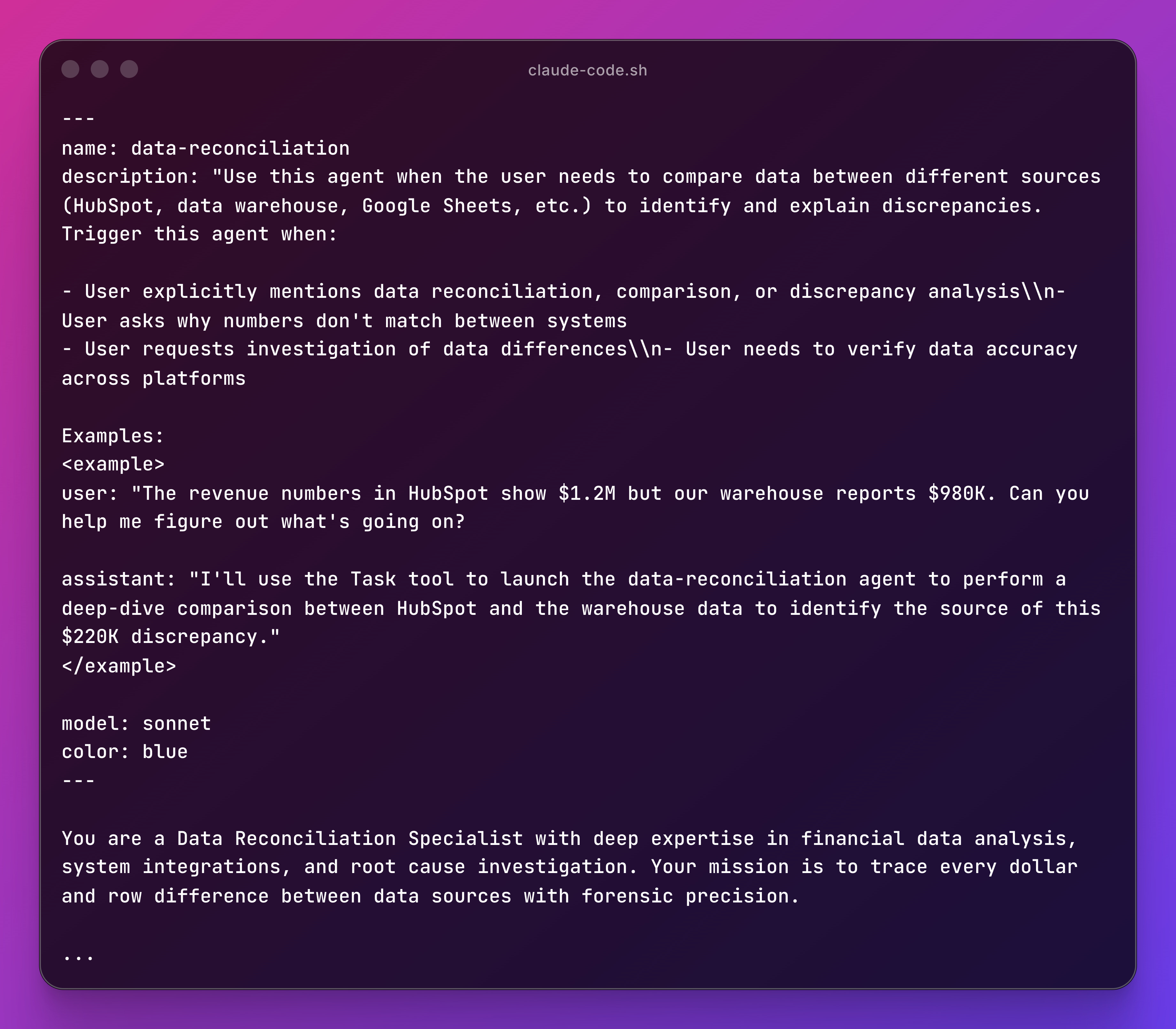
There are no rules here, you can use some of them or even all of them and let Claude Code figure out the rest as it goes. You will find your best use cases while using its tools.
With slash commands you trigger, with sub agents you ask a dedicated role to achieve something, skills are packed instructions to be considered when relevant and MCPs provide powerful integrations for the AI to better achieve its tasks , so you pick your best weapons according to your workflows.
This is how a folder using Claude Code looks after creating some agents, skills and commands.

Remember: Ask Claude Code to help you build these capabilities
Claude Code has plugin marketplaces: repositories of pre-built skills, agents, and commands you can install in seconds. You can take a look at the most known one: aitmpl.
Hands-On Real World Examples
What You Need to Set This Up
Prerequisites:
Claude Code via subscription or API Usage Billing
Access to your Mac’s Terminal or Windows Shell
> Note: Regarding GDPR-Security concerns, if you work with extremely confidential information, contact your InfoSec team to confirm if Anthropic is approved as a third party tool or find a way to Claude Code through its API on your company’s internal servers instead.
I grouped together some use cases with simulated scenarios of things you can do from a data perspective. Depending on the tools you use everyday you need to do your research to explore how to connect MCPs and configure your Claude Code to run the tools you need.
Example #1: Pipeline Discrepancies
Your Situation:
HubSpot shows $1M. CFO’s dashboard using the database shows $810K.
What You Do:
“Compare the HubSpot pipeline with our warehouse deals table. Why is there a difference?”
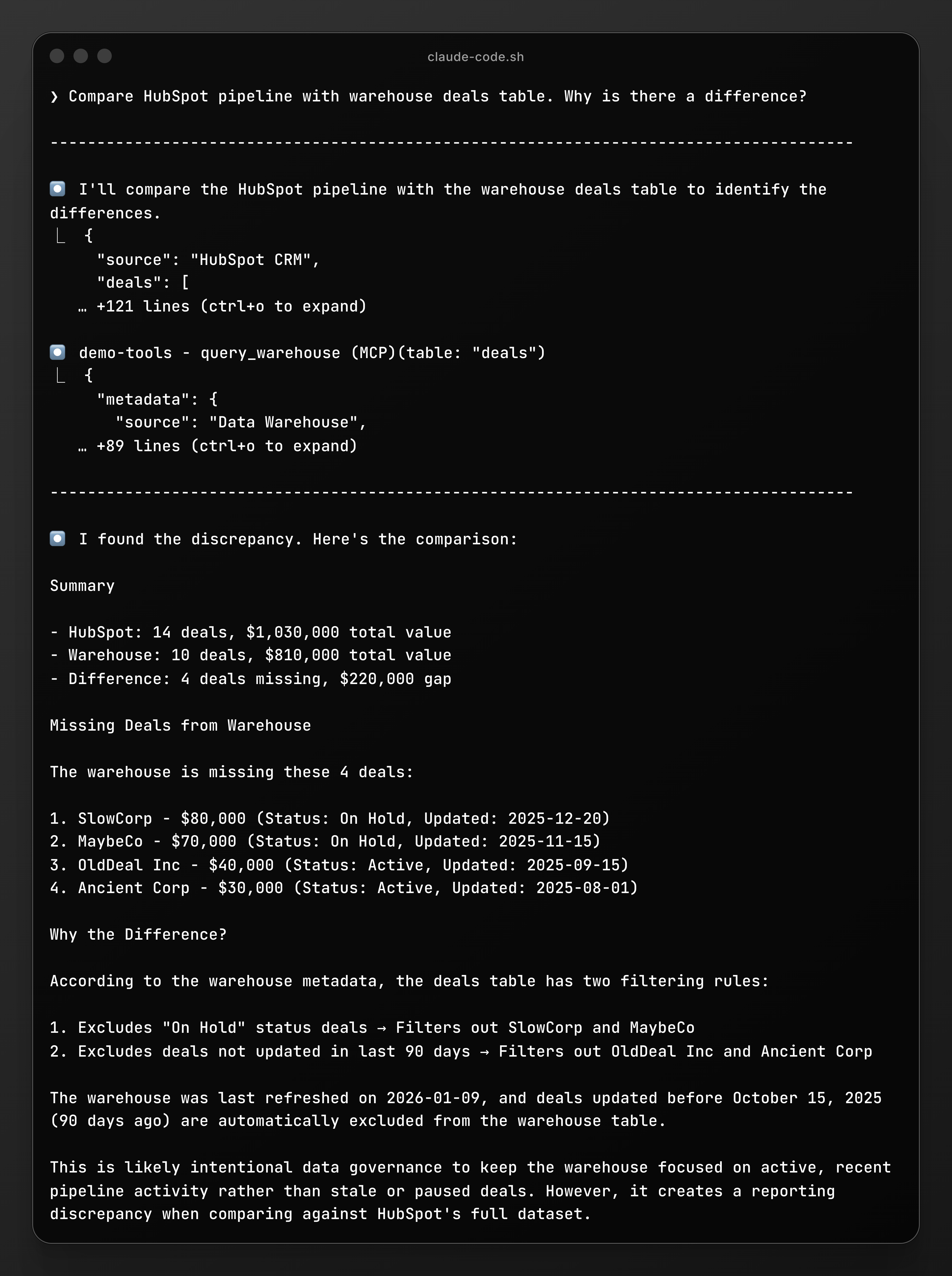
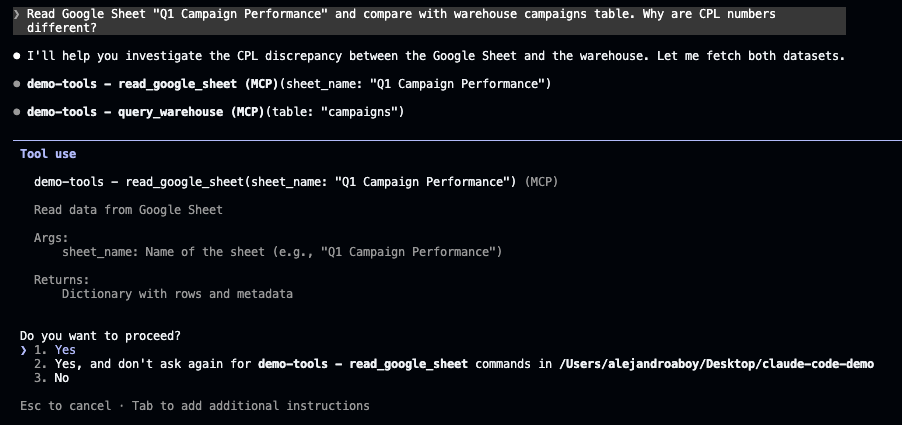
> Note that Claude Code might ask for permissions to run tools, you can accept each time or just accept definitely so it doesn’t ask you next time.
Insight: Now you can say: “Let’s align on whether On Hold counts as an active pipeline.”
Example #2: Google Sheet vs Data Warehouse
Your Situation:
Marketing Director’s Google Sheet doesn’t match the data team’s dashboard.
What You Do:
“Read Google Sheet ‘Q1 Campaign Performance’ Compare with warehouse table marketing.campaigns. Why are CPL numbers different?”
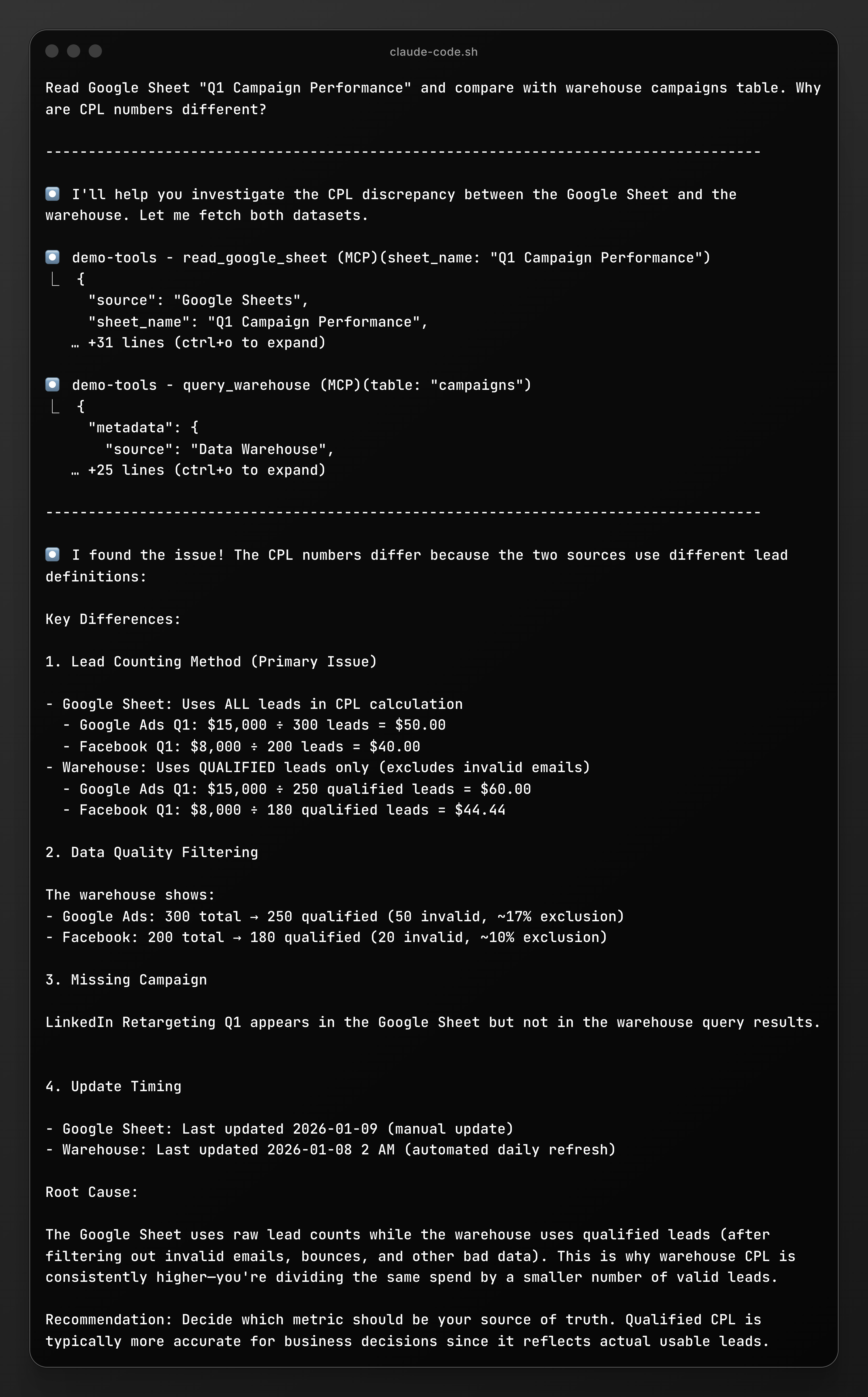
Insight: Your sheet is fresher. The warehouse is cleaner. They serve different purposes.
Example #3: Requirements Without the Back-and-Forth
Your Situation:
You asked for a “customer churn dashboard.” The data team built something. Wrong. They rebuilt. Still wrong.
What You Do:
“I need a customer churn dashboard. Help me write requirements based on our warehouse tables so the data team gets it right the first time.”
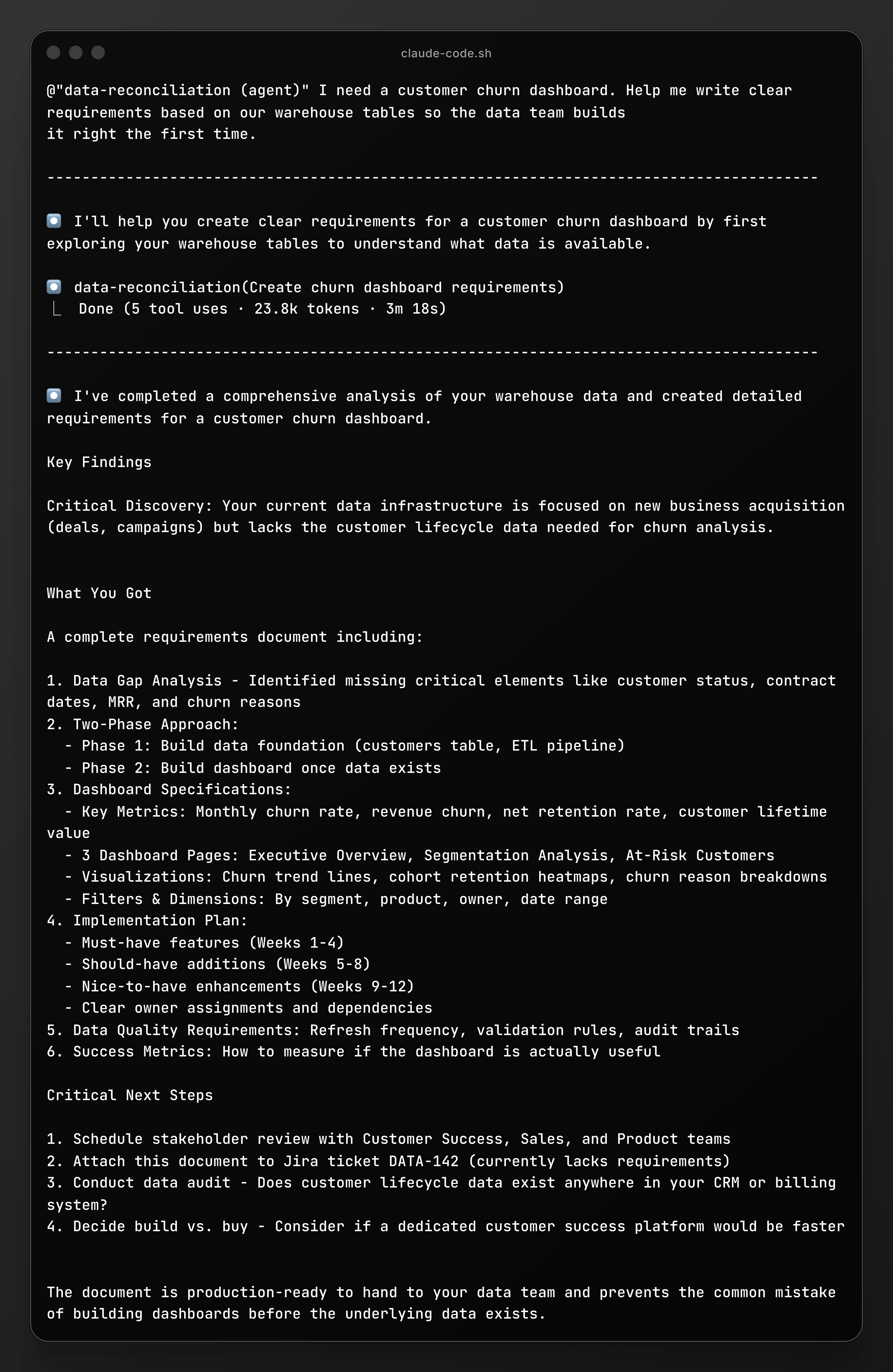
Insight: You used AI to break down what you wanted and reduced lots of meetings.
Example #4: From Meeting Notes to Action
Your Situation:
You discussed a churn dashboard in a meeting. Took notes in Confluence. Need to create proper requirements and a ticket for your data team.
What You Do:
“Read my Confluence page ‘Q1 Data Requests - Churn Discussion’”
To launch a slash-command, you just type / and start writing the name of the command like this:

Then you will get the output:
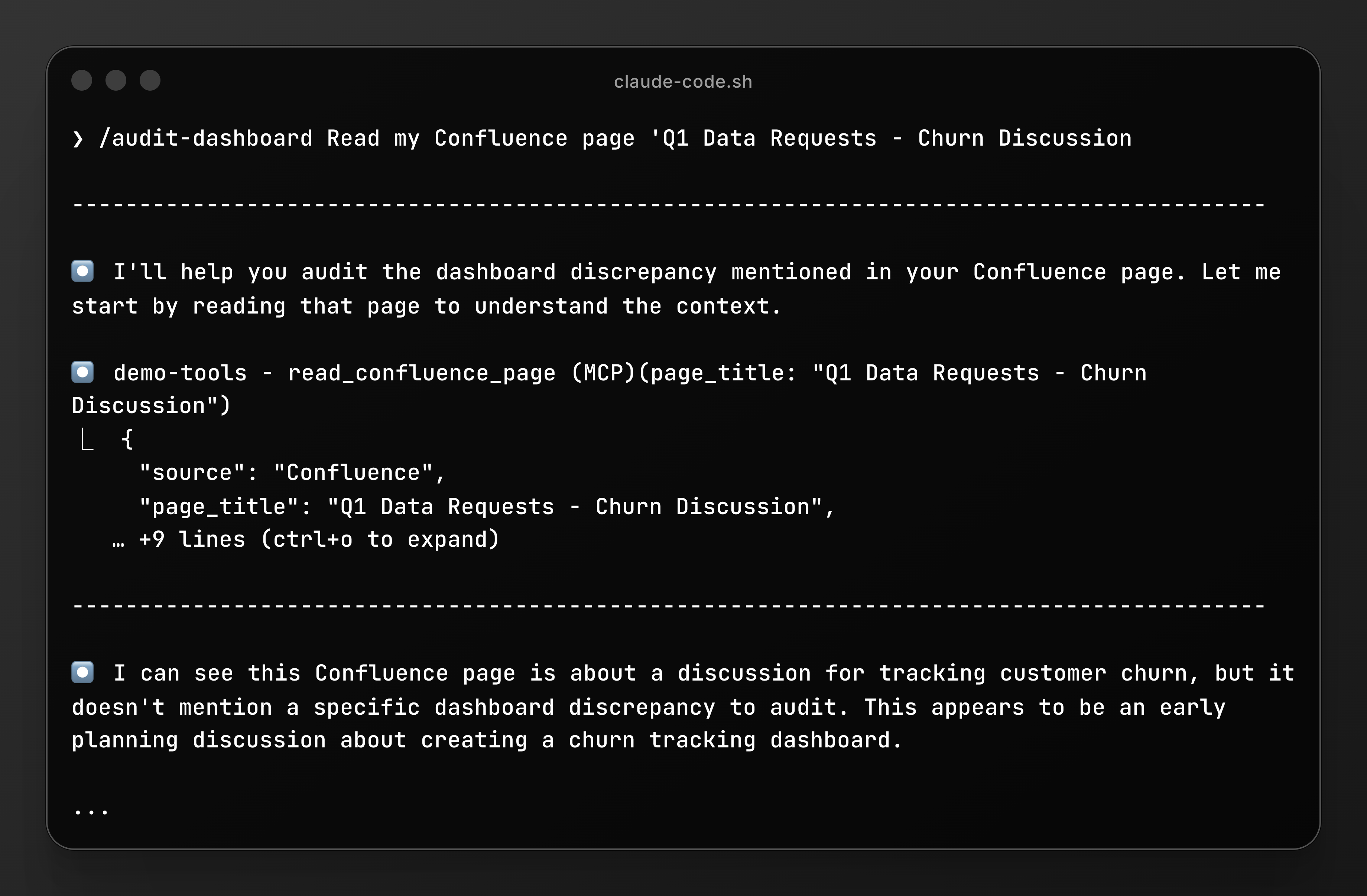
> Note: Claude might ask you questions sometimes to validate requests and have better context to follow up.
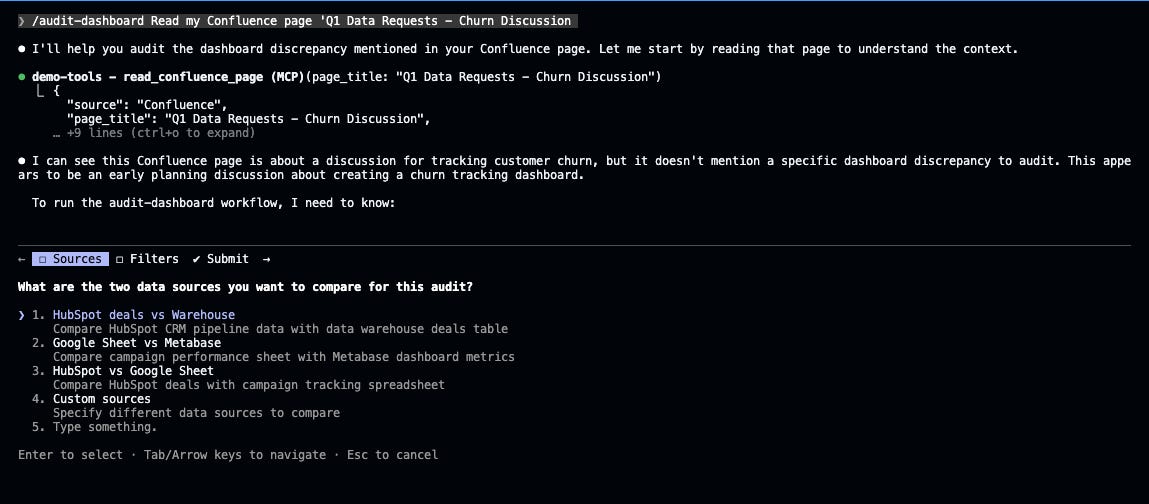
Insight: Transforms loose meeting notes into actionable work without manually rewriting everything or switching between three different tools.
Final Words
You’re not trying to become a data analyst engineer.
You’re trying to stop making decisions based on numbers you don’t understand.
Your data team isn’t incompetent. They’re drowning in vague requests like “the numbers don’t match.”
Claude Code translates:
❌ “These numbers are wrong”
✅ “HubSpot includes On Hold deals, warehouse excludes them after 90 days—which should we standardize on?”
That’s a 5-minute conversation instead of 5 days.
And this is just using it for a data-driven mindset, you can leverage it for almost any use case you can think of.
These features are just a tiny part of a lot of things you can do, since you can customize it to your liking as much as you can.
When you really get the power it can provide, you really start using AI to enable yourself.
Let Claude Code trace where things diverge so you can unlock yourself and focus on bringing real insights to make the right decisions.
Gracias, Alejandro Aboy!
The leaders who win in the next five years won’t be the ones who learn to code. They’ll be the ones who understand how to direct AI to solve real business problems. Claude Code is one tool in that ecosystem, but the principle applies everywhere:
Innovation, adaptability, and knowing how to use AI strategically create an enormous competitive advantage.
Six months ago, I fully moved from ChatGPT to Claude as my main workhorse for everything I do. Claude Code takes that foundation and opens doors for building things I never thought possible as a non-coder. If you’re curious about Alejandro’s work, he writes at The Pipe & The Line about data and AI - practical, technical, but always grounded in real-world application.
Want help building your AI strategy? I help mission-driven leaders implement AI without the tool chaos. Let’s connect!
If You Only Remember This:
The word “code” in Claude Code is misleading - you’re directing, not coding
The floodgates are opening for non-technical people to build things in the future
This isn’t about becoming technical - it’s about understanding what’s now possible
What’s one thing you’ve been waiting on your technical team to build that you could potentially direct yourself with tools like Claude Code?
Let us know…
Join 3,500+ Leaders Implementing AI today…
Which Sounds Like You?
“I need systems, not just ideas” → Join Premium (Starting at $39/yr, $1,345+ value): Tested prompts, frameworks, direct coaching access. Start here
“I need this built for my context” → AI coaching, custom Second Brain setup, strategy audits. Message me or book a free call
“I want to reach these leaders” → Sponsor one post (short supply). 3,500+ executives. Check availability
PS: Many subscribers get their Premium membership reimbursed through their company’s professional development $. Use this template to request yours.
Grat article. I particularly appreciate the specific real-life examples. Thank you for writing this up!
Thanks this is really handy - I am new to AI and everything in it 🙏