



TL;DR: AI context setup (teaching AI your role, audience, and preferences once) eliminates the generic responses that make most AI output indistinguishable across users. Two features make this possible: User Preferences (standing instructions across all conversations) and Project Knowledge (permanent document uploads AI references forever). A smaller AI model with rich context consistently outperforms larger models with no context, and the full setup takes one afternoon.
I scroll LinkedIn, Substack, Medium. Same post, different author. Scroll some more. There it is again. Different words, same framework, identical structure.
At first, I thought it was plagiarism. Then I realized what I was actually seeing: the same prompt asked to ChatGPT, Claude, or Gemini by dozens of different people, with zero additional context given… the definition of “AI Slop.”
Generic prompt in… Generic response out…. Copy, paste, publish.
What you’re seeing isn’t collaboration. It’s parroting.
And it’s everywhere because most people are still using maybe 10% of what AI can actually do.
Think about hiring a new team member. You spend the first week onboarding them, explaining your mission, your audience, your processes, and what success looks like. That investment pays off for years because they understand your context.

Now imagine if that team member forgot everything overnight. Every morning, you’d start over. “Here’s what we do. Here’s who we serve. Here’s what matters to us.” Day after day after day.
Exhausting. Inefficient. You’d never get strategic help because they’d never understand your actual situation.
That’s what you’re doing with AI right now.
Most leaders repeat the same context in every single prompt. Who they are. What they’re working on. What their audience cares about. The same information, over and over, because AI starts every conversation with zero knowledge about you.
Power users do something different. They set up AI context once (teaching it who they are, what they work on, and how they want help), then every future prompt automatically includes that context. No repetition. No starting from scratch. No generic responses that sound like everyone else’s.
This turns AI from a response-parroting machine into an actual thinking partner. One that knows your context. Understands your audience. Gives you strategic thinking specific to your situation, not the generic advice everyone else gets.
The data backs this up:
A smaller, older AI model with rich context about your business will consistently outperform the largest, newest model that has no idea who you are. - AIFire.co
The setup takes one afternoon. The payoff? You access the other 90% of AI’s capability. Forever.
In this post, you’ll discover:
What context actually means for AI (and why it’s different from just “more information”)
The four pillars of contextual AI and why they matter for leaders
How to set up User Preferences so AI knows your work style and needs
How to create Project Knowledge so AI remembers your key information
My actual setup process with specific documents you can copy
What Context Actually Means (And Why Most Leaders Get This Wrong)
Before we go further, let’s be clear about what “context” means when we talk about AI.
Context isn’t just more information. It’s the specific background knowledge that helps AI understand your situation at a human level. Your role, your constraints, your audience, your goals, how you like to work.
When I say “contextual AI,” I mean AI that has permanent memory of who you are and what you need, so every conversation builds on that foundation instead of starting from zero.
Think of it this way: context is the difference between explaining your entire organizational structure every time you need a board memo versus working with someone who already knows your board, your mission, and how you communicate.
Most leaders give AI content (the raw information about a specific task) but not context (the background understanding of who they are and how they work). That’s why responses feel generic.
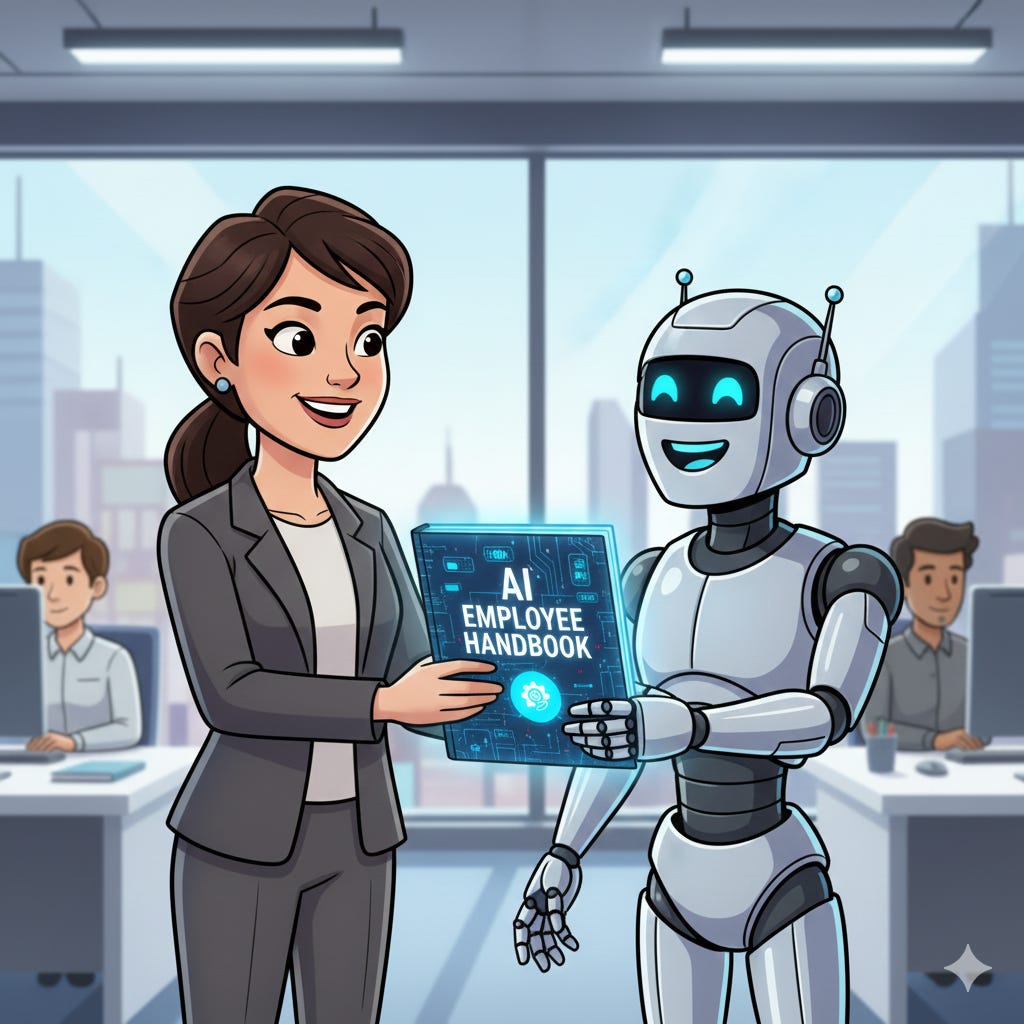
It’s like hiring an AI worker with no onboarding handbook…
Four Things AI Needs to Actually Help You (Not Just Respond)
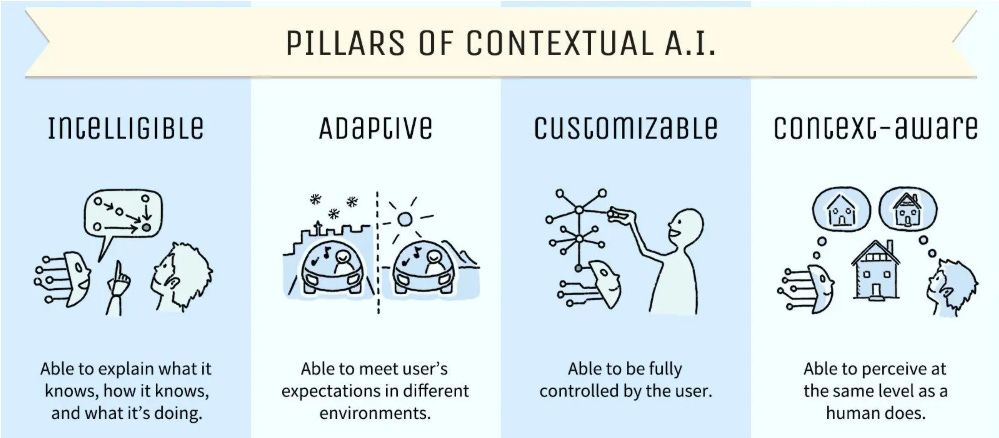
Adobe recently published an article noting the four things AI needs to move from generic tool to strategic partner. Here’s what matters:
1. Intelligible
What it knows, how it knows, and what it’s doing.
You shouldn’t have to guess why you got a certain response. AI should show its thinking, explain its sources, tell you when it’s uncertain.
Example: When I ask Claude for donor messaging advice, it tells me “I’m basing this on the background document you uploaded about your donor demographics (average age 62, values impact stories) and your brand guide’s conversational tone.” I know exactly why it suggested what it did.
2. Adaptive
Able to meet user’s expectations in different environments.
What works for a board memo shouldn’t work the same way as a donor email. AI should adjust its approach based on the situation.
Example: When I ask for a board update, I get formal structure with financial metrics upfront. When I ask for a customer thank-you, I get storytelling with impact first. Same AI, different context, automatically adjusted because it knows my different audiences.
3. Customizable
Able to be fully controlled by the user.
You should fully control how AI works with you. Your preferences, your style, your constraints. Not just accept whatever default behavior the tool gives you.
Example: I told Claude “never use jargon without defining it immediately” and “keep responses under 500 words unless I ask for more.” Now every response follows those rules without me repeating them. My preferences, my control.
4. Context-Aware
Able to perceive at the same level as a human does.
AI should understand your situation the way a human colleague would. Not just generic knowledge, but specific understanding of your work, your audience, your challenges.
Example: When I type “Help with our Q3 strategy memo,” Claude knows I’m a founder and nonprofit director, my board is traditional and numbers-focused, and we’re in rural health education, for example.
Most people rely entirely on the first pillar (Intelligible) because it’s built into the AI. They ask questions, get answers, hope for the best.
Power users activate the other three pillars through setup. And that’s where the transformation happens.
My Wake-Up Moment
About a year ago, I wasted an afternoon going back and forth with ChatGPT. Clarifying what I needed. Explaining my audience. Describing my organization’s mission. Revising. Re-explaining. Starting over.
After 3 hours, I still didn’t have what I needed.
Then I realized: this was probably the tenth time that week I’d added the exact same context. My role. My audience. What good output looks like for me. Over and over and over.
I decided to find a better way.
I spent weeks perfecting a set of instructions that I could give AI once. Now I have a Claude project for newsletter creation with 12 pages of context.
Every conversation within that project is like collaborating with a fully onboarded, highly experienced team member versus an intern on their first day.
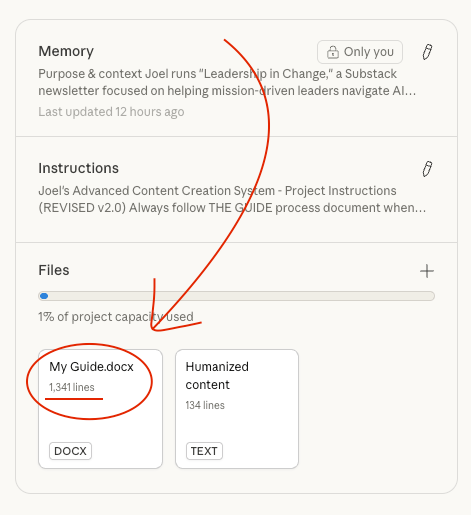
The difference is measurable. What used to take 90 minutes of back-and-forth now works on the first try. Not because AI got smarter. Because it finally knows who I am and what I need.
Sidenote:
Want the template to create your own guide? Go to the Premium Member Hub as a premium member.
Want me to create your second brain system? Contact me and join a group of leaders with working Second Brain systems I created.
A smaller model that knows my context beats a massive model with zero context every single time. The data confirms this, but I had to learn it the hard way by wasting months chasing the newest model.
Now let’s see how to get there in 2 steps.
Brought to you by COZORA👇, learn AI live!
During December, All Subscribers get 10% with code CHRISTMAS25.
Premium subscribers get $360 off (50% per year) through the coupon in the Premium Hub.

Step 1: Tell AI How You Want to Work (User Preferences)
User Preferences (Claude’s term for your standing instructions across all conversations) tell AI how to work with you. Think of this as your permanent onboarding document.
For Claude…
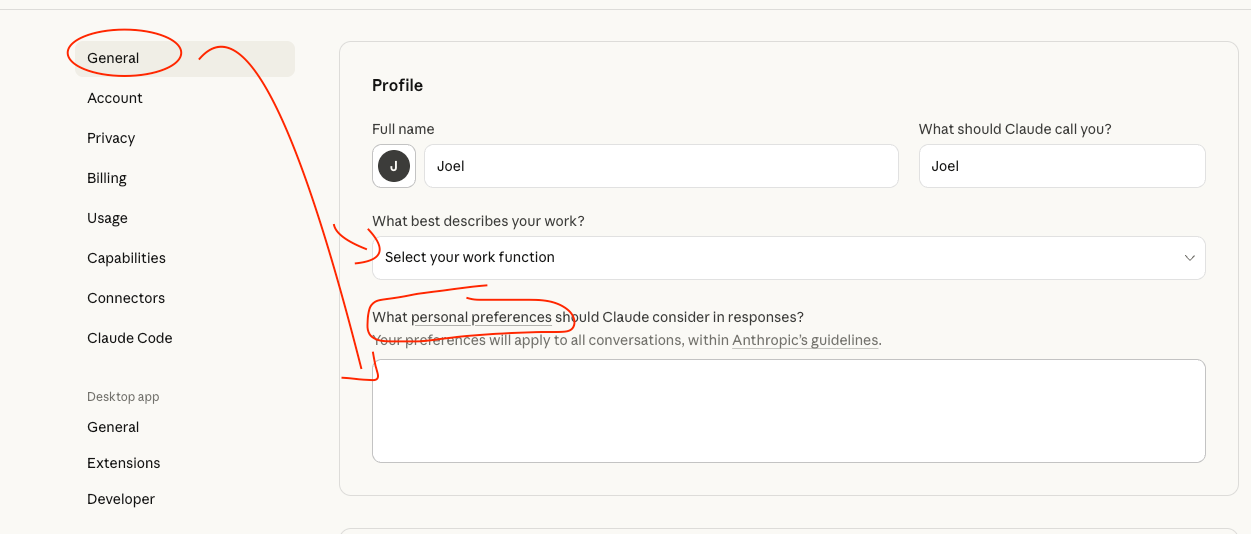
For ChatGPT…
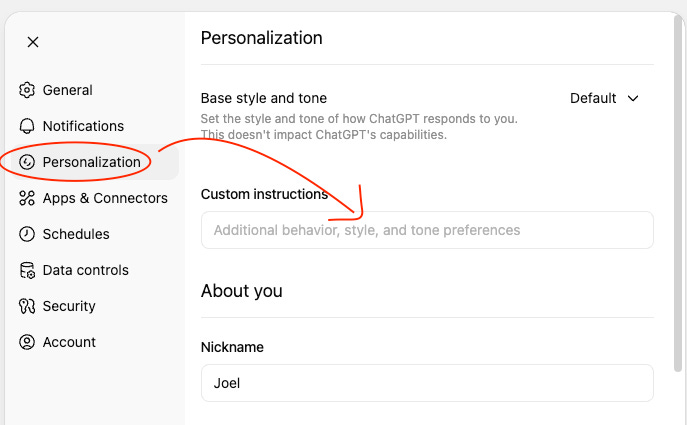
Here’s what I wrote:
Here’s what I wrote:
Your Role and Situation: “I’m the founder of Leadership in Change, a Substack newsletter with 2,000+ subscribers focused on helping mission-driven leaders navigate AI implementation and strategic change. I have an MBA and MCM.”
Your Audience: “My primary audiences are Fortune 500 executives, nonprofit directors, church pastors, business founders, and mission-driven CEOs globally. They’re non-technical leaders who need practical AI guidance without jargon. They want depth and implementation steps, not surface-level tips.”
Your Output Preferences: “Write in first-person, conversational tone. Define every technical term immediately. Focus on practical depth (the ‘how,’ not just the ‘what’). Avoid buzzwords like ‘game-changer’ or ‘let’s dive in.’”
Your Constraints: “My readers have limited technical knowledge but high strategic thinking. They need jargon translated into common terms. Solutions must be implementable by non-technical leaders within a week.”
This takes maybe 20 minutes to write once. Then every future prompt automatically includes this context.
Step 2: Give AI Permanent Memory (Project Knowledge)
Project Knowledge (Claude’s permanent memory system for specific projects) gives AI documents it can reference forever. Upload once, AI remembers forever.
I uploaded four things to my newsletter project:
1. Writing samples (Three of my best articles so AI could learn my voice and style)
2. My experience and background (So AI knows my expertise and perspective)
3. Brand style guide (Colors, fonts, visual identity)
4. My 12-step content creation process (How I like to work with AI from idea to final draft)
Adobe’s framework calls this “context-aware” AI (perceiving your situation at human level). When AI has these documents, it doesn’t just know general principles. It knows YOUR specific situation.
When you give your AI a permanent memory (Project Knowledge) and consistent rules (User Preferences), you transform it from a generic tool into an expert team member that understands you.
What to upload for your projects:
Examples of your best work (so AI matches your quality)
Strategic documents (mission, positioning, audience profiles)
Brand guidelines (if you have them)
Process documents (how you like to work)
Key data or research (anything you reference frequently)
Takes about an hour to gather and upload (most of that is finding where you saved that brand guide, not the actual uploading). Saves hours every single week after that.
When I was prepping for a partner meeting last month, I asked for a three-minute presentation summary. It gave me the exact structure I expected without me explaining that structure again.
What This Actually Changes
Here’s what used to happen.
Every prompt started with a 200-word preamble about my business, my work, my style preferences. Then the actual question. Then three rounds of “actually, can you make it more/less formal” because I forgot to mention something. 90 minutes for mediocre results.
Now?
I type: “Help me draft a board memo about our Q2 impact.”
First response nails it. Right tone. Right audience. Right length. Includes the context I would have spent 15 minutes explaining.
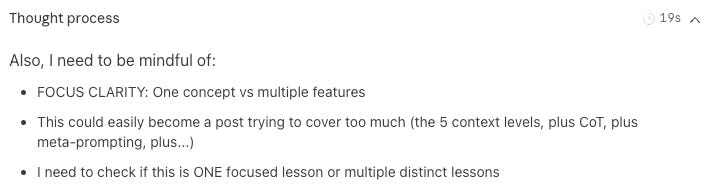
Here is an example of Claude using my context and thinking through pieces I never asked for in the prompt, but that are in the project instructions, to give me a better response:
Your One-Afternoon Setup
Here’s how I did it.
First 20 minutes: I wrote my standing instructions. Role, audience, output preferences, constraints. One time, applies forever.
Next hour: I gathered my best work samples, brand guidelines, process documents. Found them on my hard drive, uploaded to my project. Most of this was finding where I’d saved things, not the uploading itself.
Last 10 minutes: I tested it. Asked a question I’d normally ask. Compared the response to what I usually got. Adjusted preferences slightly.
That’s it. One afternoon. One time.

Then every conversation after that includes your context automatically.
For leaders ready to implement this at scale, the Premium Member Hub includes my complete 12-page contextual AI setup template.
You’ll get the exact structure I use to give AI everything it needs to know about my work, my audience, and my style. Copy it, customize it for your situation, and upload it in 30 minutes.
If You Only Remember This
You’re probably repeating the same context in every prompt because AI has no memory between conversations
User Preferences + Project Knowledge equals AI that knows you, your work, and your audience
One afternoon of setup, forever of better responses
What’s the one piece of context you’re tired of repeating to AI every single time?
Join 2,500+ Leaders Implementing AI today…
Which Sounds Like You?
“I need systems, not just ideas” → Join Premium (Starting at $39/yr, $1,345+ value): Tested prompts, frameworks, direct coaching access. Start here
“I need this built for my context” → AI coaching, custom Second Brain setup, strategy audits. Message me or book a free call
“I want to reach these leaders” → Sponsor one post (short supply). 3,500+ executives. Check availability
PS: Many subscribers get their Premium membership reimbursed through their company’s professional development $. Use this template to request yours.
Joel, I just want you to know that I thought I did this quite well but then I read your article, extracted it into Notebook LM, worked out the best prompt to put it into Gemini, and it's been a huge help. Thanks so much for showing us the way.
The relief of not having to re-explain yourself every time you talk to AI is immense. Worth a couple of hours of anyone's time!