



TL;DR: AI agents are systems that take a goal, make decisions, and act, unlike chatbots that just respond. Most leader teams confuse chatbots with agents, investing in tools that were never designed to carry real work forward. Claudia + AI walks through what agents actually are, a 4-question test for whether you need one, and a step-by-step no-code build using free tools.
Most leaders I talk to right now say the same thing: “We need AI agents.” But when I ask what they mean by that, the answers are all over the place. Some are describing chatbots. Some are describing automated workflows. Some are describing science fiction.
The confusion is real, and it’s expensive. Teams are buying tools they don’t need, building systems that don’t match their problems, and calling everything an “agent” because the word sounds impressive.
This week’s guest post comes from Claudia + AI, whose work I’ve come to love. Claudia Saleh is an AI Senior Leader, strategist, and educator who has guided thousands of professionals, from CEOs to team leads, in understanding and deploying AI practically and responsibly through her newsletter Claudia + AI, AI Agents courses, and executive workshops. Her upcoming book, AI Adoption Playbook, is a practical guide for making AI adoption stick in real teams. She also teaches a free 10-lesson AI Agents course on Substack.
If you’ve been wondering whether your team actually needs an agent or just a better workflow, this article will give you the answer. And if you do need one, Claudia walks you through building your first one without writing a single line of code.

I’ll let her take it from here.
Creating Your First AI Agent: A No-Code, No-Hype Guide for Leaders
The Problem Nobody Talks About
I was in a meeting recently when someone confidently announced: “We already use AI agents.” So I asked the obvious follow-up: “What do they do?” The answer: “They answer questions.”
That moment captures the biggest challenge in AI today. The word agent has been stretched to mean almost anything: a chatbot, a smart prompt, a workflow with AI bolted on. And when a leader bases decisions on that confusion, they invest in tools that were never designed to carry real work forward.
This article cuts through that. By the end, you will know exactly what an AI agent is, whether you need one, and how to build a simple, working version today, without writing a single line of code.
What Is an AI Agent?
Most of the things people call agents these days, are really just very good at one thing: responding. You paste in some text, you get a response, and then the ball is back in your court. You still decide what happens next.
An agent is different because it takes a goal rather than just a question. Once it has that goal, it can decide what to do next, use tools, check information, take action, and stop when the work is done, without you driving every step.
“An AI agent is a system that takes a goal, makes decisions, and acts to move work forward.”
Think of it like the difference between a very knowledgeable colleague you have to pepper with questions all day versus one who you can hand a clear objective to and trust to come back with results. The second colleague is doing agent-level work.
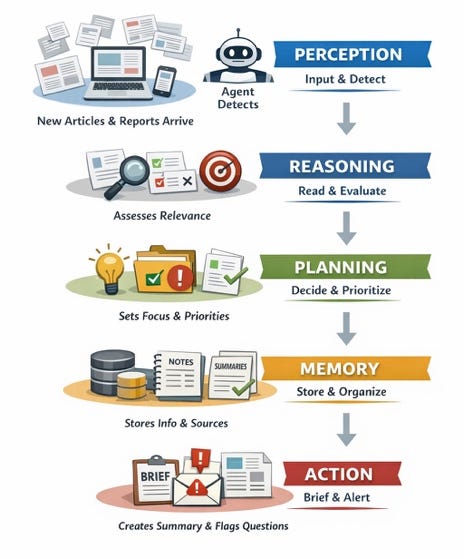
Inside every agent, five things are working together. The agent perceives what is happening (an email arrives, a form is submitted). It reasons about what the situation means. It plans a sequence of steps. It remembers relevant context. And it takes action, sending a message, updating a record, routing a request. When any one of these pieces is missing or weak, agents feel unreliable. When they work together, agents feel almost like a dependable team member.
Do You Really Need an Agent?
Here is the question most vendors do not want you to ask:
Does my problem actually require an agent? The honest answer is that many problems do not.
A simple workflow, meaning a fixed sequence of steps that never changes, will handle a lot of operational work reliably and cheaply. AI automation, which is a workflow with AI helping inside specific steps, handles a bit more variety. Agents are for the situations where the path itself is not fixed, where the system needs to decide what to do next based on context, not just execute a script.
But not all agents are created equal. They have an agency spectrum that goes from supervised to autonomous. At lower levels, the agent only acts when prompted and stays tightly guided by a person. As autonomy increases, the agent begins to initiate actions, make choices within boundaries, and handle more of the flow on its own, with humans reviewing or intervening when needed. Fully autonomous agents sit at the far end of this spectrum. They operate continuously, adapt to changing conditions, and pursue goals with minimal oversight, which also makes them harder to control and riskier to deploy.
Before building anything, run your task through these four questions:
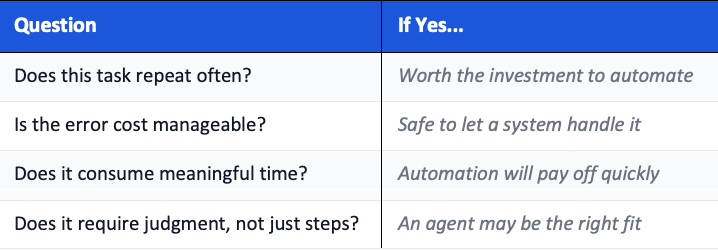
If you answer yes to most of them, you have a candidate worth building. If most answers are no, a simpler automation, or even doing nothing, is probably the smarter call.
Build Your First Agent: A Step-by-Step Example
The fastest path to understanding agents is building one. Many AI tools now have agents embedded in them. OpenAI has Agent Mode in ChatGPT Plus (the paid version $20) and Agent Builder , Anthropic has Claude Computer Use, and Google has Vertex AI Agent Builder.
In ChatGPT Plus Agent Mode, you can test using this prompt. Don’t forget to select Agent Mode in the Tools option in the Chat box:
You are a travel planning agent with computer access.
Plan a 3-day trip to [destination] from [origin] for [dates]
within a total budget of [$X] for [Y] people.
Ask clarifying questions if needed.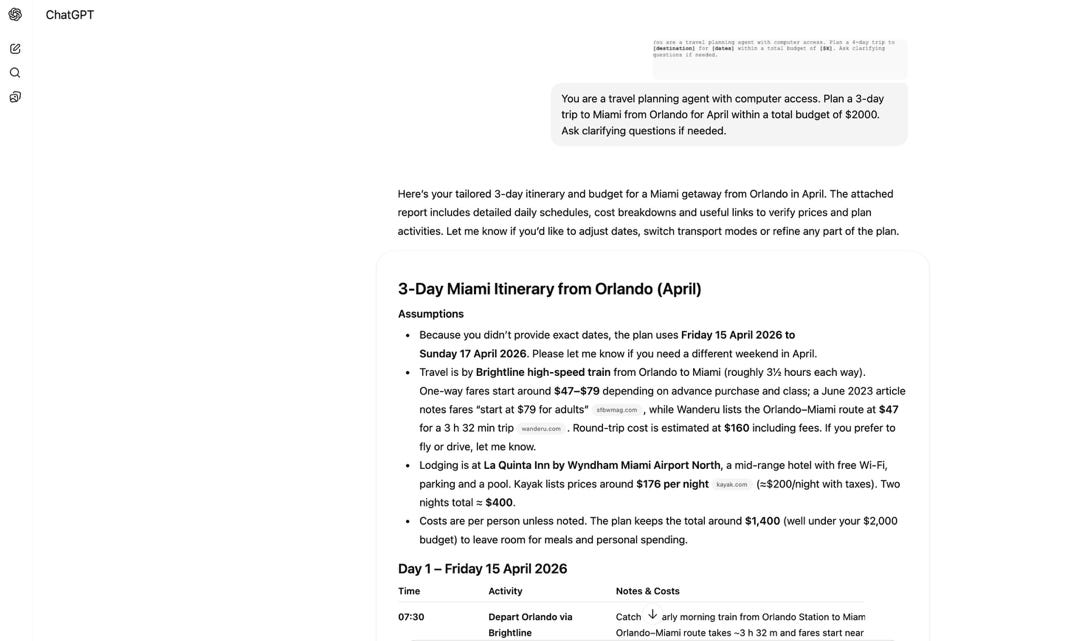
It will use the browser to check websites and prices. You can add more details about flights, the origin airport, the category of hotels, and things to avoid. The more information you give to the agent, the better the results will be.
If you don’t have ChatGPT Plus, you can sign up for one of the low-code tools that allow you to create agents. The example below uses Relay.app, a free tool that requires no coding. You can sign up in minutes. The task I chose for this exercise is one most teams recognize immediately: processing a shared inbox.
Imagine your team gets dozens of requests by email every day. Some are urgent. Some are missing information. Someone has to read each one, decide what it is, and figure out what to do next. That is exactly the kind of repeating, judgment-heavy work where an agent earns its place.
Set your trigger
Go to Relay.app, create a new workflow and choose a Gmail or Outlook trigger: “New email arrives.” This is the moment the agent wakes up.
Add a filter
Exclude newsletters, receipts, and known automated senders. If the subject contains “unsubscribe,” the agent stops. This keeps it focused on real requests.
Add an AI classification step
Send the email subject and body to an AI prompt. Ask it to return structured fields: what type of request is this, how urgent is it, is anything missing, and what should happen next.
Add branching logic
If the request is sensitive or urgent, route it to a human for review. If information is missing, draft a reply asking for exactly what is needed. If the request is complete, log it in a tracker.
Test with real emails
Run 10 actual emails through the system and compare the agent’s decisions to what you would have done. Adjust the AI prompt until the categories and routing feel consistent.
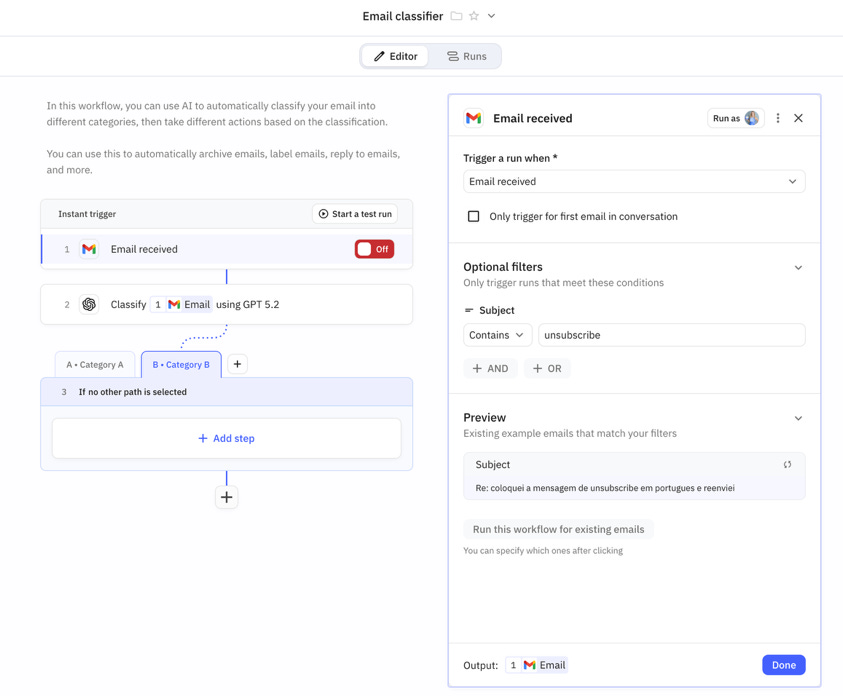
What you get: a system that reads, classifies, and routes incoming requests without anyone having to paste emails into a chat or manually decide what each one needs. A human still reviews edge cases. But the repetitive triage work has already happened.
No code and Low code Tools to Get Started (All Free to Try)
There are dozens of tools to help you create agents. Some of these tools focus on visual building and low-effort setup. Platforms like Make, Zapier (that started as workflow automation tools), Relay.app, and n8n let you connect triggers, logic, and actions using visual flows. They are especially useful for agents that react to events, evaluate information, and take clear actions like sending messages, updating records, or creating tasks. When combined with language models, these tools can support agents that reason, route work, and remember outcomes, even though they started as automation platforms.
Relay.app is best when you want to see the decision logic clearly. It is visual, well-documented, and ideal for tasks with explicit branching paths. Their template library includes a LinkedIn hook researcher, an influencer analyzer, and more.
Make connects to thousands of apps and handles complex data flows well. It is especially strong when the output of one AI step feeds directly into another system. They have recently added a natural-language agent builder.
Zapier connects to over 7,000 apps and is the fastest to set up. It is a strong fit for agents that need broad app coverage rather than complex logic. A 14-day free trial gives you full access to explore.
All three offer templates you can start from rather than building from scratch. The right choice depends less on the tool and more on how clearly you have defined the task, which brings us to the most important skill in all of this.
The Skill That Matters More Than the Tool
Whether you use Relay, Make, Zapier, n8n, or any other platform, the quality of your agent comes down to one thing: how precisely you have defined the work.
An agent needs a clear goal, a small set of decision rules, a defined output format, and explicit conditions for when to stop or ask for human help. Getting that right is a thinking exercise, not a technical one. It is the same clarity you would bring to a brief for a new hire.
A useful exercise is to complete this sentence before you touch any tool:
“When [this event happens], I want the agent to [evaluate this],
and then [take this action] unless [this condition is true],
in which case [route it here].”
If you can complete that sentence, you already have the outline of a working agent. The rest is execution.
What Agents Should Not Do (Yet)
Agents work best at the middle of the autonomy spectrum, not fully manual and not fully autonomous.
Avoid handing agents decisions that involve legal, financial, or personnel risk.
Avoid using them for exploratory creative work where the goal itself is still forming.
And avoid building an agent for a task that happens once a year.
Responsibility never disappears when you deploy an agent. The team or leader who built it still owns the outcomes. That means deciding where human review is required, when the agent should pause, and what edge cases always go to a person.
Your Action for This Week
Pick one task you repeat every week. Write it out in plain language:
“When this happens, I usually decide this, and then I do that.”
If the event can be detected, if AI can help with the decision, and if the system can take the final action, you have the outline of an agent. Pick one of the three tools above and spend 20 minutes exploring a template that is close to your task. You do not need to finish it. You need to start understanding how these systems behave.
And if you want a structured path through all of this, from what agents are to building ones that run on their own, I have a full FREE course with 10 lessons in Substack. You can start with Lesson 1 here: What People Mean When They Say AI Agents.
Thank you, Claudia + AI!
Claudia makes something clear that I think a lot of AI content misses: the hard part of building an agent isn’t the technology, it’s the thinking. Defining the goal, the decision rules, and the boundaries, that’s leadership work, not engineering work. And it’s the same muscle you use when you onboard a new hire or brief a team on a project.
If you’ve been sitting on the sidelines waiting for agents to “get simpler,” they already did. The tools Claudia walks through are free, visual, and require zero code. The only question is whether you’ve done the thinking to know what to build.
Follow Claudia’s work at Claudia + AI and check out her free 10-lesson AI Agents course.
- Joel
Questions Leaders Are Asking
What is the difference between a chatbot and an AI agent? A chatbot responds to questions and puts the next step back on you. An AI agent takes a goal, decides what to do next, uses tools, checks information, takes action, and stops when the work is done, without you driving every step. The key difference is autonomy and goal-directed behavior.
Can I build an AI agent without coding? Yes. Free no-code platforms like Relay.app, Make, and Zapier let you build working AI agents using visual flows. You connect triggers, AI classification steps, and branching logic without writing a single line of code. All three offer templates to start from.
How do I know if my task needs an AI agent or just automation? Run it through four questions: Does it repeat often? Is the error cost manageable? Does it consume meaningful time? Does it require judgment, not just fixed steps? If most answers are yes, especially the judgment question, an agent is the right fit. If not, simple automation works better and costs less.
What tasks should I NOT give to an AI agent? Avoid giving agents decisions involving legal, financial, or personnel risk. Skip tasks that happen rarely (once a year) or exploratory creative work where the goal itself is still forming. Agents work best at the middle of the autonomy spectrum, supervised, not fully autonomous.
Join 4,100+ Leaders Implementing AI today...
Which Sounds Like You?
“I need hands-on AI workflows, not just theory” → Join Premium (Starting at $49/yr, $1,345+ value): Step-by-step agent builds, automation playbooks, and direct coaching access to implement AI that actually works. Start here
“I need this built for my context” → Custom AI agent design, workflow audits, and implementation strategy for your team. Message me or book a free call
Excellent post. Using regular agent tasks has amplified my productivity 10X.
By any chance did yiu mention/ insert the secure coding principle?